Filtering by 'Today'

  • February 11, 2017
  • 16 replies
  • 64 views

Forum|alt.badge.img+4

Hi, I have a view in one of my bases with a date field called ‘Live Date’ and a filter that’s defined as ‘Where “Live Date” is “today”’.

I would expect that each day I would open this view, the records in the view would reflect the day’s date.

However, this is not the case - the records that stay in the view are those that were marked as ‘today’ on the day the filter was created.

This makes it difficult to use Airtable for to-do management as you have to remember to clear the filter and remake it. It’s also challenging when the person using the database isn’t the one who made it and that person only has a read-only permission.

This seems inconsistent with other filter behaviours - for example on when filtering on single selects records will move in and out of the base automatically.


16 replies

  • Participating Frequently
  • February 13, 2017

Same problem. I tried to create a function and output data if it is true. but this filter works only if you remove it and put again into a new day.


Forum|alt.badge.img+17

I assume that you hare using the TODAY() in that Live Date field. The reference says:

these functions change only when the formula is recalculated or a base is loaded

So as I understand the data should update when loading Airtable.com and entering the base, or reloading the page, isn’t it? Sad that this is not working :weary:

In the other hand, I don’t understand what are you trying to do with that field. If you add a field called Due Date, then you could compare with today or do a filter. Can you explain please?

Thanks!


Forum|alt.badge.img+4
  • Author
  • Known Participant
  • February 16, 2017

I assume that you hare using the TODAY() in that Live Date field. The reference says:

these functions change only when the formula is recalculated or a base is loaded

So as I understand the data should update when loading Airtable.com and entering the base, or reloading the page, isn’t it? Sad that this is not working :weary:

In the other hand, I don’t understand what are you trying to do with that field. If you add a field called Due Date, then you could compare with today or do a filter. Can you explain please?

Thanks!


Hi Elias,

I’m not using a formula, just a filter on a date field.

I have an editorial planner for social media posts.

I just want to be able to open this view, see what today’s posts are when the view loads, and then paste out of it and close the view.

At the moment, I’m having to clear the filter and then re-make it every day after midnight when the date changes.


Forum|alt.badge.img+17

Hi Elias,

I’m not using a formula, just a filter on a date field.

I have an editorial planner for social media posts.

I just want to be able to open this view, see what today’s posts are when the view loads, and then paste out of it and close the view.

At the moment, I’m having to clear the filter and then re-make it every day after midnight when the date changes.


Reviewing the thread I noticed that it’s a date field :pensive: . What date do you store for every record? You have to enter any date: birthday, due date, event date, etc. It seems like you expects that the date field gets automatically as Today.

I have a base to manage events, and I have 2 Views with a filter like:

  • Schedule: the filter is “>= Today”
  • Archive: the filter is “< Today”

Both of them works properly. I don’t know if I am missing something :thinking: :fearful:


  • New Participant
  • February 16, 2017

Hey there,

I think what I have tried before could help you.

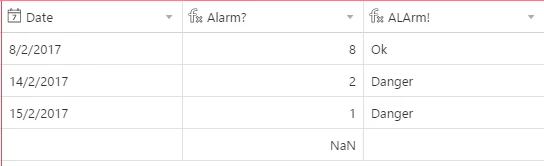
So here I have 3 fields
Firs I entered the desired dates
then I came up with a basic formula for “Alarm?” -> DATETIME_DIFF(TODAY(), Date, ‘days’)
This will calculate the difference between the first date (in the field “Date”) and today in “days”. then in the next field, we have “ALArm!”.

Another formula -> IF({Alarm?} >= 5, “Ok”,IF({Alarm?} >= 3, “Close”,IF({Alarm?} >= 1, “Danger”,IF({Alarm?} < 1, “Dead”))))

This was something I tried just for fun, I hope it helps and if you have any other questions just go ahead :slightly_smiling_face:


  • Participating Frequently
  • February 16, 2017

Hi Matt,

This is certainly unexpected. Does it not work for any of your bases, even just a simple one with only a couple columns and few dates or only on your main one?

Can you email support@airtable.com so we can investigate exactly what’s not working for you?

Thanks!
Alex


  • Participating Frequently
  • February 22, 2017

Hey there,

I think what I have tried before could help you.

So here I have 3 fields
Firs I entered the desired dates
then I came up with a basic formula for “Alarm?” -> DATETIME_DIFF(TODAY(), Date, ‘days’)
This will calculate the difference between the first date (in the field “Date”) and today in “days”. then in the next field, we have “ALArm!”.

Another formula -> IF({Alarm?} >= 5, “Ok”,IF({Alarm?} >= 3, “Close”,IF({Alarm?} >= 1, “Danger”,IF({Alarm?} < 1, “Dead”))))

This was something I tried just for fun, I hope it helps and if you have any other questions just go ahead :slightly_smiling_face:


Hi
I tried. It does not work as it should.
The field has a new 1 and 0, but the filter gives the old values. As long as I do not make it a condition of the filter again.


  • Participating Frequently
  • February 23, 2017

I have the same problem. The only way I seem to be able to get around it is to change “Where [field] is Today” to “Where [field] is [another date]” and then change it back to Today.


  • Participating Frequently
  • February 24, 2017

I have the same problem. The only way I seem to be able to get around it is to change “Where [field] is Today” to “Where [field] is [another date]” and then change it back to Today.


Yes. Any filter change - and the data is displayed well again. But it would be very nice if they updated themselves. Doing it manually is not convenient, and can be easy to forget and lose money / client / agreement.


Forum|alt.badge.img+4
  • Author
  • Known Participant
  • February 24, 2017

Yes. Any filter change - and the data is displayed well again. But it would be very nice if they updated themselves. Doing it manually is not convenient, and can be easy to forget and lose money / client / agreement.


Totally.

Make it very difficult to use Airtable as a to-do list.


  • Participating Frequently
  • February 24, 2017

The same airtable problem: my wife and my friend’s Design Studio (20 employees).
They use airtable for projects and tasks.


Forum|alt.badge.img+17

I still don’t get what you need. Why something like this does not work?

https://airtable.com/shrTISlGxKheGQyGQ

Of course you could add a Status field (or Done field), and filter also by it.


Forum|alt.badge.img+4
  • Inspiring
  • February 25, 2017

Hi,

We’re investigating this issue—it should be automatically updating the visible records in the view without the need to change filters, so there’s a bug.

Thanks,

Kasra


  • New Participant
  • September 27, 2018

Any word on this yet?


  • Participating Frequently
  • December 29, 2018

Hi,

We’re investigating this issue—it should be automatically updating the visible records in the view without the need to change filters, so there’s a bug.

Thanks,

Kasra


Looks like this is still a problem. Any update?


Forum|alt.badge.img+4
  • Inspiring
  • January 2, 2019

We improved time-based filters in September to fix some of these issues.

Please email support@airtable.com if this issue is still happening for you so we can investigate more closely. Thank you!