More string handling functions

  • November 15, 2015
  • 11 replies
  • 28 views

Forum|alt.badge.img+4

Like SPLIT, STRPOS, CONTAINS, LEFT/RIGHT/MID etc.

Regex match maybe.

11 replies

Forum|alt.badge.img+12
  • Known Participant
  • July 1, 2017

And Replace! Would be great for building primary keys out of names that contain special characters.


Forum|alt.badge.img+2
  • Participating Frequently
  • January 16, 2018

This is a great request. All I’m trying to do is take a column of emails and output the domain (i.e., jsmith@example.comexample.com), which would be trivial to do with split or regular expressions.


Forum|alt.badge.img+4
  • Known Participant
  • January 7, 2019

This is a great request. All I’m trying to do is take a column of emails and output the domain (i.e., jsmith@example.comexample.com), which would be trivial to do with split or regular expressions.


Hey @Alex_Armstrong, did you ever find a solution to that problem?


Kamille_Parks11
Forum|alt.badge.img+27

This is a great request. All I’m trying to do is take a column of emails and output the domain (i.e., jsmith@example.comexample.com), which would be trivial to do with split or regular expressions.


@Alex_Armstrong and @nnnnneil

You could use a combination of RIGHT(), LEN() and FIND()

RIGHT({Email Field},LEN({Email Field})-FIND('@',{Email Field}))


Forum|alt.badge.img+4
  • Known Participant
  • January 7, 2019

@Alex_Armstrong and @nnnnneil

You could use a combination of RIGHT(), LEN() and FIND()

RIGHT({Email Field},LEN({Email Field})-FIND('@',{Email Field}))


Thanks @Kamille_Parks. In my particular case, my email field contains single and multiple email addresses. E.g:

bob@thistest.com
craig@anothertest.com, dennis@anothertest.com, yung@anothertest.com, sam@anothertest.com

Is there a way to handle that?


Forum|alt.badge.img+2
  • Participating Frequently
  • January 7, 2019

@Alex_Armstrong and @nnnnneil

You could use a combination of RIGHT(), LEN() and FIND()

RIGHT({Email Field},LEN({Email Field})-FIND('@',{Email Field}))


Thanks @Kamille_Parks. That’s a really cool solution!


Forum|alt.badge.img+5
  • Inspiring
  • January 7, 2019

Thanks @Kamille_Parks. In my particular case, my email field contains single and multiple email addresses. E.g:

bob@thistest.com
craig@anothertest.com, dennis@anothertest.com, yung@anothertest.com, sam@anothertest.com

Is there a way to handle that?


Yes — but you’re not going to like it.

The problem is that Airtable currently has no support for a processing loop; hence, you’ll need to define an explicit extraction step for up through the maximum number of emails you anticipate having in a single field. You can find detailed instructions on how to do this in this reply to a post from a user wishing to extract individual hashtags from a list. You’ll need to keep the same structure but substitute @Kamille_Parks’ domain extraction routine for the hashtag extractor in the original. (Actually, you’ll probably decide to modify your work flow instead, but on the off chance you really do press on, you’ll find all you need to know in that post.)


Kamille_Parks11
Forum|alt.badge.img+27

Yes — but you’re not going to like it.

The problem is that Airtable currently has no support for a processing loop; hence, you’ll need to define an explicit extraction step for up through the maximum number of emails you anticipate having in a single field. You can find detailed instructions on how to do this in this reply to a post from a user wishing to extract individual hashtags from a list. You’ll need to keep the same structure but substitute @Kamille_Parks’ domain extraction routine for the hashtag extractor in the original. (Actually, you’ll probably decide to modify your work flow instead, but on the off chance you really do press on, you’ll find all you need to know in that post.)


Thanks @W_Vann_Hall. I code in Javascript and PHP, so every time a use case like this one comes along I yearn for a foreach() equivalent in Airtable

@nnnnneil: If you’re emails are being pulled from another table via a Lookup or Rollup, you could go back to that table, add a formula field with the Right/Len/Find formula to get the domain, and rollup/lookup the new formula field instead. Otherwise, I think W’s solution is your best bet.


Forum|alt.badge.img+4
  • Known Participant
  • January 9, 2019

Thanks @W_Vann_Hall. I code in Javascript and PHP, so every time a use case like this one comes along I yearn for a foreach() equivalent in Airtable

@nnnnneil: If you’re emails are being pulled from another table via a Lookup or Rollup, you could go back to that table, add a formula field with the Right/Len/Find formula to get the domain, and rollup/lookup the new formula field instead. Otherwise, I think W’s solution is your best bet.


Thanks @W_Vann_Hall.

@Kamille_Parks you were right. I was thinking about it all wrong. Simply using your formula on the other table solved the problem. Then i used a rollup with arrayunique to pull the one domain from many email addresses.

Many thanks!


Forum|alt.badge.img
  • Participating Frequently
  • September 20, 2019

@Alex_Armstrong and @nnnnneil

You could use a combination of RIGHT(), LEN() and FIND()

RIGHT({Email Field},LEN({Email Field})-FIND('@',{Email Field}))


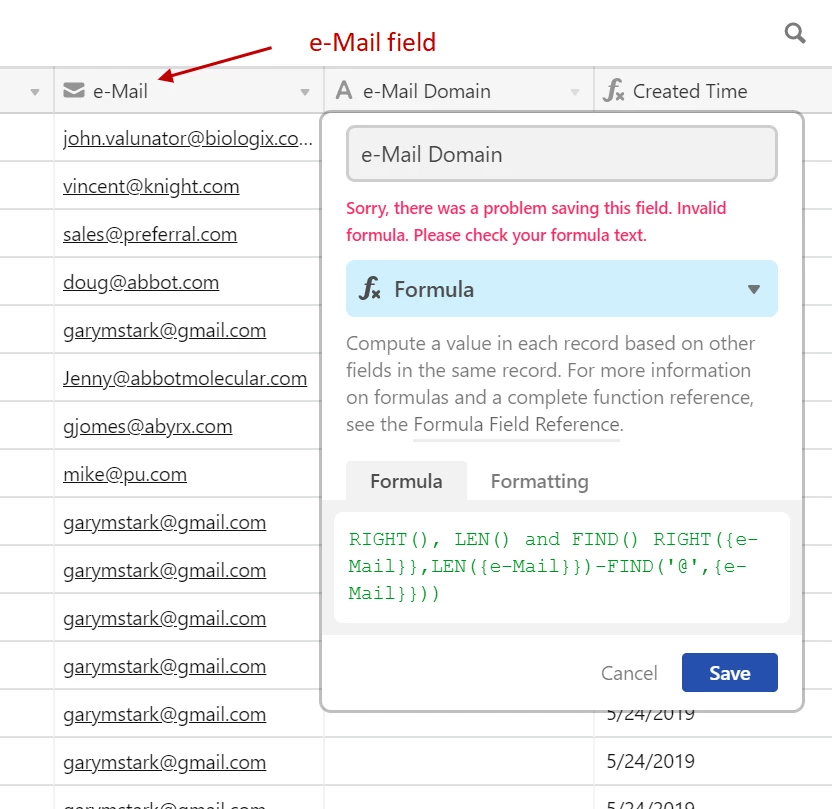
Sorry for the 2nd post, but the same issue was raised in 2 different sections. I tried to use your formula but I keep getting an error message. Any thoughts as to what I’m doing wrong? I’ve uploaded an image of what I’m seeing. Thank you!!


  • Participating Frequently
  • October 17, 2019

Sorry for the 2nd post, but the same issue was raised in 2 different sections. I tried to use your formula but I keep getting an error message. Any thoughts as to what I’m doing wrong? I’ve uploaded an image of what I’m seeing. Thank you!!


I would assume the issue is the extra “RIGHT(), LEN(), and FIND()” at the beginning of the formula