Regional Support (Time, Date, Currency formating)

  • September 22, 2015
  • 98 replies
  • 407 views

Forum|alt.badge.img+4

Hi everyone, the title basically sais it all :grinning_face_with_big_eyes:


98 replies

Forum|alt.badge.img+4
  • Author
  • Participating Frequently
  • September 23, 2015

I may add, a Global Setting with:

Time Region
Currency Symbol
Time Format (24h)
Date Format

Whould already help, does not have to be automatically.


Forum|alt.badge.img+8
  • Participating Frequently
  • September 23, 2015

Hey Patrick,

Thanks for posting!

Right now, you can use any symbol you want for a currency, but it’s per column not a global setting.
We’re working on time and date formats, that should be available in the next couple of weeks.


Forum|alt.badge.img+4
  • New Participant
  • November 15, 2015

Hey Patrick,

Thanks for posting!

Right now, you can use any symbol you want for a currency, but it’s per column not a global setting.
We’re working on time and date formats, that should be available in the next couple of weeks.


It is indeed possible to use any currency symbol, but in some parts of the world it is customary to write it after the number, like 100500 €, not €100500.


  • Participating Frequently
  • December 8, 2015

Airtable Team,

Can I translate the new guide into Chinese and post it on my website? Of course, I will include the link of the original page.


Forum|alt.badge.img+3
  • Inspiring
  • December 8, 2015

Hi Karl!

Go right ahead :slightly_smiling_face: Would love to see it once you’re done, if you wouldn’t mind sharing the link!

Thanks so much,

Zoelle


  • New Participant
  • March 16, 2016

In this matter, it would be very gentle from you guys to make able the calendar not to start on sundays… we look at calendars starting on mondays and its really confusing looking at it in other sequence. Hope you can make this option!

thanks.

rj


Forum|alt.badge.img+8
  • Known Participant
  • March 25, 2016

I agree with everyone in this thread. Lay persons (in the US) use Sunday, while accountants use Monday for start of week. US uses Mmm dd, YYYY while EU Uses dd-Mmm-YYYY, and millitary uses YYYY-MM-DD. US uses AM/PM while EU and millitary use 24HR. Crucial.


Forum|alt.badge.img+5

These are all great, specific suggestions, and we love hearing them—the more we know about how you all would like to use time/date/currency fields, the more we can implement future changes to these fields in a thoughtful, considered way.

In the meantime, we do have the DATETIME_FORMAT and SET_TIMEZONE functions, both of which you can use to reformat dates. It’s not ideal, but it might be useful as a stopgap measure for some of you.


  • New Participant
  • May 19, 2016

I may add, a Global Setting with:

Time Region
Currency Symbol
Time Format (24h)
Date Format

Whould already help, does not have to be automatically.


In addition to date / time format and currency position discussed in this forum, I would suggest to incorporate

  1. currency amount to be expressed in words. e.g. if the amount is $125.35, this function would express as “$ One Hundred Twenty Five and Thirty Five Cents only”. Such functionality is required in many business applications like writing cheques or printing invoices. It will be very useful in financial applications.

  2. Basic date format are available but One more date format is suggested: dd/mmm/yyyy or mmm/dd/yyyy where mmm is first three letters of month e.g. Jul for July; Dec for December etc. This will provide uniformity in printing dates because dd/mm/yyyy or mm/dd/yyyy have different connotation depending on country.

thanks…

pmshah


  • New Participant
  • September 29, 2016

Hi there,

it’d be great if you could support different decimal marks in airtable. For example, in most European countries the decimal comma is commonly used for this purpose. While this is not a big deal when you’re working with a small team, it can lead to quite a few mistakes when collecting data, e. g. using a form view.

Best,
Till


  • New Participant
  • November 12, 2016

Hi there,

it’d be great if you could support different decimal marks in airtable. For example, in most European countries the decimal comma is commonly used for this purpose. While this is not a big deal when you’re working with a small team, it can lead to quite a few mistakes when collecting data, e. g. using a form view.

Best,
Till


absolutely this one as well as choosing whether the currency symbol is before or after the amount. it is disappointing how often simple features take way too long to appear for international users.

partly related to the 2nd pont by @Parashar_Shah (unless im doing something wrong) when I use the formula to display dates in the 3 letter month format and sort it in a view it does so alphabetically which it obviously shouldnt or am I doing something wrong?


Forum|alt.badge.img+4
  • Known Participant
  • December 9, 2016

I just imported a CSV into a new base.

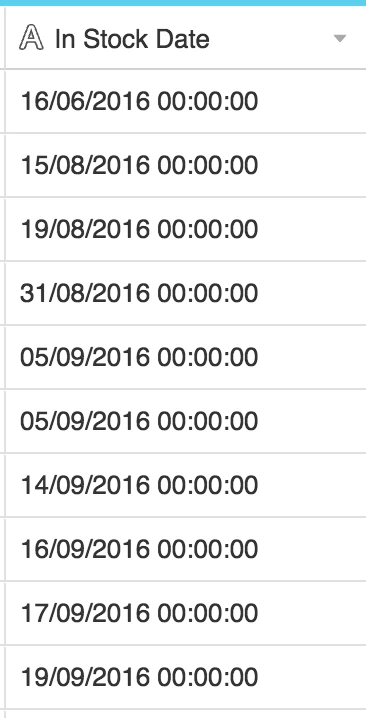
I’m in England, so the system that generates my reports automatically uses the DD/MM/YYYY HH:MM format for dates.

When I imported the data, everything looked fine. At the time it was a text field.

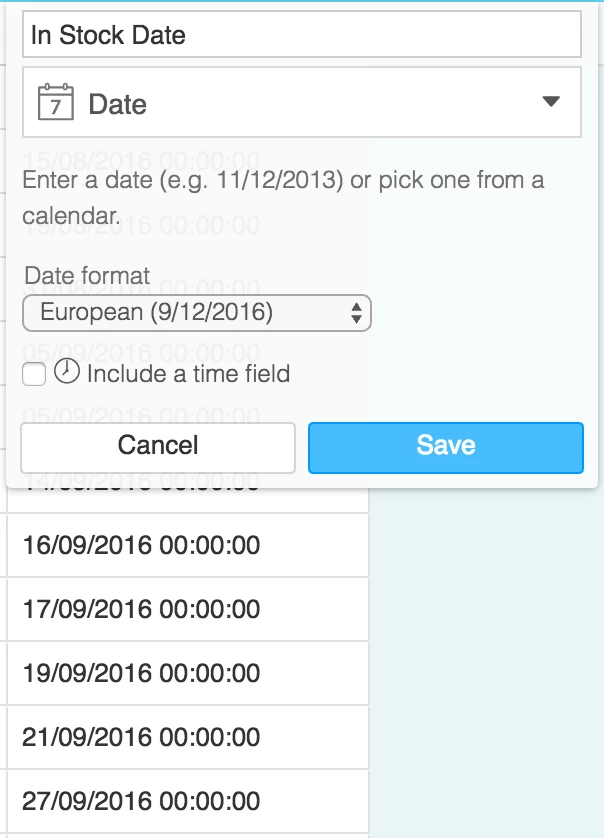
I decided to change the field type to Date. Before any of the data was converted, I made sure to choose ‘European’ in the dropdown.

The problem is that upon clicking ‘Okay’, Airtable does not associate the choice of date format with the pre-existing data in the fields.

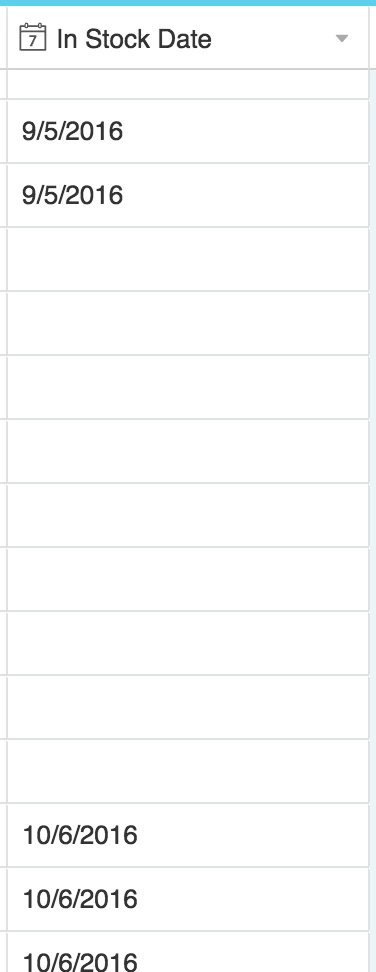
So what happens is that any dates before the 12th of a month are reversed (for example the 9th of December becomes the 12th of September), and any dates that occur after the 12th of the month are simply wiped as they’re not recognised as a date.

This leads to a table that looks more like this:

Is it possible for the Date field to take the date format choice into account before it decides how to parse this data?


  • New Participant
  • December 10, 2016

Hi Matt. A quick thought… Maybe you could format your source file date field in the American way, export to your Csv, import to airtable. Airtable should treat your field as a date and not a text so you finally can change it to European format.


Forum|alt.badge.img+4
  • Known Participant
  • December 10, 2016

Hi Matt. A quick thought… Maybe you could format your source file date field in the American way, export to your Csv, import to airtable. Airtable should treat your field as a date and not a text so you finally can change it to European format.


Hi Emilio, good idea. I’ll try it.

Definitely think this is a bug worth fixing, though.


Forum|alt.badge.img+4
  • New Participant
  • January 29, 2017

The custom currency symbol is awesome, it suits the needs of my team perfectly…well almost, the ability to select which end the symbol appears would take things to the perfect level.


Forum|alt.badge.img+4
  • New Participant
  • April 12, 2017

After months since first requests for support of a decimal comma (3,14 instead of 3.14) have appeared here nothing has changed in Airtable. That’s a pity. Instead we’ve got a new field type and a new design.

A new field type is nice - but it does not make Airtable more usable to many, many potential users in Europe. I won’t be able to entice anyone of my customers to use Airtable as long as their clerks and office workers cannot use their native number format. Even simple applications cannot be moved from Excel to Airtable without regional input and output formats. I cannot imagine how much revenue will not be generated due to this lack of basic international functionality. It’s so basic, even, that the iPad/iPhone versions of Airtable have it - but the online and desktop versions are lacking it (at least for the decimal comma).

Please, Airtable team, provide all the basic formatting options relevant in most parts of the world outside the US. You’ve created a great tool - but all its cool features are facing a basic constraint: internationalization. It’s not just techies and nerds and geeks using your product. Or at least it shouldn’t :wink:


Thierry_Gattlen
Forum|alt.badge.img+10

Hello,
I have excactly the same problem when importing cvs with local date format (Switzerland).
I have already notified the Airtable team on this behavior.
Hope it will be corrected soon


Forum|alt.badge.img+9

It would be lovely to have a localization option for the menu language.
At least a language-settings file for menu conversion and making it open-source would work. Also community can create lot of language files without any development cost for airtable dev. team.(like wordpress).


+1
I would like to support to translate to German.


Forum|alt.badge.img+4
  • New Participant
  • June 9, 2017

So when is more international formatting support coming to Airtable (especially the decimal comma)?
The lack of it is holding me back to wholeheartedly recommend Airtable to my clients.


  • Participating Frequently
  • June 15, 2017

These are all great, specific suggestions, and we love hearing them—the more we know about how you all would like to use time/date/currency fields, the more we can implement future changes to these fields in a thoughtful, considered way.

In the meantime, we do have the DATETIME_FORMAT and SET_TIMEZONE functions, both of which you can use to reformat dates. It’s not ideal, but it might be useful as a stopgap measure for some of you.


@Katherine_Duh: Any progress on timezone support either globally, by user or by field? We’ll take anything! Airtable works great for my international team in so many ways, but having dates and times confused due to TZ issues is very unpleasant.


  • New Participant
  • July 25, 2017

Yes please. Spanish.

Everyone here speaks English but, from an Internal Marketing and training standpoint, software captions and labels should be in the local language.


Forum|alt.badge.img+19
  • Inspiring
  • July 25, 2017

I agree. I know people who can’t use Airtable (for co-workers) in Germany because it’s not localized.


  • New Participant
  • October 4, 2017

+1 for the open-source language-settings file
the translation in French could increase the number of Airtable’s users, definitely :winking_face:
(and we could help for sure)


It’s a great tool and I’m happy to pay 24$ a month, but: Converting data from spreadsheets as a german user is a pain in the neck because Airtable ignores non-US Standards. I manually have to search and replace csv-data from 1.240,00 to 1,240.00. Also I have to convert standard (at least in Germany) Date formats from 03.04.2017 to something like 4-3-17 before I can use my data: Converting in Airtable will break everything. That’s really annoying and shouldn’t be a big problem to fix. Please, Airtable, I understand America comes first, but could Europe be second? Thanks!