[SOLVED] Hidden Fields in Expanded Record View

  • February 25, 2016
  • 34 replies
  • 198 views

Forum|alt.badge.img+4

Please give us an option to hide fields in the Expanded Record view based upon the hidden fields in the grid view.

34 replies

  • Known Participant
  • February 25, 2016

Fully support that request :thumbs_up:


Forum|alt.badge.img+16
  • Known Participant
  • April 5, 2016

A little late but I give this request my complete support


Forum|alt.badge.img+19
  • Inspiring
  • June 1, 2016

Me too!

Also the order in which the fields appear looks random (creation time?). I’d love to move them around. :slightly_smiling_face:


Forum|alt.badge.img+4
  • Participating Frequently
  • June 2, 2016

Fully support that request :thumbs_up:


Yes please - the search in calendar view is fantastic but it’s really let down by the view of expanded record being clogged up with every field ever created in there!!!


Forum|alt.badge.img+4
  • Participating Frequently
  • June 2, 2016

Me too!

Also the order in which the fields appear looks random (creation time?). I’d love to move them around. :slightly_smiling_face:


Yes, being able to move them around would be very helpful


Forum|alt.badge.img+16
  • Known Participant
  • June 8, 2016

Yes, being able to move them around would be very helpful


following suggestions I use a lot of “helper” fields (example, to make up for lack of conditional rollups) and they crowd the expanded view if they cannot be hidden


Forum|alt.badge.img+19
  • Inspiring
  • June 16, 2016

Just to be sure: for the iOS client too please. :slightly_smiling_face:


Forum|alt.badge.img+3
  • Known Participant
  • October 5, 2016

Echo echo echo echo . . .

I look forward to this ability being added


  • Participating Frequently
  • October 8, 2016

I also fully support this.


  • New Participant
  • November 14, 2016

hugely valuable for the reason that @Polen says


  • New Participant
  • November 16, 2016

fully support! I personally use 1-2 columns for calculations / functions. And it is absolutely confusing / useless to display those columns. looking forward to this function being added.


Forum|alt.badge.img+2
  • New Participant
  • January 10, 2017

This is a must! We use this as inventory management software and I’d love to be able to hide fields from our technicians so they don’t see clutter when inputting data while out of the office.

Please and thanks!


Forum|alt.badge.img+2
  • New Participant
  • January 17, 2017

Please add this. I am using Airtable as a project management tool. The Expanded Record View is critical and its been frustrating trying to make it look good when I use all of the features of Airtable. There are several ways to implement this, but probably the easiest and most effective would be to mirror the View you are looking at. If it is not on the View, then its not on the Expanded Record. Probably the easiest to program for you as well.


Important feature to get views organized and neet!


  • Participating Frequently
  • February 15, 2017

Just started in with Airtable… it didn’t even occur to me that hidden fields would show up in expanded view. PLEASE make expanded view match/mirror the main table view.


Forum|alt.badge.img+7
  • Known Participant
  • March 2, 2017

I will be using Airtable with multiple users who need the least amount of distraction or confusion as possible when using the base. Airtable is already super user friendly, however this was a concern as I demonstrated the use of the program for our intended purposes. Users became confused by some of the columns I needed to place to create formulas because I couldn’t hide them in expanded view.


Yes please… I really need to hide some of my fields. :smiling_face_with_halo:


  • New Participant
  • March 10, 2017

I vote for this feature too. Does anyone have a workaround for this?


  • New Participant
  • March 11, 2017

Fully support this request, too!


It would be helpful for me to be able to have separate settings for expanded view, different from the grid. This way I could ‘drill down’ to get more detail about that specific record, while still being able to hide some of the fields I’ve created that I either don’t need right then, or may also be calculated fields used for sorting or filtering, etc.

This also helps because my record ID is calculated. I hide the source fields in grid view to aid in searching, and it would be nice to edit them in expanded view.


  • New Participant
  • April 1, 2017

Any idea if this is going to be released?


Forum|alt.badge.img+4

Whoa! Where did this guy come from?

I don’t know how to use it, but I’m glad to see it at last! :slightly_smiling_face:
-Donald


  • New Participant
  • April 4, 2017

I just saw that too. Thank you for doing that Airtable.


  • New Participant
  • September 18, 2017

How do you enable this? I’m still seeing fields that are hidden in the view on the expanded view?


  • New Participant
  • September 18, 2017

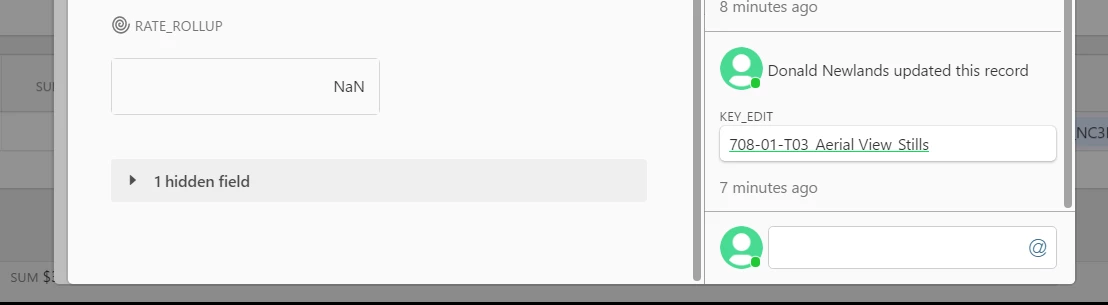
Mine was automatically enabled. In the expanded view once you get passed the non-hidden items, there is an arrow that says “hidden fields” that you can click to show or hide them.