Auto-populating Date column with date field type using results from DATETIME_PARSE formula

  • October 5, 2022
  • 4 replies
  • 88 views

Forum|alt.badge.img+4

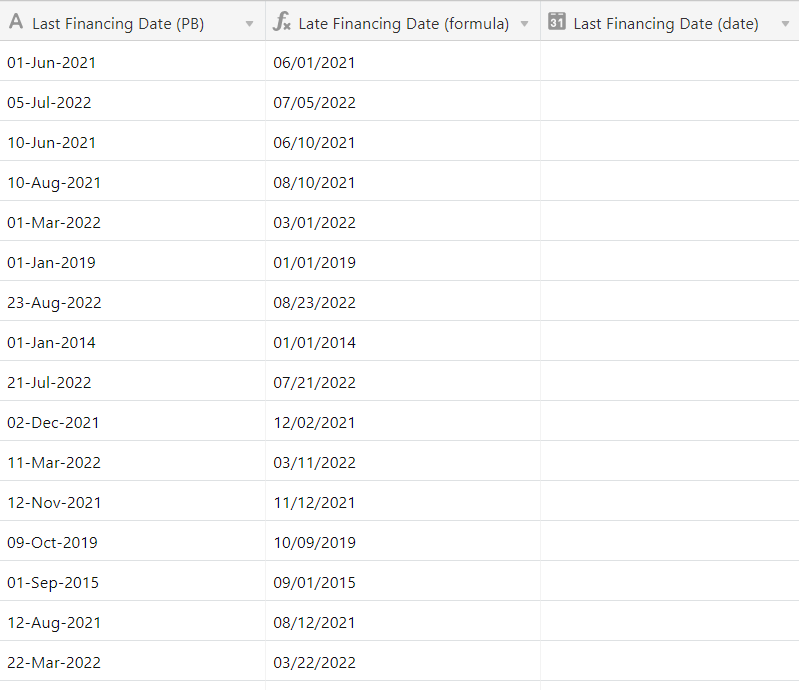
I’ve imported some data into Airtable which includes a column with dates, but as a text string. I would like to be able to sort, filter and group this data by date, so I need to figure out a way to turn that text string into a date field type. I created a new column with both the DATETIME_FORMAT and DATETIME_PARSE formulas, which returns the date in the format that matches Airtable’s date field type format (i.e. MM/DD/YYYY), but this is still a text string. I’m trying to figure out how to turn this into a date field type in some way - possibly using an automation?

Another important piece of information is that I will periodically be updating the original text string with updated information (copy + pasted from another source in the same original format) - e.g. for the first column, I would be updating the “Last Financing Date (PB)” to a more recent date like 05-Oct-2022. Therefore, I need something that will auto-populate. I’ve seen related posts where the solution was creating the DATETIME_PARSE column with a formula field type, and once the formula has run, converting that same column to a date field type. This is obviously a static solution, not a dynamic one.

Is there a way to do what I’m trying to accomplish? Happy to answer any questions / share more info.

4 replies

Kamille_Parks11
Forum|alt.badge.img+27

You only need Parse. Parse converts strings into dates, and Format converts dates into strings.

DATETIME_PARSE({Last Financing Date (PB)}, 'DD-MMM-YYYY')

^ do that and your formula will dynamically update whenever you update your text column. The third column is extraneous.


Forum|alt.badge.img+4
  • Author
  • Participating Frequently
  • October 5, 2022

You only need Parse. Parse converts strings into dates, and Format converts dates into strings.

DATETIME_PARSE({Last Financing Date (PB)}, 'DD-MMM-YYYY')

^ do that and your formula will dynamically update whenever you update your text column. The third column is extraneous.


@Kamille_Parks thanks for your quick response! Got it on not having to use the DATETIME_FORMAT. However, the third column isn’t extraneous because I can’t sort, filter or group using a formula field type, so I can’t exactly use the results of the DATETIME_PARSE function in the way I need. Does that make sense?

Thank you!


Kamille_Parks11
Forum|alt.badge.img+27

@Kamille_Parks thanks for your quick response! Got it on not having to use the DATETIME_FORMAT. However, the third column isn’t extraneous because I can’t sort, filter or group using a formula field type, so I can’t exactly use the results of the DATETIME_PARSE function in the way I need. Does that make sense?

Thank you!


If you can’t sort by the Formula field then that’s either a bug or your formula is wrong. Formula fields, when output properly, have all the same sorting/filtering options as regular Date fields.

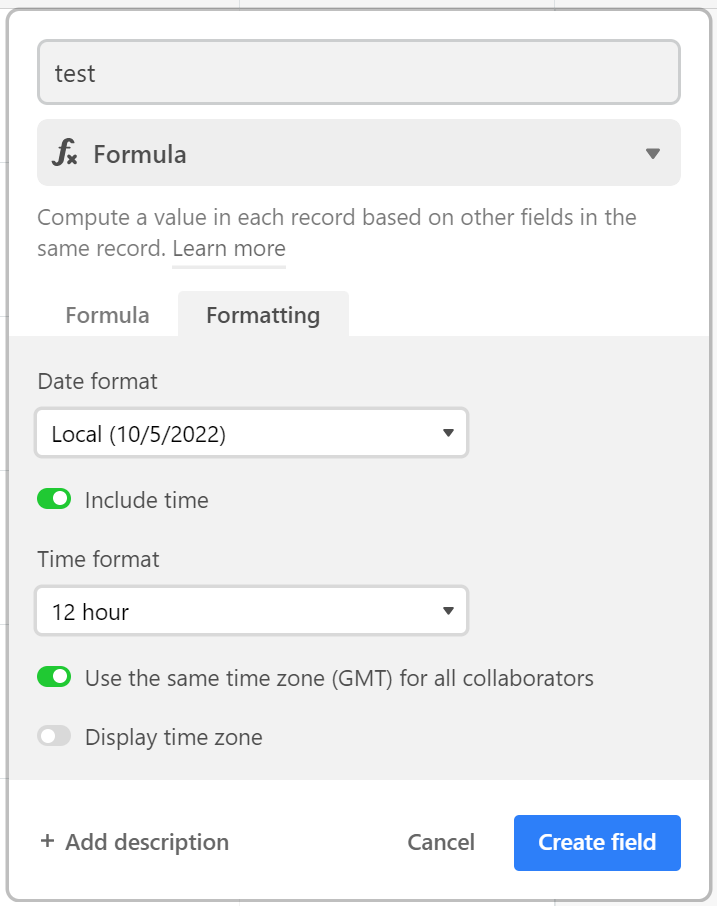
When editing your formula, can you click the formatting tab? If you don’t see this then there is something wrong with your formula.


Forum|alt.badge.img+4
  • Author
  • Participating Frequently
  • October 6, 2022

Wow @Kamille_Parks, you just made my whole day, week, month, year! I’ve been trying to figure this out for so long and I just had to tweak my formula slightly for the Formatting to work / be an option.

THANK YOU SO MUCH! Problem solved :slightly_smiling_face: