Calculate Delivery Date Based on Scope Estimate and Workdays?

  • July 16, 2019
  • 9 replies
  • 87 views

Hi Airtable community, formula specialists!

How can I use:

  • A fixed start date (e.g. 07/15/2019)
  • A #-of-days to execute estimate (e.g. 7)
  • WORKDAYS_DIFF()…

to generate an “Est. Delivery Date” that adds a number of days to the start date, treating weekends as “unavailable”?

The acceptance criteria here would be that the forumla returns “07/23/2019” or “07/23/2019 12:00” is fine.

Bonus if the formula can take a decimal rather than an integer for “# Days” for the purpose of supporting half-days. (I’d never get more granular than half-days.)

I’m going to be trying to create this formula myself, but thought the community may want a crack at it, too.

Thanks!

9 replies

  • Author
  • New Participant
  • July 16, 2019

The standard formula that isn’t helpful because it treats weekend days like workdays is:

IF({Start},DATEADD({Start},{Days},'days'))


Kamille_Parks11
Forum|alt.badge.img+27

You’re pretty close, you actually need WORKDAY() instead of WORKDAY_DIFF()

So your formula should be WORKDAY({Start},{Days})


  • Participating Frequently
  • July 16, 2019

Hi everyone – I’m a total beginner, looking for something similar, but in reverse. I have a DueDate field. Can I generate a StartDate field with a formula that subtracts 14 workdays from the due date? Can the StartDate field be in a date format, so I can see the results in a calendar view? Thanks so much for your help!


Kamille_Parks11
Forum|alt.badge.img+27

Hi everyone – I’m a total beginner, looking for something similar, but in reverse. I have a DueDate field. Can I generate a StartDate field with a formula that subtracts 14 workdays from the due date? Can the StartDate field be in a date format, so I can see the results in a calendar view? Thanks so much for your help!


Use a negative number: WORKDAY({DueDate},-14). And yes, you can format the result as a date to be used in the calendar.


  • Participating Frequently
  • July 16, 2019

Use a negative number: WORKDAY({DueDate},-14). And yes, you can format the result as a date to be used in the calendar.


THANK YOU so much! This is awesome.


  • New Participant
  • July 17, 2019

What would the formula be to calculate the date based on days not workdays? many thanks!


Kamille_Parks11
Forum|alt.badge.img+27

What would the formula be to calculate the date based on days not workdays? many thanks!


^ that’s the “normal” date calculator function. You can replace the field reference {Days} in that example with a static number (i.e. 14). All date generation formulas in Airtable accept negative numbers.


Forum|alt.badge.img+4
  • New Participant
  • February 10, 2021

Really hoping you all can help me figure out what I’m doing wrong!

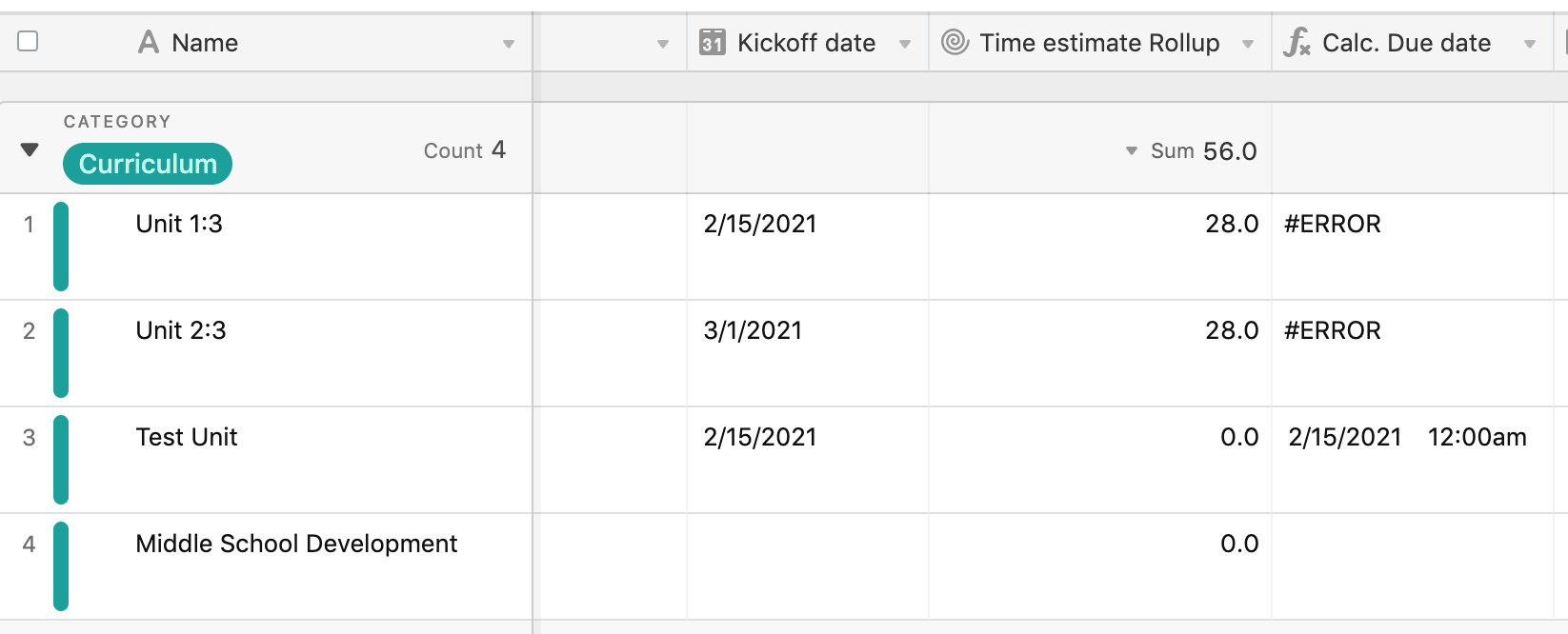
I am trying to use a Rollup to calculate my estimated days (summing the estimated times for the tasks that are associated with that project), and referring to THAT in my due-date formula.

I’m using columns which are called:
– Kickoff date
– Time estimate Rollup (which is pulling estimated times from my Tasks table)
– Calc. Due Date

In that Calc. Due Date columns, I’m using the formula: IF({Kickoff date},WORKDAY({Kickoff date},{Time estimate Rollup}, ‘days’))

When I save, I get an Error in each row that has rolled up dates. In records that don’t have rolled up dates, the formula seems to work of course! Pic attached.

What am I doing wrong?


Kamille_Parks11
Forum|alt.badge.img+27

Really hoping you all can help me figure out what I’m doing wrong!

I am trying to use a Rollup to calculate my estimated days (summing the estimated times for the tasks that are associated with that project), and referring to THAT in my due-date formula.

I’m using columns which are called:
– Kickoff date
– Time estimate Rollup (which is pulling estimated times from my Tasks table)
– Calc. Due Date

In that Calc. Due Date columns, I’m using the formula: IF({Kickoff date},WORKDAY({Kickoff date},{Time estimate Rollup}, ‘days’))

When I save, I get an Error in each row that has rolled up dates. In records that don’t have rolled up dates, the formula seems to work of course! Pic attached.

What am I doing wrong?


You’re confusing the format for WORKDAY() with the one for DATEADD(). WORKDAY() only requires two arguments, and if there is a third argument it would be a list of holidays to exclude from the calculation. Notice how all the examples above are written. Get rid of the , 'days' bit from your formula.