Calculate the difference in hours based on two time fields [SOLVED]

  • August 29, 2018
  • 11 replies
  • 153 views

Mabye this is an easy one for you Airtable gurus. I am currently creating a more or less complex ToDo list and want to create a field which calculates the difference between Estimate and ACTUAL use of time. Does anyone know a simple trick or formula to solve this? Many thanks in advance !

11 replies

Forum|alt.badge.img+3
  • Known Participant
  • August 29, 2018

DATETIME_DIFF({Estimated Date},{Actual Date},‘hours’)


  • Author
  • Participating Frequently
  • August 29, 2018

DATETIME_DIFF({Estimated Date},{Actual Date},‘hours’)


I really appreciate your presence on planet earth. Thanks :slightly_smiling_face:


Forum|alt.badge.img+18

This is pretty simple, but you have to just keep in mind that a “Duration” field holds its value in seconds.

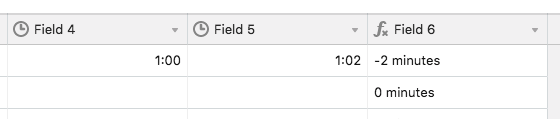
So if you have a duration field, and you enter 1:00 in it to represent 1 hour, and then you create a formula field that just returns the value of that duration field, you’ll find that the formula field returns 3600 - because there are 3600 seconds in an hour.

The implication is that if you have two duration fields (Expected and Actual), and you subtract one from the other in a formula field, you need to divide the result by 3600 if you want it to return in hours; or by 60 if you want it to return in minutes.

When Expected = 1:00
And Actual = 1:02
Difference =

({Expected} - {Actual})/60 & " minutes"

will return -2 minutes

(Seeing the reply that was just sent in above mine, it becomes evident that you weren’t talking about duration fields… maybe someone will still find this useful anyhow :grinning_face_with_smiling_eyes: )


  • Author
  • Participating Frequently
  • August 29, 2018

This is pretty simple, but you have to just keep in mind that a “Duration” field holds its value in seconds.

So if you have a duration field, and you enter 1:00 in it to represent 1 hour, and then you create a formula field that just returns the value of that duration field, you’ll find that the formula field returns 3600 - because there are 3600 seconds in an hour.

The implication is that if you have two duration fields (Expected and Actual), and you subtract one from the other in a formula field, you need to divide the result by 3600 if you want it to return in hours; or by 60 if you want it to return in minutes.

When Expected = 1:00
And Actual = 1:02
Difference =

({Expected} - {Actual})/60 & " minutes"

will return -2 minutes

(Seeing the reply that was just sent in above mine, it becomes evident that you weren’t talking about duration fields… maybe someone will still find this useful anyhow :grinning_face_with_smiling_eyes: )


Thank you very much. As I inserted the formula it seems that the time difference is not being viewed or summed up. Therefore, must I remove the minutes? What can i do that it detects it as a value? Many thanks in advance.


  • Author
  • Participating Frequently
  • August 29, 2018

DATETIME_DIFF({Estimated Date},{Actual Date},‘hours’)


@Jacob_Turley As I inserted your formula, there was a failure. Is the “hours” part being inserted as well or is this value also changed/customized according to the table?


Forum|alt.badge.img+18

Thank you very much. As I inserted the formula it seems that the time difference is not being viewed or summed up. Therefore, must I remove the minutes? What can i do that it detects it as a value? Many thanks in advance.


Are you using duration fields or date fields?


  • Author
  • Participating Frequently
  • August 29, 2018

Are you using duration fields or date fields?


I am using a duration fields. According to that it sums them up, what the formula field unfortunately isn’t. Is there a solution to sum up these values when collapsed in group?


  • Author
  • Participating Frequently
  • August 29, 2018

I am using a duration fields. According to that it sums them up, what the formula field unfortunately isn’t. Is there a solution to sum up these values when collapsed in group?


The solution in calculating the difference and summing it up is the formula:

({Expected} - {Actual})/60
After adding the formula into the “Formula field” you simply have to group (by whatever value you like; Can be per month or day, or by task type) and then collapse the whole group.
After collapsing the group, click on “sum” and choose “sum” from the dropdown.


Forum|alt.badge.img+2
  • Participating Frequently
  • January 17, 2019

Are you using duration fields or date fields?


how would this question be answered if someone was using the date field?


Forum|alt.badge.img+5
  • Inspiring
  • January 18, 2019

how would this question be answered if someone was using the date field?


“how would this question be answered if someone was using the date field?”

See the first reply to the post, the one from @Jacob_Turley.


  • New Participant
  • January 27, 2021

@Jacob_Turley As I inserted your formula, there was a failure. Is the “hours” part being inserted as well or is this value also changed/customized according to the table?


Same.

Don’t copy/paste because it’s not good single quotes (’ instead of ’)
You can just copy/paste DATETIME_DIFF and follow online help too.