Converting WEEKNUM to date range?

  • July 25, 2018
  • 9 replies
  • 272 views

Forum|alt.badge.img

I’m trying to make my “group by week” formatting easier to understand by showing the date range for the week rather than the week number but can’t seem to get the formula that works in Excel to work in Airtable-- has anyone figured this out? Thank you!


9 replies

Forum|alt.badge.img+5
  • Inspiring
  • July 25, 2018

This formula —

DATETIME_PARSE({WeekNum}&'','w')

— will return the first day of the week. You could then use

DATETIME_FORMAT(
    DATETIME_PARSE(
        {WeekNum}&'',
        'w'
        ),
    'M-D-YYYY'
    )&
' – '&
DATETIME_FORMAT(
    DATEADD(
        DATETIME_PARSE(
            {WeekNum}&'',
            'w'
            ),
        6,
        'days'
        ),
    'M-D-YYYY'
    )

to create a date range in the format 'M-D-YYYY – M-D-YYYY'.


Forum|alt.badge.img

This formula —

DATETIME_PARSE({WeekNum}&'','w')

— will return the first day of the week. You could then use

DATETIME_FORMAT(
    DATETIME_PARSE(
        {WeekNum}&'',
        'w'
        ),
    'M-D-YYYY'
    )&
' – '&
DATETIME_FORMAT(
    DATEADD(
        DATETIME_PARSE(
            {WeekNum}&'',
            'w'
            ),
        6,
        'days'
        ),
    'M-D-YYYY'
    )

to create a date range in the format 'M-D-YYYY – M-D-YYYY'.


Beautiful! Worked like a charm. Thank you so much1


Forum|alt.badge.img

Beautiful! Worked like a charm. Thank you so much1


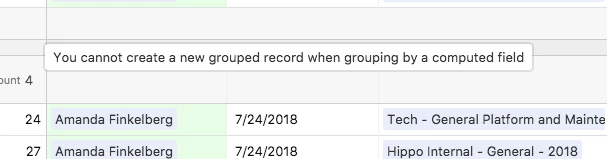
W_Vann-- any idea how to get around this? I’m making a time card view


Forum|alt.badge.img+5
  • Inspiring
  • July 25, 2018

W_Vann-- any idea how to get around this? I’m making a time card view


Um… don’t group by a computed field?

This is one of Airtable’s extremely clever and helpful features except when it isn’t. In brief, when you create a new record from within a grouped view, Airtable automatically sets the value of the grouped-by field relative to the point in the view at which you created the record.¹ (It does something similar when you add a record from a filtered view.) The problem comes when you are grouping based on a computed field, as Airtable can’t really reverse engineer the calculation to determine how multiple values should be set. You’ll either have to find a way to group based on some sort of data field — for instance, assuming you are grouping based on the date range calculation, you could instead group on {WeekNum} — or use your grouped view only for data display and enter data on a non-grouped view.


  1. I hope that was somewhat comprehensible, because I can’t think of a better way to phrase it at the moment.

Forum|alt.badge.img

Very helpful answer-- I really only wanted to group by {weeknum} but display the date range on the collapsed field (looks better) but will have to make do with one or the other, it seems.


  • New Participant
  • February 9, 2019

This formula —

DATETIME_PARSE({WeekNum}&'','w')

— will return the first day of the week. You could then use

DATETIME_FORMAT(
    DATETIME_PARSE(
        {WeekNum}&'',
        'w'
        ),
    'M-D-YYYY'
    )&
' – '&
DATETIME_FORMAT(
    DATEADD(
        DATETIME_PARSE(
            {WeekNum}&'',
            'w'
            ),
        6,
        'days'
        ),
    'M-D-YYYY'
    )

to create a date range in the format 'M-D-YYYY – M-D-YYYY'.


Exactly what I’m looking for, setting a weekly priority list for the entire year, so I can now go through the list, add which week#, and I get that beautiful date range to help me plan my months. Thanks!


Forum|alt.badge.img+3
  • Participating Frequently
  • August 24, 2019

So I tried using the above formula. The Issue I am running into is this. If I have date ranging across multiple years I get the week from earliest date as the range for all the dates. Example: 1/5/2020 shows up as part of 1/6/2019 - 1/12/2019 The correct Range should be 1/5/2020 to 1/11/2020.

Any Suggestions?


  • New Participant
  • July 28, 2020

So I tried using the above formula. The Issue I am running into is this. If I have date ranging across multiple years I get the week from earliest date as the range for all the dates. Example: 1/5/2020 shows up as part of 1/6/2019 - 1/12/2019 The correct Range should be 1/5/2020 to 1/11/2020.

Any Suggestions?


So I’m dealing with this exact same question, did you find out how to do this?


Forum|alt.badge.img+9

This formula —

DATETIME_PARSE({WeekNum}&'','w')

— will return the first day of the week. You could then use

DATETIME_FORMAT(
    DATETIME_PARSE(
        {WeekNum}&'',
        'w'
        ),
    'M-D-YYYY'
    )&
' – '&
DATETIME_FORMAT(
    DATEADD(
        DATETIME_PARSE(
            {WeekNum}&'',
            'w'
            ),
        6,
        'days'
        ),
    'M-D-YYYY'
    )

to create a date range in the format 'M-D-YYYY – M-D-YYYY'.


A modified version of this formula worked for me for 2020, but 2021 is all jacked up now. I’m honestly not even really sure how it worked in the first place. How does passing in a week number translate into a Month/Day/Year?

DATETIME_FORMAT( DATETIME_PARSE( {WeekNumber}&’’, ‘w’ ), ‘M-D-YYYY’ )
This gives me 12/29/2019 for example.

EDIT: I figured out that getting the number of the day of the week and doing some math works. Just Replace {Day 0} with your date. It will output something like (2) Jan 4-8. If the week is between months it will output something like this (14) Mar 29-Apr 2.

	IF({Day 0}="",
		"",
		IF(ISERROR(WEEKNUM({Day 0},"Sunday")),
			"", 
			"(" & WEEKNUM({Day 0},"Sunday") & ") " & DATETIME_FORMAT(DATEADD({Day 0},-DATETIME_FORMAT({Day 0},'d')+1,'day'),'MMM D') & "-" &
			IF(DATETIME_FORMAT(DATEADD({Day 0},-DATETIME_FORMAT({Day 0},'d')+1,'day'),'M') = DATETIME_FORMAT(DATEADD(DATEADD({Day 0},-DATETIME_FORMAT({Day 0},'d')+1,'day'), 4, 'days'), 'M'),
				DATETIME_FORMAT(DATEADD(DATEADD({Day 0},-DATETIME_FORMAT({Day 0},'d')+1,'day'), 4, 'days'), 'D'),
				DATETIME_FORMAT(DATEADD(DATEADD({Day 0},-DATETIME_FORMAT({Day 0},'d')+1,'day'), 4, 'days'), 'MMM D')
			)
		)
	)