Question

Create a new linked records directly through a form

  • December 9, 2025
  • 4 replies
  • 17 views

Forum|alt.badge.img

I’m trying to enable users filling out a form to create a new contact. For context, I’m building a repository of companies and their points of contact. Currently, the “Add Contact” button only allows selecting from existing contacts already in the repository. Since this form is meant for intake, I want users to be able to create new contacts directly from the form and have them automatically linked to the company.


When I reached out to support, they said when using Airtable's form builder, you can only link to existing records in a linked record field. Users won't be able to create a new linked records directly through the form.


Are there workarounds or unique solutions to this limitation?

4 replies

Mike_AutomaticN
Forum|alt.badge.img+28

Hey ​@madmills123,


You cannot do that natively using Airtable forms. You’ll want to (a) setup some automations to handle the record creation and linking on the back after submission, or (b) use Fillout forms which allow for linked record creation and have a simple Airtable integration (and their free plan is super generous). 
 

The latter would be cleaner in my opinion!


Mike, Consultant @ Automatic Nation


HannesK-ME
Forum|alt.badge.img+13
  • Participating Frequently
  • December 9, 2025

Hey there!

Unfortunately, Airtable forms are very limited when it comes to linked record fields. I’d recommend checking out the miniExtensions Form for a fully-featured alternative! You can allow your users to create, edit, link, unlink or even delete linked records, preview and display them in different ways and a lot more! It also has full support for all field types in Airtable, including formulas, rollups and lookups. Definitely worth a look!


TheTimeSavingCo
Forum|alt.badge.img+31

If you’re open to third party solutions I’d say just use Fillout and call it a day (https://www.fillout.com/), their free plan has 1k submissions a month

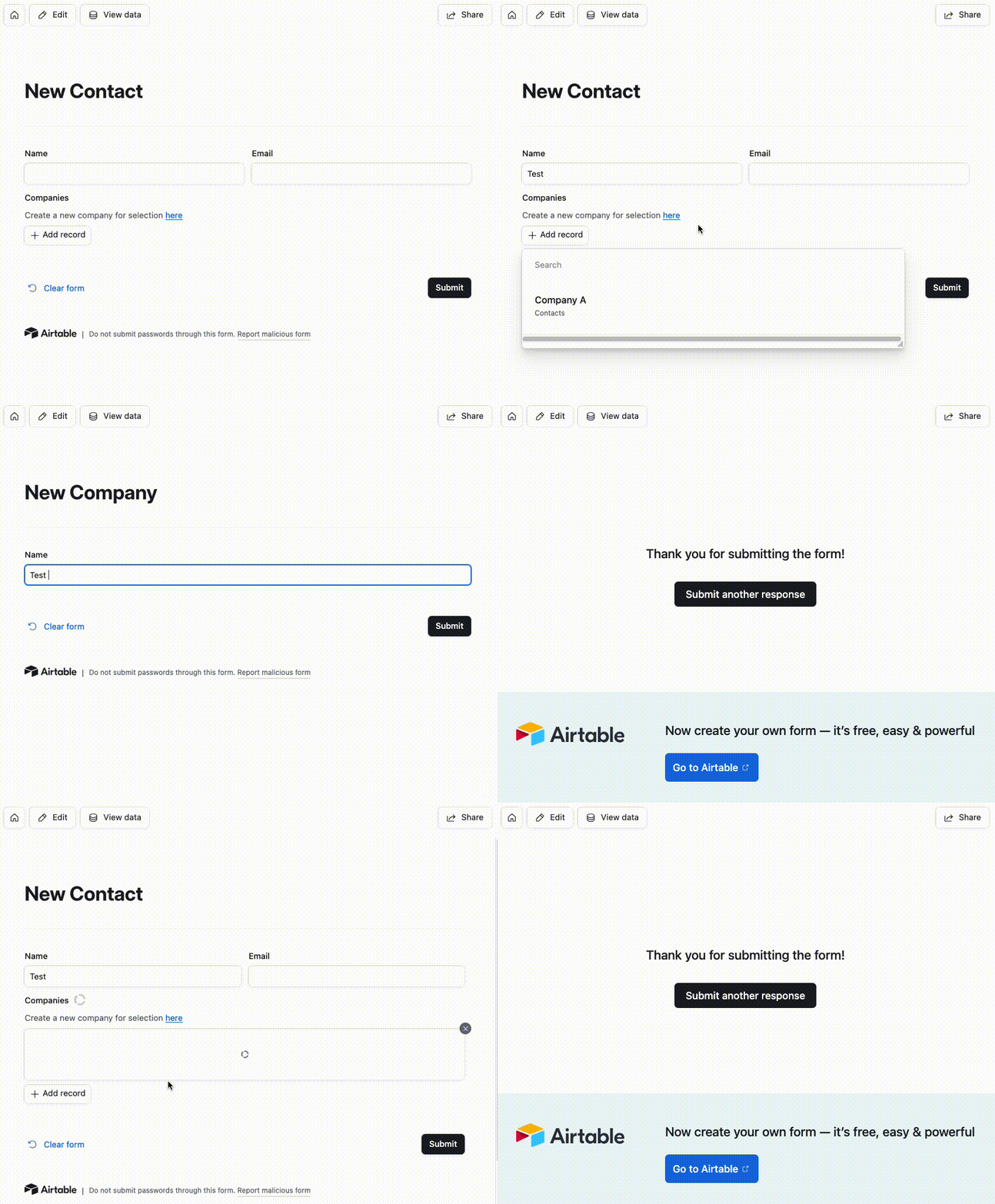
If you want to keep it within Airtable, my usual go to is to provide a link to another form within that form, and I’ve set it up here for you to check out.  That way users have the option of initially selecting a linked record if it’s available and creating one if not


Forum|alt.badge.img+1
  • New Participant
  • December 10, 2025

Use a separate form to capture new contact details and then automate linking the submitted contact to the company using Airtable Automations.