Date Difference

  • November 25, 2020
  • 2 replies
  • 16 views

I’m trying to obtain the difference between 2 dates (going out 2 decimal places). I did format the result as a decimal going out 2 places. However, I am only getting whole number results.

My columns are:
Lease End - set up as a date
Today’s Date - set up as a formula: Today()

Lease Remaining - set up as a formula: DATETIME_DIFF({Lease End},{Today’s Date}, ‘Years’)

Any help appreciated!

2 replies

JonathanBowen
Forum|alt.badge.img+18

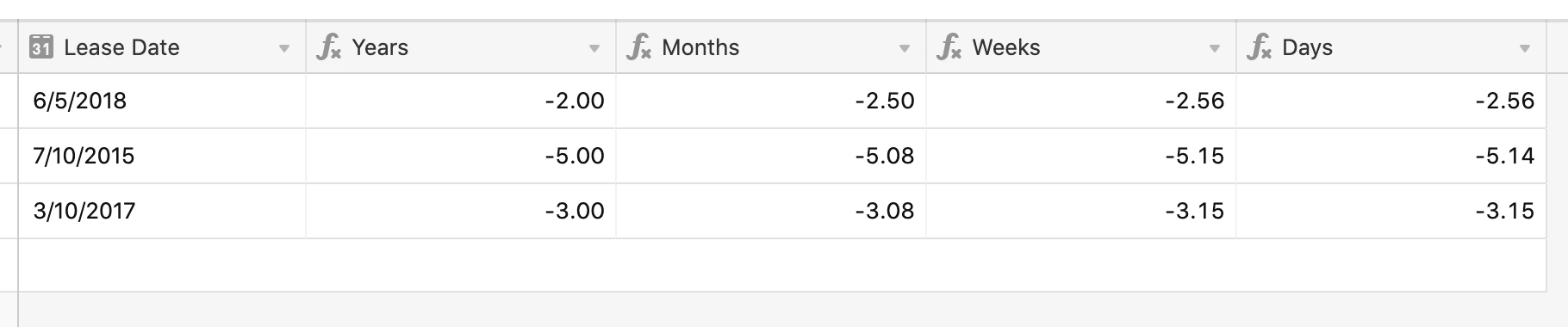
Hi @Alex_Everest - the DATETIME_DIFF formulas only give results in whole numbers (of whatever unit you’ve chosen), so even when you select a format of decimal with 2dp, you get “.00” at the end. You could try this:

Use a smaller unit, then divide by the number of that unit in a year. So for example “weeks” is:

DATETIME_DIFF({Lease Date}, TODAY(), 'weeks')/52


  • Author
  • Participating Frequently
  • November 26, 2020

Hi @Alex_Everest - the DATETIME_DIFF formulas only give results in whole numbers (of whatever unit you’ve chosen), so even when you select a format of decimal with 2dp, you get “.00” at the end. You could try this:

Use a smaller unit, then divide by the number of that unit in a year. So for example “weeks” is:

DATETIME_DIFF({Lease Date}, TODAY(), 'weeks')/52


Worked perfectly, thanks @JonathanBowen
Appreciate it!