Solved

Date filter - this/current month

  • Jul 11, 2016 2:00 PM UTC
  • 14 replies
  • 390 views

Forum|alt.badge.img+2

I cannot figure out how to filter all entries where “date” is the current month.

Best answer by Karlstens

There is no sense to creating formulas just because AT doesn’t have a filter like this month, year, week…
It’s totally unacceptable.


Yah, it’s frustrating, but this method I’ve captured below will at least work so that you can do what you need to do.

(DATETIME_FORMAT({Test_Date_Time}, 'MM') - DATETIME_FORMAT(TODAY(), 'MM')) +((DATETIME_FORMAT({Test_Date_Time}, 'YYYY') - DATETIME_FORMAT(TODAY(), 'YYYY')) * 12)
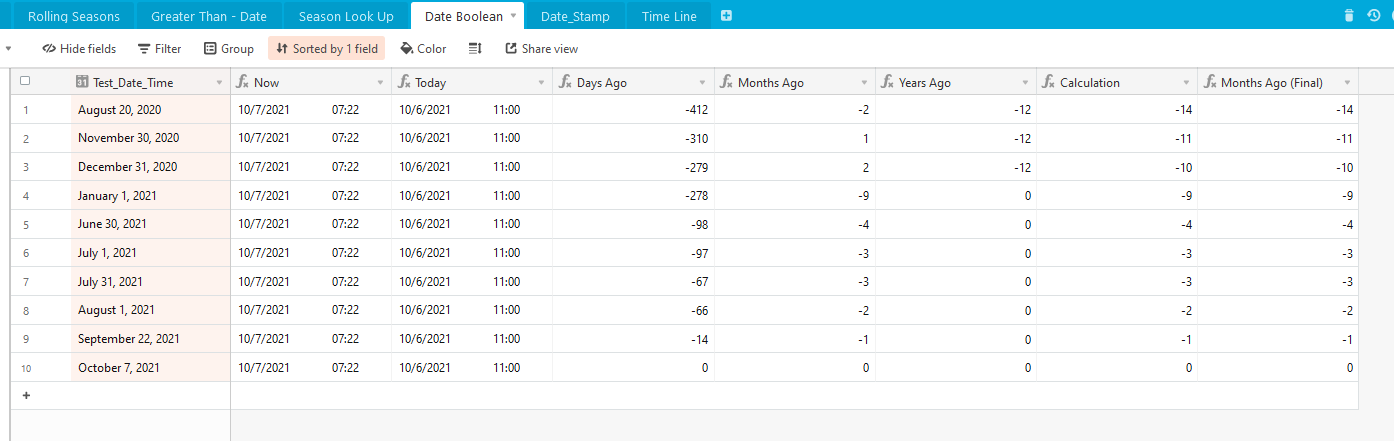
It’s worth reaching out to Airtable Support with this feature enhancement request, considering they’re actively working on the filters (which is epic!) and released new and/or group search features this morning.

View original
This topic has been closed for replies.

14 replies

  • Known Participant
  • Jul 11, 2016 7:08 PM UTC

Hi !
The filter needs a field and a constant (a value)
or
A field and a second field to work.

I don’t think that you can use a formula (?!)

So you may need to first ADD those fields before using them in a filter.

i.e

  • Field “this_month” of type FORMULA
  • Field “Month_of_my_dateField” of type FORMULA

I suggest that you add the year value to the month fields ( i.e. 201610 for october 2016)


  • Participating Frequently
  • Jul 16, 2016 3:48 PM UTC

You’ll need to do a compound filter.

Make the first line: Where | Date | is on or after | the first day of the month
Make the second line: Where | Date | is on or before | the last day of the month

This will return the results of days between the two dates.

Sadly you’ll have to re-select the dates each month, it’s not automated.


Forum|alt.badge.img+9
  • Participating Frequently
  • Jul 16, 2016 7:10 PM UTC

Here’s another way to do it so it automatically switches each month:

  1. Create a formula field in the table called “Is current month”. We want this formula to be 1 when the date is in the current month, and 0 otherwise. So we can use this formula:

    DATETIME_FORMAT({Name of your date field}, 'YYYY-MM') = DATETIME_FORMAT(NOW(), 'YYYY-MM')

  2. Now you can create a filter where “Is current month” is equal to 1.

Here’s a base that shows this set up: https://airtable.com/shr1WzfJyhsdV5HlV/tblY9aNHNVFjtgP1v/viwau4UAl4y9H0DWl


  • New Participant
  • Mar 2, 2017 2:28 PM UTC

Here’s another way to do it so it automatically switches each month:

  1. Create a formula field in the table called “Is current month”. We want this formula to be 1 when the date is in the current month, and 0 otherwise. So we can use this formula:

    DATETIME_FORMAT({Name of your date field}, 'YYYY-MM') = DATETIME_FORMAT(NOW(), 'YYYY-MM')

  2. Now you can create a filter where “Is current month” is equal to 1.

Here’s a base that shows this set up: https://airtable.com/shr1WzfJyhsdV5HlV/tblY9aNHNVFjtgP1v/viwau4UAl4y9H0DWl


This solution worked perfectly. Thank you!

Would you happen to have a similar solution for displaying all records from the previous month? For example…Today is March 2nd (or any date in March) and I want to see records only from last month (February). Do you have a similar automated solution that will adjust every month? In April, previous month filter will only show March records. May will show April records, etc.


Forum|alt.badge.img+13

This solution worked perfectly. Thank you!

Would you happen to have a similar solution for displaying all records from the previous month? For example…Today is March 2nd (or any date in March) and I want to see records only from last month (February). Do you have a similar automated solution that will adjust every month? In April, previous month filter will only show March records. May will show April records, etc.


I know this is old but for anyone else coming across this, here’s the answer:

DATETIME_FORMAT({Delivered Date}, "YYYY-MM") = DATETIME_FORMAT(DATEADD(NOW(), "month", -1), "YYYY-MM")

It takes the time NOW() and subtracts one month from it using DATEADD().


Here’s another way to do it so it automatically switches each month:

  1. Create a formula field in the table called “Is current month”. We want this formula to be 1 when the date is in the current month, and 0 otherwise. So we can use this formula:

    DATETIME_FORMAT({Name of your date field}, 'YYYY-MM') = DATETIME_FORMAT(NOW(), 'YYYY-MM')

  2. Now you can create a filter where “Is current month” is equal to 1.

Here’s a base that shows this set up: https://airtable.com/shr1WzfJyhsdV5HlV/tblY9aNHNVFjtgP1v/viwau4UAl4y9H0DWl


Hey, thanks for sharing!
It looks like the link has either been unshared or deleted, any way you can reshare an updated link?


Forum|alt.badge.img+4
  • Known Participant
  • Nov 18, 2019 3:23 AM UTC

This is great. One final twist. How would you formulate previous month in previous year? E.g. It’s Nov 2019 now, so I want a formula to indicate Oct 2018 rows.


  • New Participant
  • Nov 18, 2019 10:00 AM UTC

Here’s another way to do it so it automatically switches each month:

  1. Create a formula field in the table called “Is current month”. We want this formula to be 1 when the date is in the current month, and 0 otherwise. So we can use this formula:

    DATETIME_FORMAT({Name of your date field}, 'YYYY-MM') = DATETIME_FORMAT(NOW(), 'YYYY-MM')

  2. Now you can create a filter where “Is current month” is equal to 1.

Here’s a base that shows this set up: https://airtable.com/shr1WzfJyhsdV5HlV/tblY9aNHNVFjtgP1v/viwau4UAl4y9H0DWl


Hi @Kasra_Kyanzadeh, is the value of the formula computed once when the formula is defined or is it dynamically computed when looked at ?


Forum|alt.badge.img+5
  • Known Participant
  • Jun 4, 2020 10:55 PM UTC

Here’s another way to do it so it automatically switches each month:

  1. Create a formula field in the table called “Is current month”. We want this formula to be 1 when the date is in the current month, and 0 otherwise. So we can use this formula:

    DATETIME_FORMAT({Name of your date field}, 'YYYY-MM') = DATETIME_FORMAT(NOW(), 'YYYY-MM')

  2. Now you can create a filter where “Is current month” is equal to 1.

Here’s a base that shows this set up: https://airtable.com/shr1WzfJyhsdV5HlV/tblY9aNHNVFjtgP1v/viwau4UAl4y9H0DWl


Is it possible to use this formula for current week as well?


  • New Participant
  • Dec 13, 2020 12:46 PM UTC

Here’s another way to do it so it automatically switches each month:

  1. Create a formula field in the table called “Is current month”. We want this formula to be 1 when the date is in the current month, and 0 otherwise. So we can use this formula:

    DATETIME_FORMAT({Name of your date field}, 'YYYY-MM') = DATETIME_FORMAT(NOW(), 'YYYY-MM')

  2. Now you can create a filter where “Is current month” is equal to 1.

Here’s a base that shows this set up: https://airtable.com/shr1WzfJyhsdV5HlV/tblY9aNHNVFjtgP1v/viwau4UAl4y9H0DWl


Worked like a charm, thanks!


Karlstens
Forum|alt.badge.img+24
  • Brainy
  • Jul 31, 2021 12:59 AM UTC

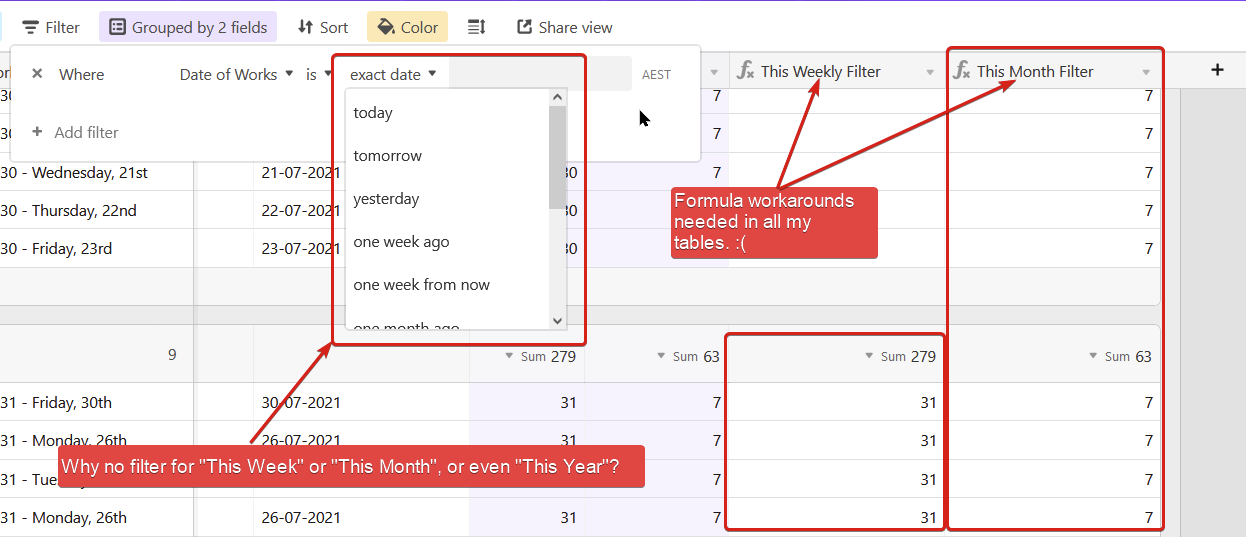
With all the advancements Airtable have been making, this work-around process to filter by the current week, month and year is starting to get old. Can AT please, please please add “This Week, This Month and This Year” filters as options?

Almost all of my tables that utilize date columns are then typically burdened with these extra columns to drive the table views that are so very critical within my automations.


Forum|alt.badge.img
  • New Participant
  • Oct 6, 2021 7:04 PM UTC

There is no sense to creating formulas just because AT doesn’t have a filter like this month, year, week…
It’s totally unacceptable.


Karlstens
Forum|alt.badge.img+24
  • Brainy
  • Answer
  • Oct 6, 2021 8:29 PM UTC

There is no sense to creating formulas just because AT doesn’t have a filter like this month, year, week…
It’s totally unacceptable.


Yah, it’s frustrating, but this method I’ve captured below will at least work so that you can do what you need to do.

(DATETIME_FORMAT({Test_Date_Time}, 'MM') - DATETIME_FORMAT(TODAY(), 'MM')) +((DATETIME_FORMAT({Test_Date_Time}, 'YYYY') - DATETIME_FORMAT(TODAY(), 'YYYY')) * 12)

It’s worth reaching out to Airtable Support with this feature enhancement request, considering they’re actively working on the filters (which is epic!) and released new and/or group search features this morning.


Forum|alt.badge.img+3
  • Participating Frequently
  • Mar 16, 2023 10:52 AM UTC

Yah, it’s frustrating, but this method I’ve captured below will at least work so that you can do what you need to do.

(DATETIME_FORMAT({Test_Date_Time}, 'MM') - DATETIME_FORMAT(TODAY(), 'MM')) +((DATETIME_FORMAT({Test_Date_Time}, 'YYYY') - DATETIME_FORMAT(TODAY(), 'YYYY')) * 12)

It’s worth reaching out to Airtable Support with this feature enhancement request, considering they’re actively working on the filters (which is epic!) and released new and/or group search features this morning.


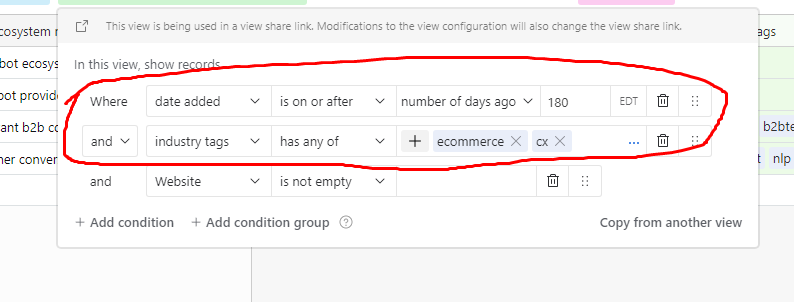
Hi support team!

How are you? Can you check this?

Actually, I try to expression these conditions in php, but I don't understand and not clear how to convert these conditions in php.

$condition_str = '
                AND(
                    {date added} =
                )
            ';
Please let me know if anyone knows how.
Thank you!