Answer

filter using linked records

  • December 8, 2025
  • 4 replies
  • 31 views

Forum|alt.badge.img+14

I’m trying to filter using linked records but i must have a mental block. 

  • Table A is People Records. it is linked to:
    • Table B: Service Records (multi records)
    • Table C: Congregation (one record)
  • Table C is Congregation. It is linked to:
    • Table D: Districts (one record)
    • Note: it is NOT linked to Service Records, but does have a lookup field to Service Records (from People).
  • Table D has lookup fields for:
    • Service Records (from Congregations)

I want to report the number of Districts that had at least one Congregation that has a Service Record that meets the following criteria:

  1. Service contains “2025 11” {Service is the “Name field”}
  2. Service does not contain “Cancelled” {Service is the “Name field”}

I also want to report the number of Congregations that have a People Record with a Service Record that meets the same criteria.

  1. Service contains “2025 11” {Service is the “Name field”}
  2. Service does not contain “Cancelled” {Service is the “Name field”}


The problem i’m running into is that some People have linked Service Records that contain “2025 11” AND ALSO records that contain “Cancelled 2025 11”. And every time i try to filter, it either brings back two records (the “2025 11” record AND the “Cancelled 2025 11”) or it brings back zero records. 

And i only want to report on the uncancelled Service.

What am i missing? 
Best answer by TheTimeSavingCo

I’ve set something up here for you to check out!  I made some assumptions about how your data’s laid out that might be in error, and if that’s the case if you could provide some screenshots of your tables I’ll see what I can do!


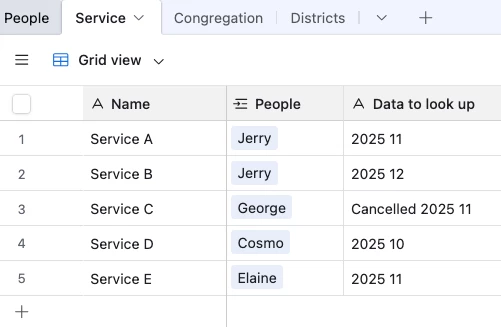
Data:

(I’m using generic names for the services to make the example clearer)

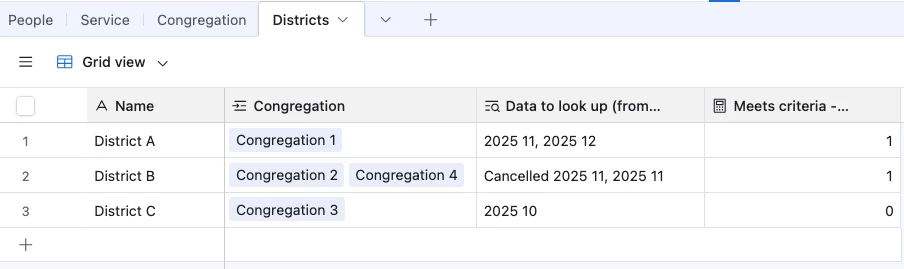
And we then use lookups to pull the data that we want to filter by over like so into Districts:


This setup then allows us to use a Count field to show which Districts had at least one service that meets the criteria you mentioned:

  1. Service contains “2025 11” 
  2. Service does not contain “Cancelled” 

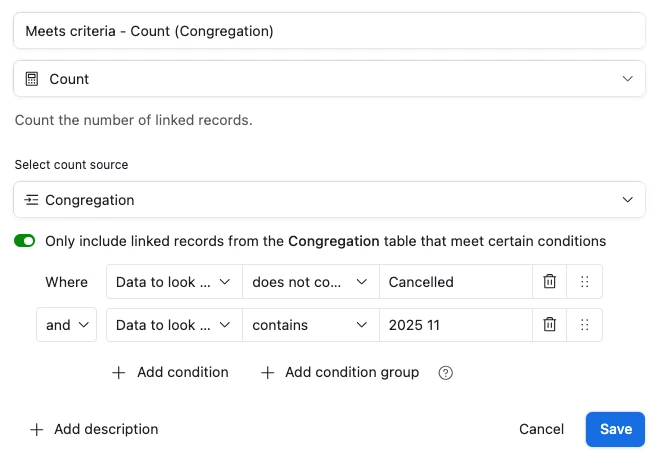
And the count field’s conditional filters look like this:

4 replies

Mike_AutomaticN
Forum|alt.badge.img+28

Hey ​@Erin_Alter,


What you are looking for is conditional lookups! You will want to check out the following article: https://automaticnation.com/airtables-lookup-field-a-quick-guide/


You can then apply the correspond filters if and as needed.


Mike, Consultant @ Automatic Nation


Forum|alt.badge.img+14
  • Author
  • Inspiring
  • December 8, 2025

@Mike_AutomaticN Thanks. i checked out the article you shared. it made me wonder if the issue is that i’m trying to report on something that isn’t linked directly? 

That prompted me to update my initial post to include this more specifically. 

  • Table A is People Records. it is linked to:
    • Table B: Service Records (multi records)
    • Table C: Congregation (one record)
  • Table C is Congregation. It is linked to:
    • Table D: Districts (one record)
    • Note: it is NOT linked to Service Records, but does have a lookup field to Service Records (from People).
  • Table D has lookup fields for:
    • Service Records (from Congregations)

When i try to use conditional lookups, it seems to only work if the record is directly linked. i am trying to avoid having to add another direct link, because the way my information comes to me, it will mean a bunch of extra manual entry to link all the records. 

but as i continue to consider this, i’m also wondering if what i really need is a junction table. this would mean another link, but perhaps i could automate it? it would also allow for a Person’s linked Congregation to change in the future, and i would still be able to report on what happened at the time of the Service event. 


DisraeliGears01
Forum|alt.badge.img+21

The answer is always more tables haha. 

In the meantime if you want a hacky solution, what about adding an additional formula field that looks for the word Cancelled in the name field and creates a single select (true/false) if it exists. Then you can add that to your existing filter setup. Something like 

IF( 
FIND("Cancelled", Name)>0, "true", "false")


TheTimeSavingCo
Forum|alt.badge.img+31

I’ve set something up here for you to check out!  I made some assumptions about how your data’s laid out that might be in error, and if that’s the case if you could provide some screenshots of your tables I’ll see what I can do!


Data:

(I’m using generic names for the services to make the example clearer)

And we then use lookups to pull the data that we want to filter by over like so into Districts:


This setup then allows us to use a Count field to show which Districts had at least one service that meets the criteria you mentioned:

  1. Service contains “2025 11” 
  2. Service does not contain “Cancelled” 

And the count field’s conditional filters look like this: