Formatting Currency Formula

  • April 9, 2019
  • 6 replies
  • 762 views

Forum|alt.badge.img+1

How do I format currency with commas/decimal points in a formula, if the output is a currency and a word? If it was just currency I could use the built in formatter but since I have a word in there it isn’t an option.
What I’m currently getting:
“$” & {Amount} & " - " & {Vendor}
$1000 - Utility Bill

What I want:
$1,000.00 - Utility Bill

6 replies

Forum|alt.badge.img+14

Yeah. That’s kind of annoying. Why do you need to concatenate the Amount and the Vendor as a string? As opposed to just viewing the two fields alongside each other, for instance.


JonathanBowen
Forum|alt.badge.img+18

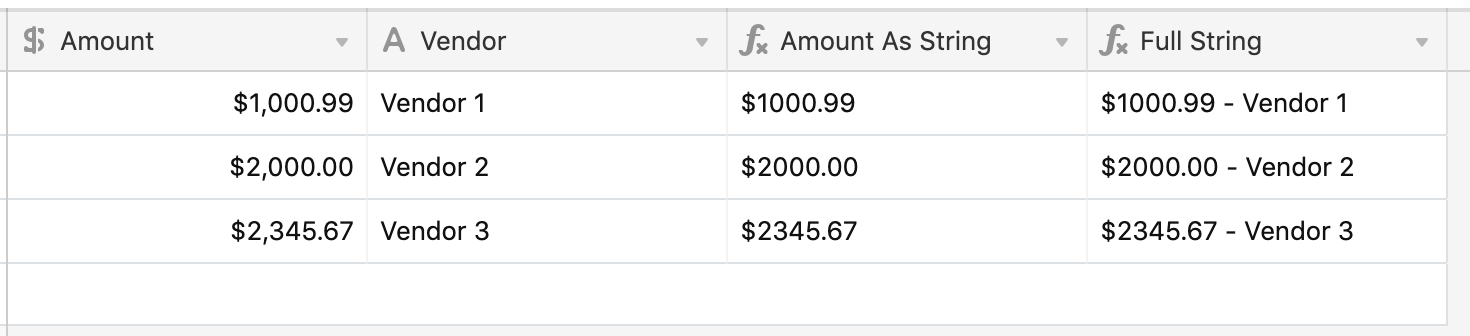
@Cady_Smith1 - I can get to this (but without the comma separator):

Amount as String:

'$' & IF(FIND('.', '' & Amount), '' & Amount, '' & Amount & '.00')

Full String:

{Amount As String} & ' - ' & Vendor

I’m sure there is a way to add the comma too, but you need to account for different scenarios (1k, 1m etc). Based on the length of the value string then insert a comma 6 places from the right etc. Not immediately obvious how you do this, but I’m sure it could be done, although formulas a bit complicated - wonder if you can get away without it?

JB


Forum|alt.badge.img+1
  • Author
  • Participating Frequently
  • April 10, 2019

Yeah. That’s kind of annoying. Why do you need to concatenate the Amount and the Vendor as a string? As opposed to just viewing the two fields alongside each other, for instance.


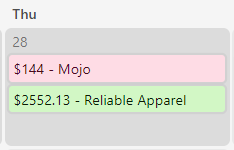
I can view them side by side in Grid view, but I also need a Calendar view. The Calendar view is going to show whatever the Name field contains. So if I use a formula in the Name field, I can customize what the title will look like in the calendar:

I was trying to format it with the proper commas/decimal points for consistency’s sake in the calendar. :slightly_smiling_face: Not an end of the world thing, I was just wondering if there was an easy way to show it that I was missing.


Justin_Barrett
Forum|alt.badge.img+21

@W_Vann_Hall made some “pretty print” routines that you can find here:


Forum|alt.badge.img

If the output of your formula is going to be a number, you can use the formatting tab in the field customization menu to do this—just switch the Format from Integer to Currency.


Justin_Barrett
Forum|alt.badge.img+21

If the output of your formula is going to be a number, you can use the formatting tab in the field customization menu to do this—just switch the Format from Integer to Currency.


That only works when the number will live in the field and doesn’t need to go anywhere else. When a user wants to use that number (formatted) elsewhere like a document, the formatting must currently be rebuilt using a formula.