How can i roll up value so that it shows only the latest one?

  • August 28, 2021
  • 3 replies
  • 193 views

Forum|alt.badge.img+9

Hello,

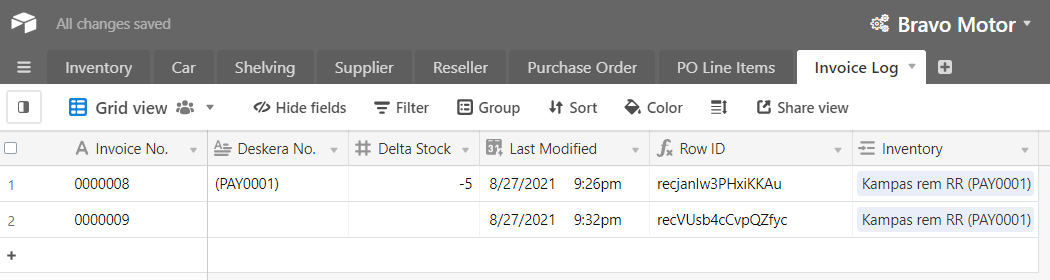
I want to show “0000009” in my cell inside Inventory table. I tried to use roll up but it shows “0000009” and “0000008”.

How can i only show the latest one only (in this case is “0000009”)

Thanks

3 replies

Databaser
Forum|alt.badge.img+25
  • Brainy
  • August 30, 2021

Hi @kennypurnomo

There might be a easier way of doing this, but it works.

Create a rollup field in your Invoice table, refering to your Invoice Log table; choose the Last Modified field and MAX(values) in the formula field. This will give you the most recent date.

Create a lookup field in your Invoice Log table, looking up that most recent date.

Create a formula field next to it: IF(lookup field=Last Modified, Invoice No.). This will show you the invoice number when it matches the most recent date and leave the other cells blank.

Create a lookup field in your Inventory table for this formula field. It will only show your most recent Invoice Number.


Forum|alt.badge.img+9
  • Author
  • Known Participant
  • August 30, 2021

Thank you. It works like a charm!


Forum|alt.badge.img+2
  • New Participant
  • December 18, 2024

There's a simpler way of doing this now. Use a Lookup field and select option "Limit the number of items shown." Then, "Last 1."