
Question

How do I determine who gave out an editor license?

  • December 23, 2025
  • 11 replies
  • 94 views

James_McElroy
Forum|alt.badge.img+4

My team recently inherited responsibly for the admin of an 850 seat Airtable enterprise license.

We’re not an IT team; we’re just enthusiastic end users of Airtable, so we’re new to being admins.

My question: is it possible to determine who gave out an editor license?

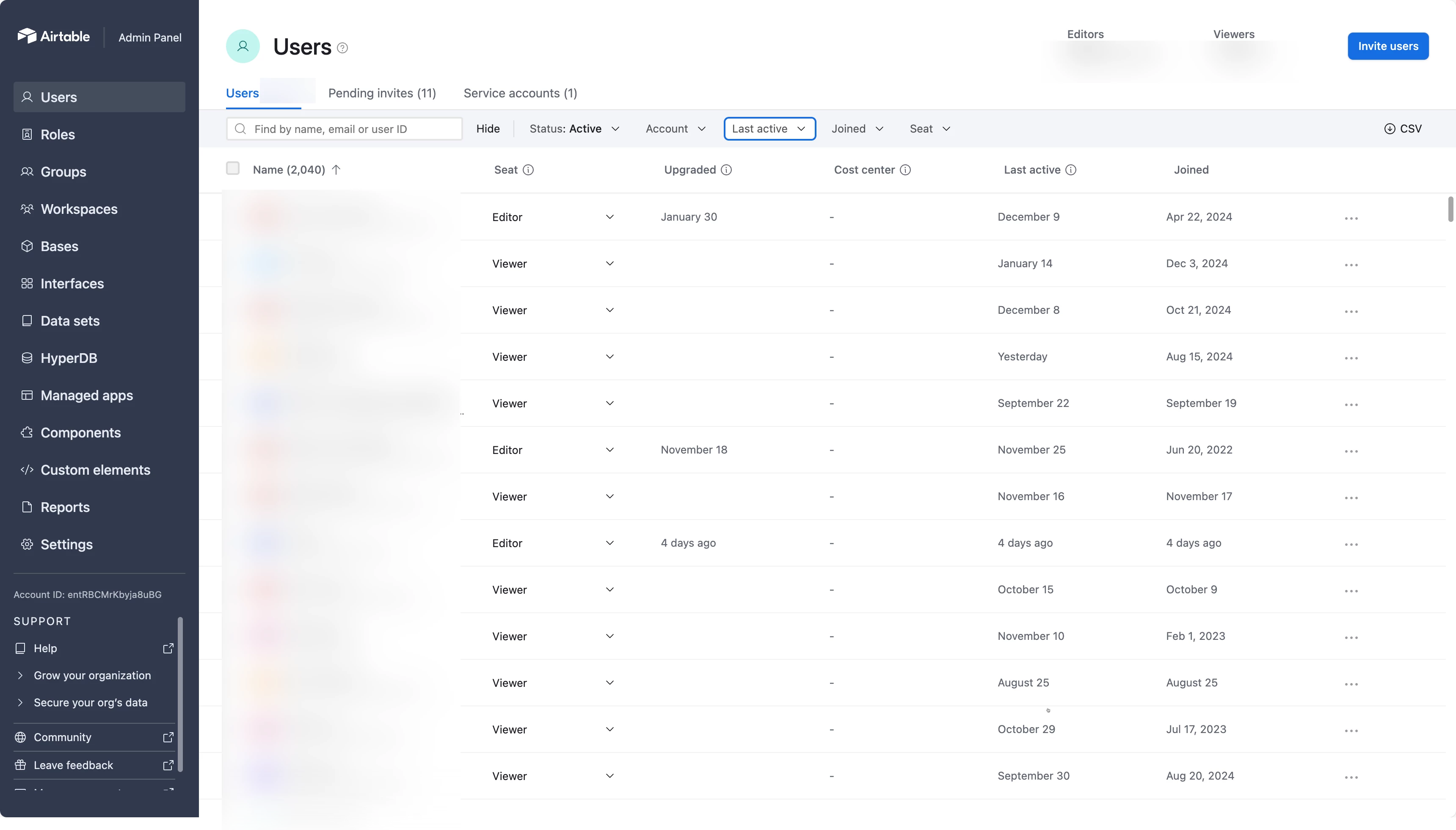
When I go into the admin panel and hover over someone who was just upgraded, I get messages like:

  • “[user name] was Editor on base [base name] on [date]”
  • “[user name] was Creator on base [base name] on [date]”
  • “[user name] made edits to workspace [workspace name] on [date]

Is this telling me their last activity in Airtable?

Is there a way to figure out who gave out the editor license they’re using?

Thanks

11 replies

DisraeliGears01
Forum|alt.badge.img+21

I’m not an enterprise admin, but according to the help documentation here, in the admin panel, select Users and find the specific user you’re trying to detail, and a sidesheet should open with additional details. If it doesn’t show in the sidesheet, download the CSV of user information, because specifically included in that CSV is Invited by Email and details on seat upgrades. 

If you haven’t already I’d highly recommend doing the Airtable Admin course in Academy. An 850 seat enterprise account feels like quite the deep end to get tossed into 🫠


James_McElroy
Forum|alt.badge.img+4
  • Author
  • Participating Frequently
  • December 23, 2025

I’m not an enterprise admin, but according to the help documentation here, in the admin panel, select Users and find the specific user you’re trying to detail, and a sidesheet should open with additional details. If it doesn’t show in the sidesheet, download the CSV of user information, because specifically included in that CSV is Invited by Email and details on seat upgrades. 

If you haven’t already I’d highly recommend doing the Airtable Admin course in Academy. An 850 seat enterprise account feels like quite the deep end to get tossed into 🫠


Thanks for the tip ​@DisraeliGears01! We are looking for a proper owner so we can go back to being enthusiastic end users :)


Mike_AutomaticN
Forum|alt.badge.img+28

Hey ​@James_McElroy,

Just as Drew, I’m not Enterprise Admin myself. However, if you have specific questions I would also highly suggest emailing support@airtable.com

Make sure to request for a human answer, as usually their first reponse is AI. Their human answers are great and usually pretty fast!


Make sure to circle back with the corresponding asnwer!

Mike, Consultant @ Automatic Nation 
YouTube Channel 


GreethamEllen
Forum|alt.badge.img+2
  • New Participant
  • December 29, 2025

Hi ​@James_McElroy!
 

In the Admin Panel, you can click on any user and see their upgrade event via the field “Upgrade Event” on the Account tab. The information will be something like “James McElroy made Jane Doe an Editor”. Hope this helps!


-Ellen


James_McElroy
Forum|alt.badge.img+4
  • Author
  • Participating Frequently
  • December 30, 2025

Hi ​@James_McElroy!
 

In the Admin Panel, you can click on any user and see their upgrade event via the field “Upgrade Event” on the Account tab. The information will be something like “James McElroy made Jane Doe an Editor”. Hope this helps!


-Ellen


Thanks Ellen. Maybe I’m on the wrong screen? I’m not seeing an account tab (I have Users, Pending Invites, and Service Accounts).

Hovering over the date in the upgraded field gives me the cryptic messages I posted above.


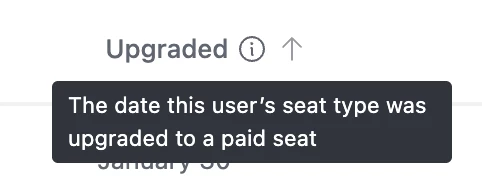
The tooltip for this field says: 
 

But these messages all list the person who was upgraded.

So for example if I hovered over the date in the Upgraded column for the row corresponding to Jane Doe, the message is one of these:

  • “Jane Doe was Editor on base [base name] on [date]”
  • “Jane Doe was Creator on base [base name] on [date]”
  • “Jane Doe made edits to workspace [workspace name] on [date]”

James_McElroy
Forum|alt.badge.img+4
  • Author
  • Participating Frequently
  • December 30, 2025

Hey ​@James_McElroy,

Just as Drew, I’m not Enterprise Admin myself. However, if you have specific questions I would also highly suggest emailing support@airtable.com

Make sure to request for a human answer, as usually their first reponse is AI. Their human answers are great and usually pretty fast!


Make sure to circle back with the corresponding asnwer!

Mike, Consultant @ Automatic Nation 
YouTube Channel 


Thanks Mike! I’m also in a thread with support but so far the responses haven’t answered my question.


GreethamEllen
Forum|alt.badge.img+2
  • New Participant
  • December 30, 2025

Hi ​@James_McElroy!
 

In the Admin Panel, you can click on any user and see their upgrade event via the field “Upgrade Event” on the Account tab. The information will be something like “James McElroy made Jane Doe an Editor”. Hope this helps!


-Ellen


Thanks Ellen. Maybe I’m on the wrong screen? I’m not seeing an account tab (I have Users, Pending Invites, and Service Accounts).

Hovering over the date in the upgraded field gives me the cryptic messages I posted above.


The tooltip for this field says: 
 

But these messages all list the person who was upgraded.

So for example if I hovered over the date in the Upgraded column for the row corresponding to Jane Doe, the message is one of these:

  • “Jane Doe was Editor on base [base name] on [date]”
  • “Jane Doe was Creator on base [base name] on [date]”
  • “Jane Doe made edits to workspace [workspace name] on [date]”

Hi ​@James_McElroy,

One more step from the screen you shared - you will need to click into an individual user’s page in order to see more information about them. The type of information you’re looking for won’t be shown on that user homepage you’re currently looking at. 

To get to a user’s page, simply click on their name and you’ll be taken to their page with additional information. Hope this helps!


-Ellen


James_McElroy
Forum|alt.badge.img+4
  • Author
  • Participating Frequently
  • December 30, 2025

Thanks - that’s giving me the same message as I shared above.

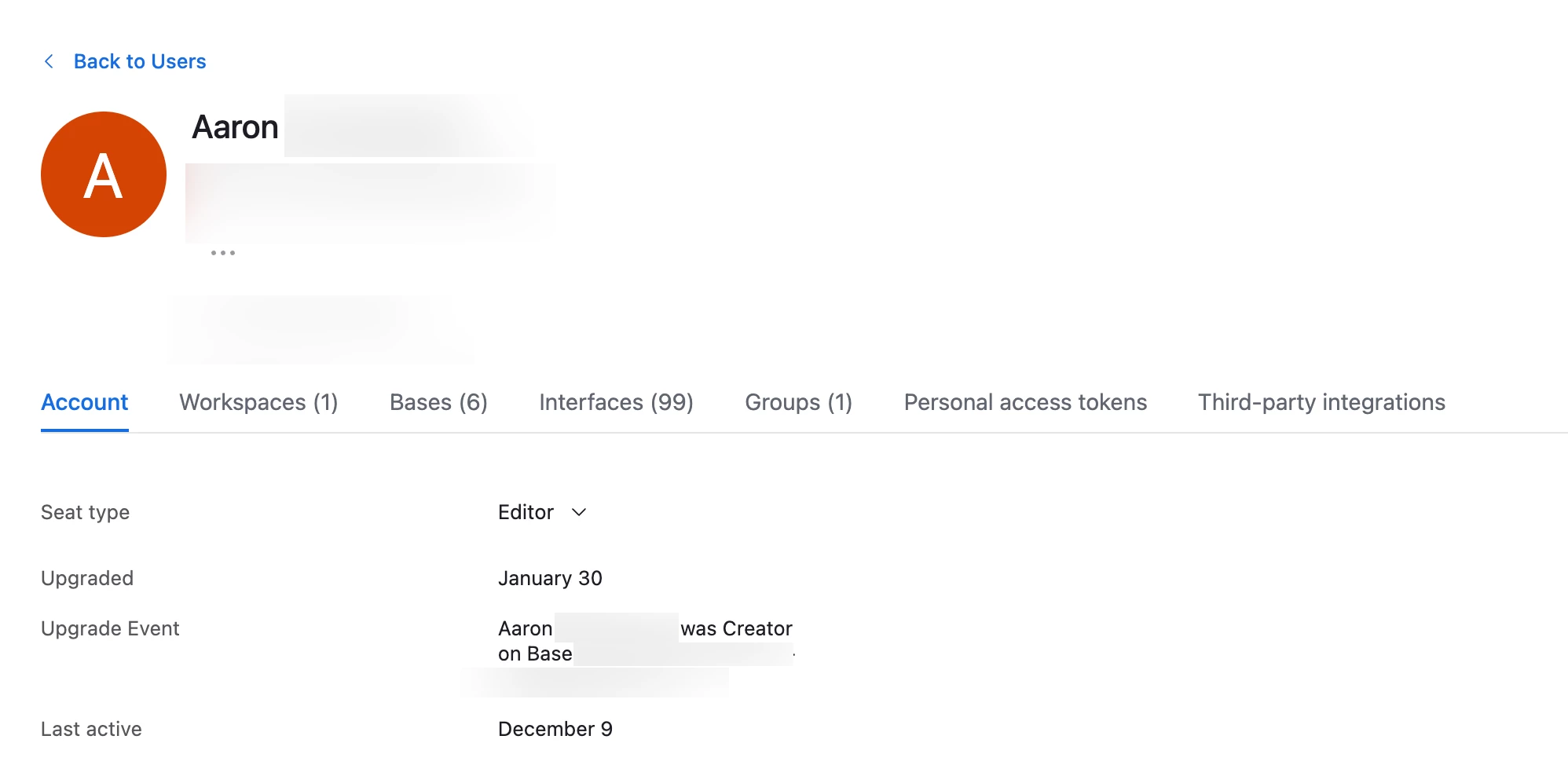
For example, here’s a user named Aaron.

The upgrade event is “Aaron was creator on base [base name]” 

Nothing in this message tells me who made Aaron a creator on that base.


GreethamEllen
Forum|alt.badge.img+2
  • New Participant
  • December 30, 2025

Hi ​@James_McElroy,

Ah, understood! In order to find out that specific activity, the best way I know to do that is to go to the base or interface where they have access, click the “Share” button (in upper right corner of the base, lower left corner of an interface). You will see a section at the bottom of the pop up that says “People with access” - click on that and you will see everyone who has access, their permission level, who granted them access and when access was granted. 


Is this what you’re looking for?


-Ellen


James_McElroy
Forum|alt.badge.img+4
  • Author
  • Participating Frequently
  • December 30, 2025

Thanks Ellen. Do that tell me who gave them access to a specific base, or who gave them a paid license?


GreethamEllen
Forum|alt.badge.img+2
  • New Participant
  • January 5, 2026

Hi ​@James_McElroy,


Going to the app and seeing who added them tells you who gave them access to that specific app; going to the admin panel and looking at the Upgrade Event will tell you who gave them a paid license!