How to display only certain records based on group count

  • June 24, 2022
  • 8 replies
  • 297 views

Forum|alt.badge.img+2

Hello, everyone,

This is my very first attempt at using Airtable, and my first question here. My name is Rosane, and I am a programmer. We are moving our processes into Airtable, and I expect to have lots of questions coming up. I have watched several tutorials, but am not finding the answer to my current question.

I need to count records in a base, and only display groups that have 9 or fewer records. I grouped my base and collapsed all so I see the counts, but I can’t figure out how not to show all counts. Any help is very much appreciated.

Thanks,

Rosane

8 replies

ScottWorld
Forum|alt.badge.img+35
  • Genius
  • June 25, 2022

Welcome to the community, @Rosane_Mordt!

Unfortunately, what you want to do is not natively built into Airtable.

Airtable can cosmetically show you those group counts onscreen as a very shallow veneer, but Airtable doesn’t actually let you DO anything with those group counts.

You can’t use them in formulas, you can’t filter by them, you can’t sort by them, you can’t do ANYTHING with them. You can’t even copy & paste them. The only thing you can do with them is stare at them with your eyeballs and read them out loud to somebody who is standing in the same room as you. I don’t even think Airtable lets you read them out loud over a phone call. Lol.

I would highly recommend emailing support@airtable.com to request that they greatly improve this feature. In my personal opinion, it is much needed in Airtable.

The only way that you can natively sort or filter based on group counts is to link records to other tables, and then use a combination of linked record fields, count fields, and/or rollup fields to get usable numbers. But this is much more advanced stuff than what you were probably hoping to dive into.

You could also automate some sort of a group counting automation with JavaScripting or external automation tools like Make.com, but that is EVEN MORE advanced.

Also, since you’re brand new to Airtable, you might gain a lot from my free Airtable training course:


JonathanBowen
Forum|alt.badge.img+18

Welcome to the community, @Rosane_Mordt!

Unfortunately, what you want to do is not natively built into Airtable.

Airtable can cosmetically show you those group counts onscreen as a very shallow veneer, but Airtable doesn’t actually let you DO anything with those group counts.

You can’t use them in formulas, you can’t filter by them, you can’t sort by them, you can’t do ANYTHING with them. You can’t even copy & paste them. The only thing you can do with them is stare at them with your eyeballs and read them out loud to somebody who is standing in the same room as you. I don’t even think Airtable lets you read them out loud over a phone call. Lol.

I would highly recommend emailing support@airtable.com to request that they greatly improve this feature. In my personal opinion, it is much needed in Airtable.

The only way that you can natively sort or filter based on group counts is to link records to other tables, and then use a combination of linked record fields, count fields, and/or rollup fields to get usable numbers. But this is much more advanced stuff than what you were probably hoping to dive into.

You could also automate some sort of a group counting automation with JavaScripting or external automation tools like Make.com, but that is EVEN MORE advanced.

Also, since you’re brand new to Airtable, you might gain a lot from my free Airtable training course:


@Rosane_Mordt - there is one way to do this, but relies on your group field being a linked field. Example:

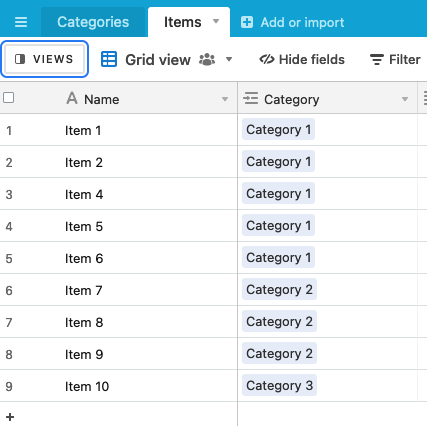
I have Categories and Items table and each item is linked to a Category:

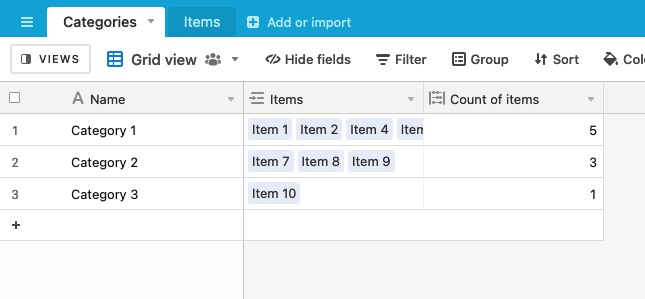
On my categories table, I count the number of items associated with each:

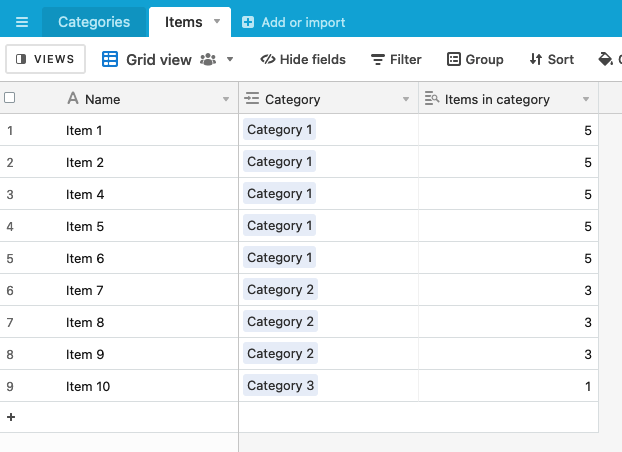
I can now pass this count value down to every item (lookup field)

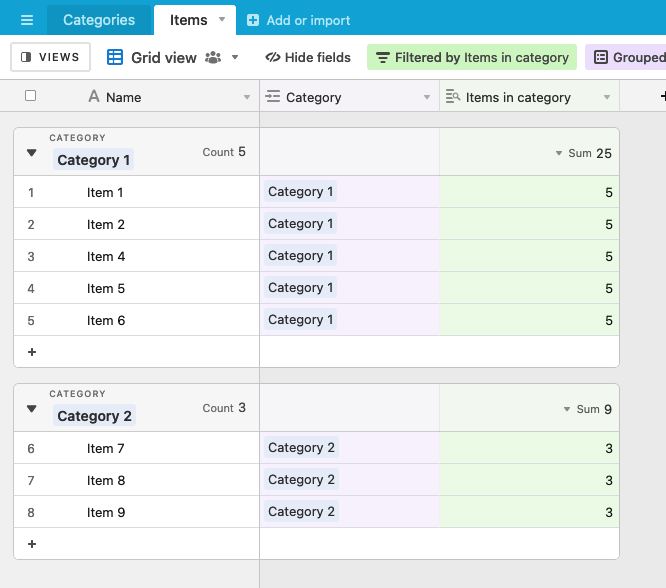
I can group by category and filter out any records where (for example) the Items in category value is less than 2:


ScottWorld
Forum|alt.badge.img+35
  • Genius
  • June 25, 2022

Thanks, @JonathanBowen, for taking the time to spell this out!

@Rosane_Mordt: This is one of the advanced workarounds that I was referring to earlier,


Forum|alt.badge.img+2
  • Author
  • New Participant
  • June 25, 2022

@Rosane_Mordt - there is one way to do this, but relies on your group field being a linked field. Example:

I have Categories and Items table and each item is linked to a Category:

On my categories table, I count the number of items associated with each:

I can now pass this count value down to every item (lookup field)

I can group by category and filter out any records where (for example) the Items in category value is less than 2:


Thank you so much, @JonathanBowen ! I will give this a try.

Rosane


Forum|alt.badge.img+2
  • Author
  • New Participant
  • June 25, 2022

Thanks, @JonathanBowen, for taking the time to spell this out!

@Rosane_Mordt: This is one of the advanced workarounds that I was referring to earlier,


Thank you, @ScottWorld!

Rosane


Amanda_Schulze
Forum|alt.badge.img+4

Welcome to the community, @Rosane_Mordt!

Unfortunately, what you want to do is not natively built into Airtable.

Airtable can cosmetically show you those group counts onscreen as a very shallow veneer, but Airtable doesn’t actually let you DO anything with those group counts.

You can’t use them in formulas, you can’t filter by them, you can’t sort by them, you can’t do ANYTHING with them. You can’t even copy & paste them. The only thing you can do with them is stare at them with your eyeballs and read them out loud to somebody who is standing in the same room as you. I don’t even think Airtable lets you read them out loud over a phone call. Lol.

I would highly recommend emailing support@airtable.com to request that they greatly improve this feature. In my personal opinion, it is much needed in Airtable.

The only way that you can natively sort or filter based on group counts is to link records to other tables, and then use a combination of linked record fields, count fields, and/or rollup fields to get usable numbers. But this is much more advanced stuff than what you were probably hoping to dive into.

You could also automate some sort of a group counting automation with JavaScripting or external automation tools like Make.com, but that is EVEN MORE advanced.

Also, since you’re brand new to Airtable, you might gain a lot from my free Airtable training course:


I second this! This feature would be super helpful, especially in trying to navigate de-duping.


jcervantes11
Forum|alt.badge.img+10
  • Known Participant
  • November 10, 2023

I second this! This feature would be super helpful, especially in trying to navigate de-duping.


Exactly my thought, I was hoping to have a View that only showed records if the group by Full Name was > 1, that way I could have an automation email the record creator and myself notifying them of a potential duplicate record creation. If you've thought of an alternative way to figure this out, please let me know!


jcervantes11
Forum|alt.badge.img+10
  • Known Participant
  • November 10, 2023

Exactly my thought, I was hoping to have a View that only showed records if the group by Full Name was > 1, that way I could have an automation email the record creator and myself notifying them of a potential duplicate record creation. If you've thought of an alternative way to figure this out, please let me know!


Never mind my above request... I ended up using the Find Records in the automation and if the length is > 1 then I notify someone to look into the potential duplicates.