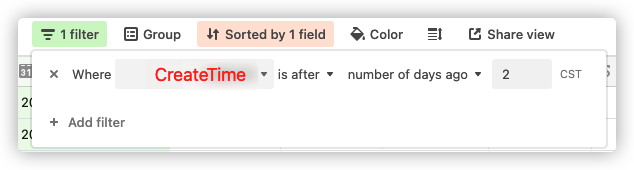
How to filter record by 'The last twenty-four hours ' by 'airtable.js'?

  • June 10, 2021
  • 3 replies
  • 35 views

I can’t find the right one 。

btw,how to use the filter(like above image) by the [airtable.js ] [select api][ filterByFormula ].(I can’t find a suitable document)

Please!

3 replies

kuovonne
Forum|alt.badge.img+29
  • Brainy
  • June 10, 2021

Try a formula like …

DATETIME_DIFF(TODAY(), CREATED_TIME(), 'days') <= 2 

You may need to play around with the number of days, and you may have issues with timezones. If you want more granular control, you could use something like …

DATETIME_DIFF(NOW(), CREATED_TIME(), 'hours') <= 48 

  • Author
  • New Participant
  • June 15, 2021

Try a formula like …

DATETIME_DIFF(TODAY(), CREATED_TIME(), 'days') <= 2 

You may need to play around with the number of days, and you may have issues with timezones. If you want more granular control, you could use something like …

DATETIME_DIFF(NOW(), CREATED_TIME(), 'hours') <= 48 

thanks a lot!
Can you please tell me how to use it in airtable.js or is there a documentation for it, I tried to find it but couldn’t.
sorry for any inconvenince caused


kuovonne
Forum|alt.badge.img+29
  • Brainy
  • June 15, 2021

thanks a lot!
Can you please tell me how to use it in airtable.js or is there a documentation for it, I tried to find it but couldn’t.
sorry for any inconvenince caused


You can see the documentation here. You need to be logged into your Airtable account in the web browser, and the documentation will reflect your actual base.

Build the formula as a text string, and then pass the formula as the filterByFormula parameter when you select records.