Question

How to Restrict User Access by Table, Field, or Row in Airtable?

  • December 9, 2025
  • 2 replies
  • 15 views

Forum|alt.badge.img+1

Hello everyone!

How can I manage user-level access in Airtable so that each role only sees specific tables or fields? Does Airtable support row-level or column-level permissions?

Details:
I’m building a structure where I have multiple tables (Operational, Manager, Admin), and each user role should only see the data that belongs to them. For example:

Operational users should only see the Operational table

Managers should see both Operational and Manager tables

Admin should see everything

Interfaces solve part of the problem, because I can show or hide tables and fields, but I want to confirm:

Is there any way to implement real column-level permissions?

Is there any way to implement true row-level permissions?

Are interfaces the only recommended approach to hide fields and restrict access?

I want to be sure I am building the structure correctly.


Thank you!

2 replies

HannesK-ME
Forum|alt.badge.img+13
  • Participating Frequently
  • December 9, 2025

You might want to check out the miniExtensions Portal for this use case. It gives you full control over which data different types of users can access, all without giving them any access to Airtable at all. Essentially, they’d only see what you specifically want them to see. By default, they’ll also only see records that are related to them, but that can be changed, if needed, to let them see more records, for example based on specific filters.


TheTimeSavingCo
Forum|alt.badge.img+31

Is there any way to implement real column-level permissions?
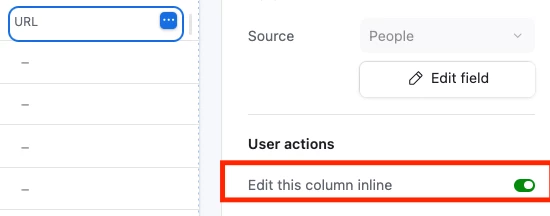
For viewing, Interfaces would be the way to go.  For editing, this is usually handled within the specific Interface where we set whether the column is editable or not:

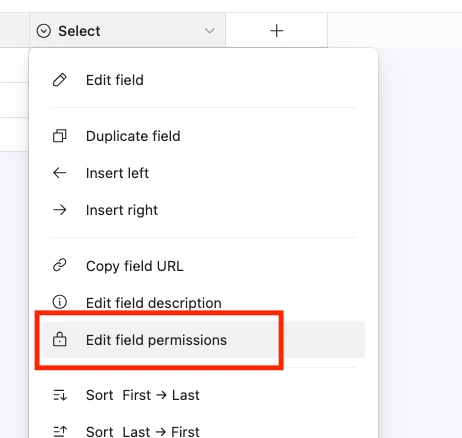
Within the data layer you can also set field permissions:


Is there any way to implement true row-level permissions?

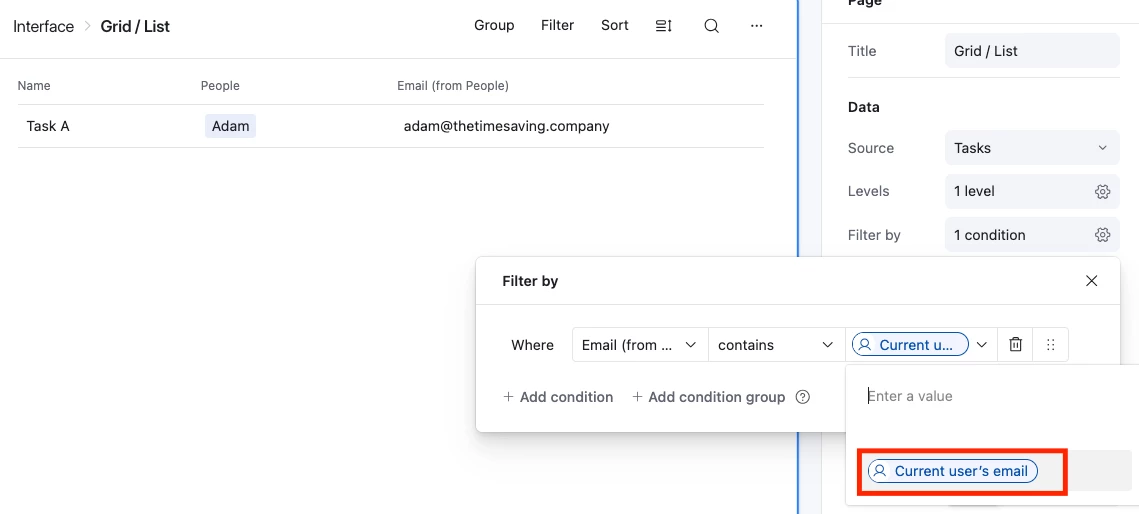
Visibility wise, yeah.  If you set up your data so that each record is linked to a user in some way via their email that gives you the ability to filter by the logged in user’s email:

To give them the ability to view a record without editing it you’d set every column in the Interface to not be editable

---

Are interfaces the only recommended approach to hide fields and restrict access?
 

Hmm, as an Airtable native solution, yeah.  There are various third party portals that connect to Airtable that you can look into, such as Softr, Zite, Noloco etc that you can check out that might help if Airtable gets too pricey