How to show email as ex****@gmail.com? in embade page only

  • July 3, 2021
  • 4 replies
  • 28 views

Hello i want to embed my tabil data now how can i show email as exam***@gmail.com! ??

4 replies

kuovonne
Forum|alt.badge.img+29
  • Brainy
  • July 3, 2021

Welcome to the Airtable community!

Try this formula. If the email address has less than 4 characters before the @, it will just show the email address without obscuring any characters.

IF(
    AND(
        {email},
        REGEX_MATCH({email}, ".+@.+"),
        LEN(REGEX_EXTRACT({email}, "^[^@]+")) > 4
    ),
    CONCATENATE(
        LEFT({email}, 4),
        REPT("*", LEN(REGEX_EXTRACT({email}, "^[^@]+")) - 4),
        REGEX_EXTRACT({email}, "@.+")
    ),
    {email}
)

  • Author
  • New Participant
  • July 3, 2021

Welcome to the Airtable community!

Try this formula. If the email address has less than 4 characters before the @, it will just show the email address without obscuring any characters.

IF(
    AND(
        {email},
        REGEX_MATCH({email}, ".+@.+"),
        LEN(REGEX_EXTRACT({email}, "^[^@]+")) > 4
    ),
    CONCATENATE(
        LEFT({email}, 4),
        REPT("*", LEN(REGEX_EXTRACT({email}, "^[^@]+")) - 4),
        REGEX_EXTRACT({email}, "@.+")
    ),
    {email}
)

Where i have to put this formula?


kuovonne
Forum|alt.badge.img+29
  • Brainy
  • July 3, 2021

Create a new formula field and use the formula. Replace {email} with the name of your email field.


Justin_Barrett
Forum|alt.badge.img+21

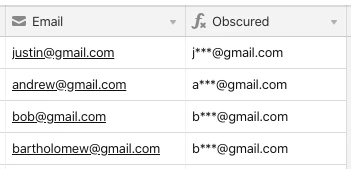
Here’s an alternate approach. Instead of building the obscured version based on the original’s length, you can automatically obscure all characters after the first one (or first few, depending on your preference) with a series of asterisks:

IF(Email, REGEX_REPLACE(Email, "(.{0,1})(.*)(@.*)", "$1***$3"))

To leave more characters visible, change the second number in {0,1} to something higher.