

Solved

Is there a way to use record templates (or a similar feature) to generate grouped child records for an existing parent record—without using automations?

  • February 2, 2026
  • 6 replies
  • 24 views

Forum|alt.badge.img+1

We use Airtable heavily with parent --> child relationships and are trying to standardize our workflows using record templates, especially within Interfaces while reducing the amount of automations used in this aspect of our workflow.

What we’re trying to do (high level)
We want to generate groups of task records (child records) and link them to a parent record that already exists. We only ever work in interfaces so it must have a way to function for our users there.

  • Using record templates or a native grouping feature
  • Without relying on automations
  • Without creating a new parent record

Current setup

We have many tables that act as a parent record and then one table that is the child record (tasks). Most of them have a pre- and post- step of creation, some with 3 steps where specific tasks are generated at each phase (e.g. Interest, Application, and Decision). Below is an example of 2 steps (pre-award and post-award). 

  • Pre-award tasks (works well)
    • Parent record is created via an Interface form using the native record template tool
    • The template creates the parent record and a predefined set of child task records with task dependencies and start and end dates linked.
    • All relationships are created at once
  • Post-award tasks (where we’re stuck)
    • The parent record already exists
    • Based on a decision (approved / declined), we need to generate a specific set of post-award tasks
    • Currently:
      • Task sets live in a separate “templates” table (e.g., “Approved Award Tasks”)
      • Automations run when a decision field changes or a button is clicked
      • The automation finds the correct linked template name (manually linked) and loops through each task in the list and creates the child record and pulls in any fields I have identified including linking the existing parent project
      • This works, but we’re trying to reduce the number of  automations and automation complexity while also keeping everything inside Interfaces if possible.

My questions for the community

  • Is this currently possible using record templates or another native Airtable feature?
  • Are there known workarounds without automations?
  • Is this a known limitation of record templates today?
  • Has anyone solved a similar “post-creation task generation” problem in Interfaces?

Any insights, patterns, or confirmations that this isn’t yet supported would be super helpful.
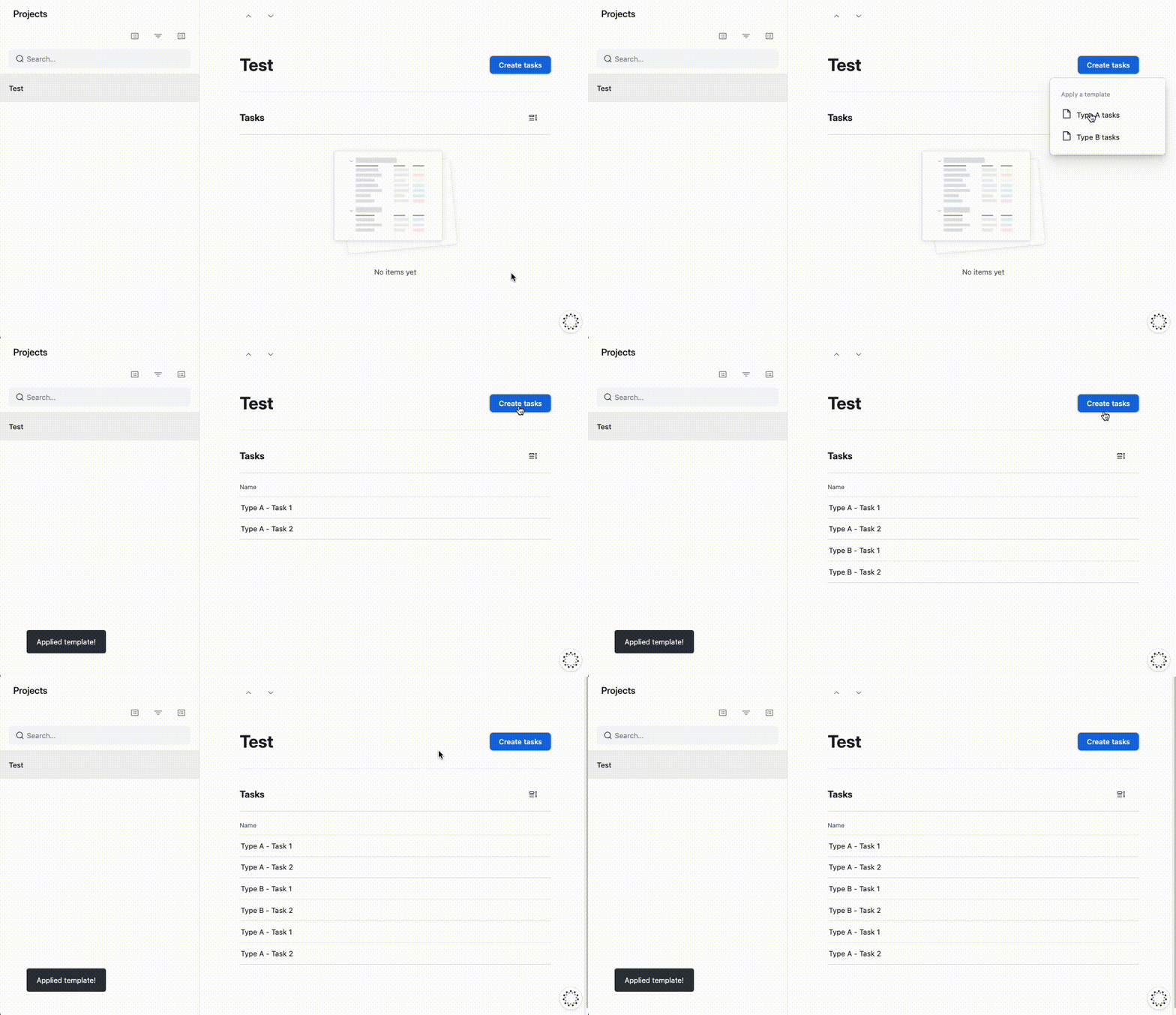
Best answer by TheTimeSavingCo

Hm, I think I’m not understanding something about your setup.  We’re able to use Record Templates to create a set of records linked to an existing record like so:

I’ve set it up here for you to check out

If you could let me know which bit of this doesn’t work for your flow I’ll see what I can do to help!

6 replies

Mike_AutomaticN
Forum|alt.badge.img+28

Hey ​@ktj17,

May I ask why you are trying to stay away from automations for this use case?

Just to get the full picture.
 

Completely different matter, but would love to have you join the March 2026 AT Community led Hackathon! Make sure to sign up!!


Mike, Consultant @ Automatic Nation 
YouTube Channel


Forum|alt.badge.img+1
  • Author
  • New Participant
  • February 2, 2026

Hi Mike,


We are trying to stay away from using automation so that we can utilize our automations for other use cases in our program. I don’t mind using a few automations for this but how I currently have it set up uses a large portion of our automations and I want to reduce that or find another solution.


The way I have my automations set up are one of two ways,

  1. The first is used mostly for our event planning logistics since all of our events are different, we have fields called advertisement, agenda, food/drink catering, food/drink delivery, registration, etc. that are all set up as single select fields and when the record matches “yes”. Each field we need to track logistics for has an automation associated with it because I am telling it to find records of a specific template group name.
    • Trigger [when a record matches conditions - specific field (single select) is “Yes” ], Actions [ Find records in Tasks Templates table where the field “Template Group” has any of “Enter specific template group name”, then repeat for each in the list from the find records - Create a record in Tasks table (with a set of fields I have chosen)
    • Example: Field name → Advertisement Needed?
      • Trigger [when a record matches conditions - Advertisement Needed? is “Yes” ], Actions [Find records in Tasks Templates table (list of tasks associated with a template group) where the field “Template Group” has any of “Event Advertisement” (a list of 6 tasks related to advertising the event), then repeat for each in the list from the find records - Create a record in Tasks table (with a set of fields I have chosen)
  2. The second type is used per parent table to generate the post- tasks therefore for every parent table we have that has post- tasks, there is a specific automation because we are having it trigger off specific fields in that parent table.
    • Trigger [when a record matches conditions - specific field (single select) is “Generate Tasks (Automation)” and “Post-Award Template Group” field is not empty], Actions [Find records in Tasks Templates table where the field “Template Group” has any of (Dynamic) “Post Award Template Group (Using data from the “When a record matches conditions” trigger”, then repeat for each in the list from the find records - Create a record in Tasks table (with a set of fields I have chosen)
    • Example: Parent table is Awards
      • Trigger [when a record matches conditions - “Task Trigger (Post Award) is “Generate Tasks (Automation)”  and “Post-Award Template Group” field is not empty], Actions [Find records in Tasks Templates table where the field “Template Group” has any of (Dynamic)“Enter specific template group ID (Using data from the “When a record matches conditions” Trigger”, then repeat for each in the list from the find records - Create a record in Tasks table (with a set of fields I have chosen)

Forum|alt.badge.img+1
  • Author
  • New Participant
  • February 2, 2026

Hey ​@ktj17,

May I ask why you are trying to stay away from automations for this use case?

Just to get the full picture.
 

Completely different matter, but would love to have you join the March 2026 AT Community led Hackathon! Make sure to sign up!!


Mike, Consultant @ Automatic Nation 
YouTube Channel

Hi Mike,


We are trying to stay away from using automation so that we can utilize our automations for other use cases in our program. I don’t mind using a few automations for this but how I currently have it set up uses a large portion of our automations and I want to reduce that or find another solution.


The way I have my automations set up are one of two ways,

  1. The first is used mostly for our event planning logistics since all of our events are different, we have fields called advertisement, agenda, food/drink catering, food/drink delivery, registration, etc. that are all set up as single select fields and when the record matches “yes”. Each field we need to track logistics for has an automation associated with it because I am telling it to find records of a specific template group name.
    • Trigger [when a record matches conditions - specific field (single select) is “Yes” ], Actions [ Find records in Tasks Templates table where the field “Template Group” has any of “Enter specific template group name”, then repeat for each in the list from the find records - Create a record in Tasks table (with a set of fields I have chosen)
    • Example: Field name → Advertisement Needed?
      • Trigger [when a record matches conditions - Advertisement Needed? is “Yes” ], Actions [Find records in Tasks Templates table (list of tasks associated with a template group) where the field “Template Group” has any of “Event Advertisement” (a list of 6 tasks related to advertising the event), then repeat for each in the list from the find records - Create a record in Tasks table (with a set of fields I have chosen)
  2. The second type is used per parent table to generate the post- tasks therefore for every parent table we have that has post- tasks, there is a specific automation because we are having it trigger off specific fields in that parent table.
    • Trigger [when a record matches conditions - specific field (single select) is “Generate Tasks (Automation)” and “Post-Award Template Group” field is not empty], Actions [Find records in Tasks Templates table where the field “Template Group” has any of (Dynamic) “Post Award Template Group (Using data from the “When a record matches conditions” trigger”, then repeat for each in the list from the find records - Create a record in Tasks table (with a set of fields I have chosen)
    • Example: Parent table is Awards
      • Trigger [when a record matches conditions - “Task Trigger (Post Award) is “Generate Tasks (Automation)”  and “Post-Award Template Group” field is not empty], Actions [Find records in Tasks Templates table where the field “Template Group” has any of (Dynamic)“Enter specific template group ID (Using data from the “When a record matches conditions” Trigger”, then repeat for each in the list from the find records - Create a record in Tasks table (with a set of fields I have chosen)

TheTimeSavingCo
Forum|alt.badge.img+31

Hm, I think I’m not understanding something about your setup.  We’re able to use Record Templates to create a set of records linked to an existing record like so:

I’ve set it up here for you to check out

If you could let me know which bit of this doesn’t work for your flow I’ll see what I can do to help!


Forum|alt.badge.img+1
  • Author
  • New Participant
  • February 3, 2026

Hm, I think I’m not understanding something about your setup.  We’re able to use Record Templates to create a set of records linked to an existing record like so:

I’ve set it up here for you to check out

If you could let me know which bit of this doesn’t work for your flow I’ll see what I can do to help!

Thank you so much! I think this is exactly what I need but every time I looked up if this was possible, I was told that the native record template couldn’t do this. How did you set up the tasks in the record template tool so that with one click of the button two tasks are generated? In your example, are you able to include start and end dates of tasks and can they be dependent on each other the same way you can set it up in the parent->child record template set up?


Forum|alt.badge.img+1
  • Author
  • New Participant
  • February 3, 2026

I was able to figure it out how to add the tasks and attach to the parent record, thank you so much!!
