Question

Kanban Interface: Combining Data from Two Sources

  • December 8, 2025
  • 3 replies
  • 35 views

Forum|alt.badge.img

Hi,

I'm building a Kanban-style interface that needs to display data from two separate sources.

Goal:

  • The first column of the Kanban should list Job Listings (Source 1).

  • The subsequent columns should display relevant Candidate Profiles (Source 2).

  • A single candidate would be able to be placed more than once in the Kanban with different Job listing.

Essentially, I want to map multiple candidates to a single job listing within the Kanban view.

Currently, I'm struggling to set up this dual-source data structure in the interface.

Is there a standard or recommended method for achieving this job-to-candidate grouping functionality?


3 replies

TheTimeSavingCo
Forum|alt.badge.img+31

Hmm, you could probably get something working with a Kanban view if you messed with your data enough but I wouldn’t recommend it

The first limitation you’d need to get around is that Kanban columns need to be single selects / user fields, and so to get this working you’d need to have a system to convert your jobs into options for the select field

The next limitation you’d need to get around is needing the ability to put the same candidate into different jobs.  To get that working you’d need to have a system that would help you to duplicate the Candidate record so that you could put it under a different job

---

I’d suggest having these three tables instead:

  1. Candidates
  2. Jobs
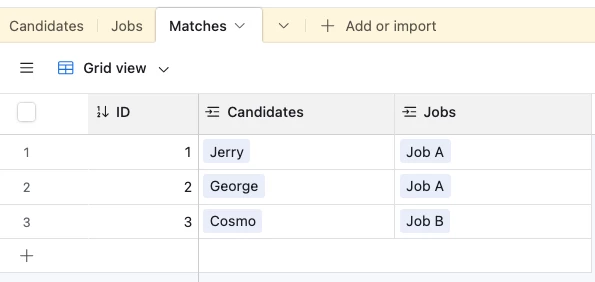
  3. Matches, where each record represents a link between a Candidate and a Job

And the Matches table would look something like this:


Mike_AutomaticN
Forum|alt.badge.img+28

Hey ​@Miroslav,


I’d suggest following Adam’s suggestion above re: Matches table.


In this case, Matches table would work as a “junction table”. You can check out the video below in why these are so important!


Mike, Consultant @ Automatic Nation


Forum|alt.badge.img+1
  • New Participant
  • December 8, 2025

To group job listings with candidates in your Kanban interface, use a many-to-many relationship:

  1. Job Listings (Source 1) have a list of Candidate IDs associated.

  2. Candidates (Source 2) have a list of Job IDs they are linked to.

For each Job Listing, display the relevant Candidate Profiles in the Kanban column. Use drag-and-drop functionality to move candidates between job listings.

Tools like React DnD or React Beautiful DnD can help with drag-and-drop. Manage data efficiently with Redux or Context API.

This will allow candidates to be mapped to multiple job listings seamlessly.