Question

Merge Two AT Accounts

  • January 26, 2026
  • 3 replies
  • 38 views

Forum|alt.badge.img+2

I set up a Teams account for our nonprofit and got a discounted rate. Later, I found out that one of our volunteers had already created a Teams account and was paying for it. I asked AT Sales how to merge the volunteer’s account with ours, but I got a canned, unhelpful response. Can someone help with the merge?


3 replies

ScottWorld
Forum|alt.badge.img+35
  • Genius
  • January 26, 2026

Airtable charges you by the workspace, so what that means is that your volunteer owns a workspace and you own another workspace.

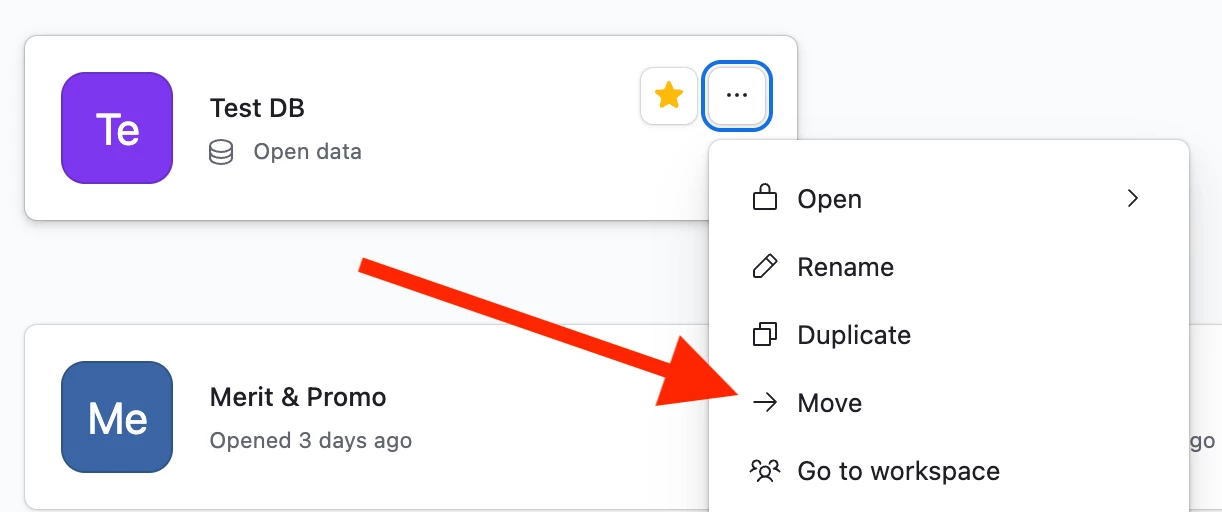
What you need to do is make sure that you are a creator or owner of both workspaces, and then move all the bases from his workspace to your workspace. See screenshot below.

After you’ve moved all of the bases from his workspace to your workspace, then he can cancel his workspace with Airtable by removing his payment details from his workspace.

Hope this helps!

If you have a budget and you’d like to hire the best Airtable consultant to help you with this or anything else that is Airtable-related, please feel free to contact me through my website: Airtable consultant — ScottWorld


DisraeliGears01
Forum|alt.badge.img+21

What do you need to merge? Did the volunteer account make bases in their own workspace that need to be ported over? 

You can add new users to your Non-profit Team workspace, but it’ll cost you a seat fee per user ($144/year). 

If there’s stuff in the volunteer’s workspace that needs to be moved to your non-profit workspace, you could do invite them as an editor and they could copy their bases into your workspace, but it’d cost you the seat fee. The way I usually do this to avoid fees is to have a separate, non-paid workspace that I transfer bases into where both paid accounts have editor access. That sounds way abstract, so let me give you a practical example…

I manage a non-profit workspace, and I also have a personal Teams account for side projects. If I happen to work on something in my non-profit space that I need to move to my personal account, I don’t want my non-profit to eat a seat fee, so I have a “Demos” free workspace that my work and personal account both have editor permissions on. I can copy whatever base from the non-profit space into the Demos workspace, log on with my personal account, and copy that over in my personal space. 


Forum|alt.badge.img+2
  • Author
  • New Participant
  • January 26, 2026

Thanks. I wondered how I was going to avoid an extra seat fee. I’ve copied your comment and will try it. I’ve been the treasurer of a couple of very small nonprofits and have set them up with their own free accounts, so I’m used to juggling.