

Question

Need help with Automation

  • December 5, 2025
  • 2 replies
  • 42 views

Forum|alt.badge.img+1

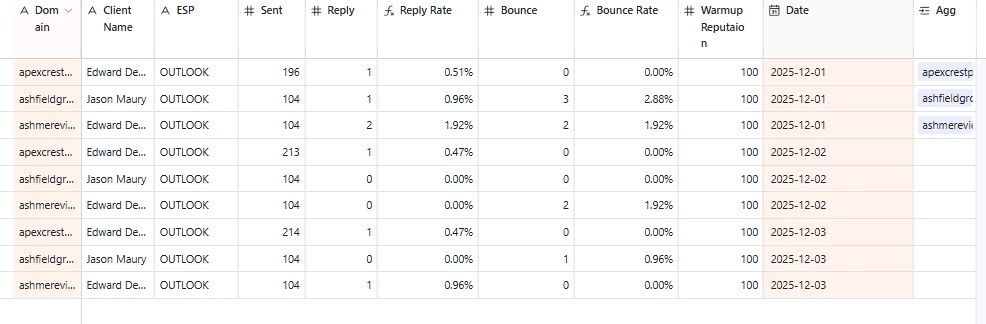
I have some domain data that updates daily, and I need the data to be aggregated by domain as new entries are created each day.

  1. I tried using Rollup, but it only links one set of domain records. I have data for the same domain across two more days, but it’s not being summed.

How can I automate this? Is there a better approach?

2 replies

Taha-Jiruwala
Forum|alt.badge.img+9

Here’s how to do it:

1. Create a Domains table
Add one record per domain. This becomes your master list.

2. In your daily data table, add a linked record field
For each new daily entry, link it to the correct domain in the Domains table. 

3. In the Domains table, add a Rollup field
Roll up whatever field you want. Airtable will automatically include today’s data, tomorrow’s data, and every future entry.

Let me know if you have any questions.

Taha, Views And Bases


TheTimeSavingCo
Forum|alt.badge.img+31

Assuming ‘Agg’ is a table where each record contains a single domain and thats where your rollups are, try:

  1. Create an automation that’ll trigger when a new record is created
    1. This depends on how the data comes in, I’m assuming this data’s being synced in from an external service and so I’m using ‘when new record is created’.  If data’s being keyed in manually you’ll need to trigger this via a checkbox or something
  2. Its action will be to paste the value from ‘Domain’ into ‘Agg’
    1. This’ll automatically create the link and your rollups in the ‘Agg’ table will update

For your past data, in a view with no filters, try:

  1. Click the field header for ‘Domain’
    1. This’ll select the entire field
  2. Hit CTRL / CMD + C
  3. Click the field header for ‘Agg’
  4. Hit CTRL / CMD + V

This’ll link up all your old data and populate the rollups for you
