Solved

Random number functions

  • Aug 2, 2016 9:01 PM UTC
  • 39 replies
  • 1843 views

Show first post
This topic has been closed for replies.

39 replies

Justin_Barrett
Forum|alt.badge.img+21

@Daniel_Robbins @Jonathan_Southgate Instead of trying to build the number manually by combining minutes and seconds, you could try using the “x” format specifier, which is a UNIX timestamp that includes milliseconds. Depending on how quickly the records are made (mainly in your case, @Daniel_Robbins), that might do the trick.


ScottWorld
Forum|alt.badge.img+35
  • Genius
  • May 19, 2020 6:04 PM UTC

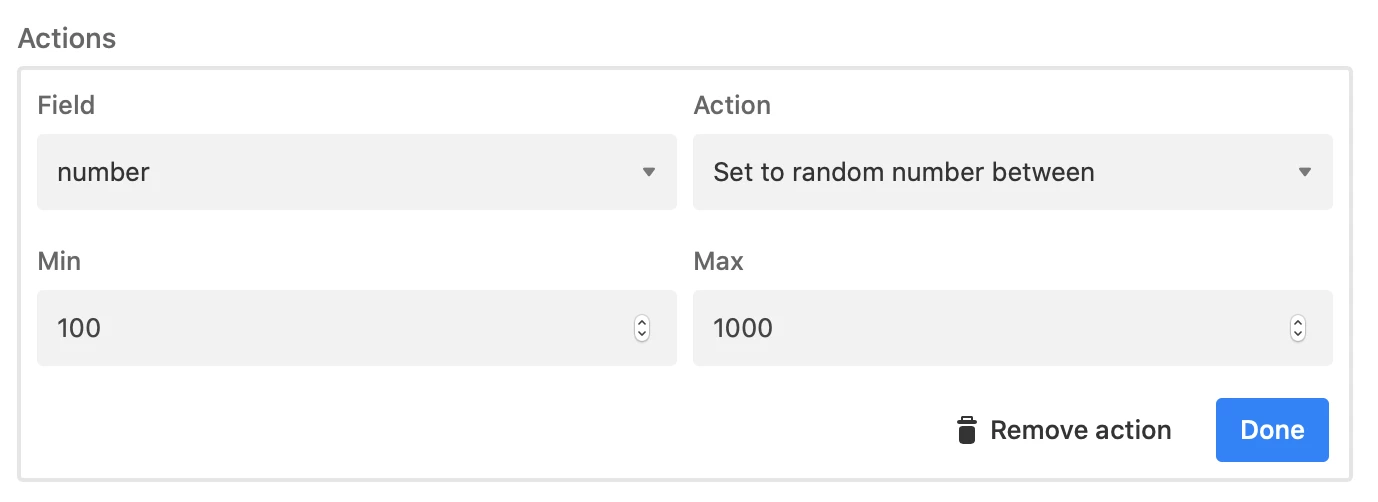
You can use the Batch Update Block to generate random numbers for your records. See screenshot below.

Interestingly, the same block can also be used to generate random names & email addresses!


Forum|alt.badge.img+2
  • New Participant
  • Answer
  • Jun 25, 2020 9:00 PM UTC

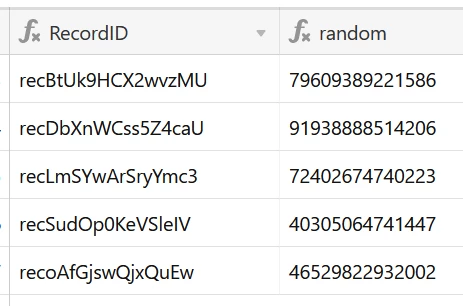
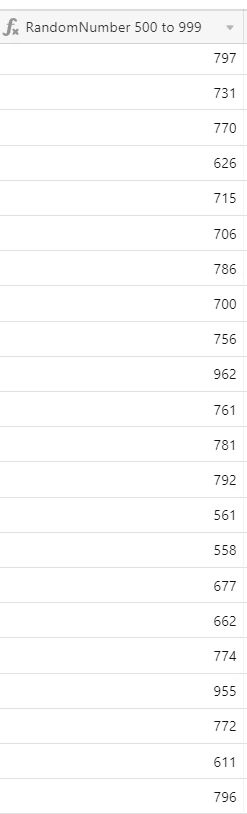
Here’s a way to generate random number using formula field in airtable
first choose a MIN and MAX range for your random numbers then use the following formula:
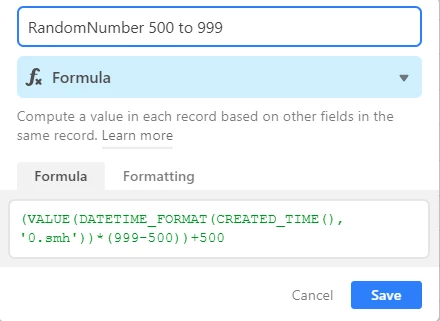
(VALUE(DATETIME_FORMAT(CREATED_TIME(), ‘0.smh’))*(MAX-MIN))+MIN
this generates the following:

Forum|alt.badge.img+15
  • Inspiring
  • Aug 12, 2020 4:45 PM UTC

We’ve built an extension that allows you to generate a random number or ID. You can choose how many characters it should have and whether to include letters or not.


  • New Participant
  • Aug 23, 2021 7:58 PM UTC

We don’t have any random number functions at the moment, but I’ll reach out to you once we implement something like this. Can you share why you need a random number function? We might be able to provide a workaround.


I would love to get a work around for this. I am trying to use a setup to generate automated SMS message for Zapier and need to use some random numbers to alternate the messages that are being sent.


Forum|alt.badge.img+1

Here is my brute force solution! This formula takes a direct approach by converting the letters in RECORD_ID() to numbers. It’s just 52 nested SUBSTITUTE() calls :rofl:

SUBSTITUTE(
SUBSTITUTE(
SUBSTITUTE(
SUBSTITUTE(
SUBSTITUTE(
SUBSTITUTE(
SUBSTITUTE(
SUBSTITUTE(
SUBSTITUTE(
SUBSTITUTE(
SUBSTITUTE(
SUBSTITUTE(
SUBSTITUTE(
SUBSTITUTE(
SUBSTITUTE(
SUBSTITUTE(
SUBSTITUTE(
SUBSTITUTE(
SUBSTITUTE(
SUBSTITUTE(
SUBSTITUTE(
SUBSTITUTE(
SUBSTITUTE(
SUBSTITUTE(
SUBSTITUTE(
SUBSTITUTE(
SUBSTITUTE(
SUBSTITUTE(
SUBSTITUTE(
SUBSTITUTE(
SUBSTITUTE(
SUBSTITUTE(
SUBSTITUTE(
SUBSTITUTE(
SUBSTITUTE(
SUBSTITUTE(
SUBSTITUTE(
SUBSTITUTE(
SUBSTITUTE(
SUBSTITUTE(
SUBSTITUTE(
SUBSTITUTE(
SUBSTITUTE(
SUBSTITUTE(
SUBSTITUTE(
SUBSTITUTE(
SUBSTITUTE(
SUBSTITUTE(
SUBSTITUTE(
SUBSTITUTE(
SUBSTITUTE(
SUBSTITUTE(RIGHT(RECORD_ID(), 14)
,"a","0")
,"b","1")
,"c","2")
,"d","3")
,"e","4")
,"f","5")
,"g","6")
,"h","7")
,"i","8")
,"j","9")
,"k","0")
,"l","1")
,"m","2")
,"n","3")
,"o","4")
,"p","5")
,"q","6")
,"r","7")
,"s","8")
,"t","9")
,"u","0")
,"v","1")
,"w","2")
,"x","3")
,"y","4")
,"z","5")
,"A","6")
,"B","7")
,"C","8")
,"D","9")
,"E","0")
,"F","1")
,"G","2")
,"H","3")
,"I","4")
,"J","5")
,"K","6")
,"L","7")
,"M","8")
,"N","9")
,"O","0")
,"P","1")
,"Q","2")
,"R","3")
,"S","4")
,"T","5")
,"U","6")
,"V","7")
,"W","8")
,"X","9")
,"Y","0")
,"Z","1")

The digit distribution should be close to uniform, but because 26 * 2 = 56 letters is not divisible by 10, there will be a slight bias toward “0” and “1” corresponding to those last two characters, “Y” and “Z”.


Forum|alt.badge.img+13

Here’s a way to generate random number using formula field in airtable
first choose a MIN and MAX range for your random numbers then use the following formula:

(VALUE(DATETIME_FORMAT(CREATED_TIME(), ‘0.smh’))*(MAX-MIN))+MIN
this generates the following:


Very nicely done @Mahmoud_Habib!


Forum|alt.badge.img+7

In case anyone needs it, for example this is how to get a random number between 1 and 30:

IF(VALUE(RECORD_ID()) <= 0, 1, IF(VALUE(RECORD_ID()) >= 1000000, 30, MOD(VALUE(RECORD_ID()), 30) + 1))


Forum|alt.badge.img+4
  • Participating Frequently
  • Jul 13, 2023 9:33 AM UTC

Thanks Joachim. That works very nice and without much complications.

I need to generate a random number between 1 and 156 and I just replaced the 30 for 156 and Voila :D.

I'm not exactly sure how that works but looks good, Although I got a lot of 1's and 2's (I have around 280 records)

I was using this formula:

ROUND((VALUE(DATETIME_FORMAT(CREATED_TIME(), '0.smh'))*(156-1)),0)
but I had a very few "hits" for numbers higher than 100 not sure why.
 
Can you elaborate a little more on how this randomness is reached?
 
Much thanks 🙂

Forum|alt.badge.img+6
  • Participating Frequently
  • Feb 3, 2024 3:53 PM UTC

Here’s a way to generate random number using formula field in airtable
first choose a MIN and MAX range for your random numbers then use the following formula:

(VALUE(DATETIME_FORMAT(CREATED_TIME(), ‘0.smh’))*(MAX-MIN))+MIN
this generates the following:


I have checked and rechecked this it is saying it is an invalid formula


Forum|alt.badge.img+7

Thanks Joachim. That works very nice and without much complications.

I need to generate a random number between 1 and 156 and I just replaced the 30 for 156 and Voila :D.

I'm not exactly sure how that works but looks good, Although I got a lot of 1's and 2's (I have around 280 records)

I was using this formula:

ROUND((VALUE(DATETIME_FORMAT(CREATED_TIME(), '0.smh'))*(156-1)),0)
but I had a very few "hits" for numbers higher than 100 not sure why.
 
Can you elaborate a little more on how this randomness is reached?
 
Much thanks 🙂

The VALUE(RECORD_ID()) attempts to convert the unique record id (which is alphanumeric) to a numeric value. In theory, since each record has a unique id, the numeric value derived from it would also be unique.

  1. This part IF(VALUE(RECORD_ID()) <= 0, 1,... checks if the numeric conversion resulted in a number less than or equal to zero. If yes, it returns 1.

  2. The second condition IF(VALUE(RECORD_ID()) >= 1000000, 30,... checks if the numeric conversion resulted in a number greater than or equal to 1 million. If yes, it returns 30.

  3. If neither of the conditions is met, it uses MOD(VALUE(RECORD_ID()), 30) + 1, which calculates the remainder when the numeric value of Record_ID is divided by 30 and adds 1 to it.

The randomness in this formula does not come from a random function but rather from the unique numeric id converted from the unique alphanumeric id of each record, distributed across a range of 1 to 30. 


Forum|alt.badge.img+7

I have checked and rechecked this it is saying it is an invalid formula


Use this :

MOD( VALUE( LEFT( DATETIME_FORMAT( CREATED_TIME(), 'X' ), 5 ) & RIGHT( DATETIME_FORMAT( CREATED_TIME(), 'X' ), 5 ) & MID( RECORD_ID(), LEN( RECORD_ID() ), 1 ) , 3 ), 500 ) + 500

Forum|alt.badge.img+6
  • Participating Frequently
  • Feb 3, 2024 9:37 PM UTC

Worked thanks!


hello_ipsally
Forum|alt.badge.img+4
  • New Participant
  • Jun 14, 2024 11:08 PM UTC

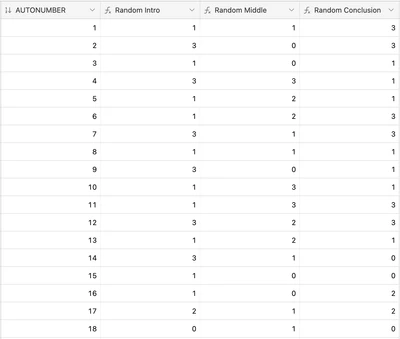
I used irrational numbers using prime numbers, then using MOD to limit range. Here's an example of random number between 0 - 3.


MOD( MID( REGEX_REPLACE( ((AUTONUMBER/17+AUTONUMBER/13)/7)&"" ,"[.]","") ,4,1) ,4)


  1. AUTONUMBER will always be a unique number
  2. AUTONUMBER / 17 and AUTONUMBER / 13 gives irrational numbers, dividing it by 7 to add complexity
  3. (AUTONUMBER/17+AUTONUMBER/13)/7)&"" concatenation turns it into a string
  4. REGEX_REPLACE( __.______, "[.]","") removes the decimal place
  5. MID( _____ , 4 , 1) extracts the 4th number on that string
  6. MOD( _____, 4) returns the remainder after dividing by 4 giving a number range between 0 - 3
    • Optionally +value at the end to adjust the range
  7. Change the MID values for another random number for the same record

Results are good, only issues every 1547 numbers (13*17*7) which is 0 which is fine, results are pretty evenly divided across 0-3 without being an exact split (387,396,266,261 - out of 1310 records).