Random quotation mark in calculated field?

  • March 24, 2017
  • 31 replies
  • 342 views

Show first post
This topic has been closed for replies.

31 replies

  • New Participant
  • February 7, 2021

Thanks @kuovonne for your solution (which I discovered after I tried something similar). I also had this problem, compounded by having three linked record fields (which I didn’t want to solve by creating a combined record solely for creating a “local variable”).
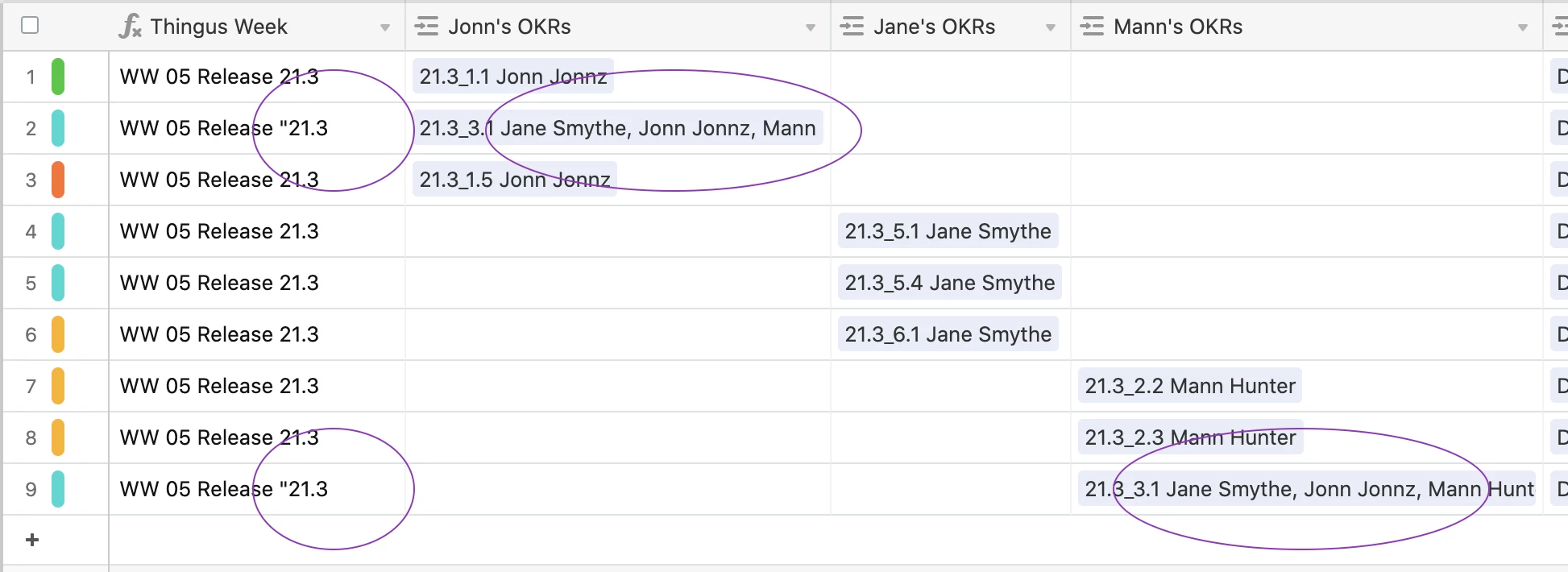
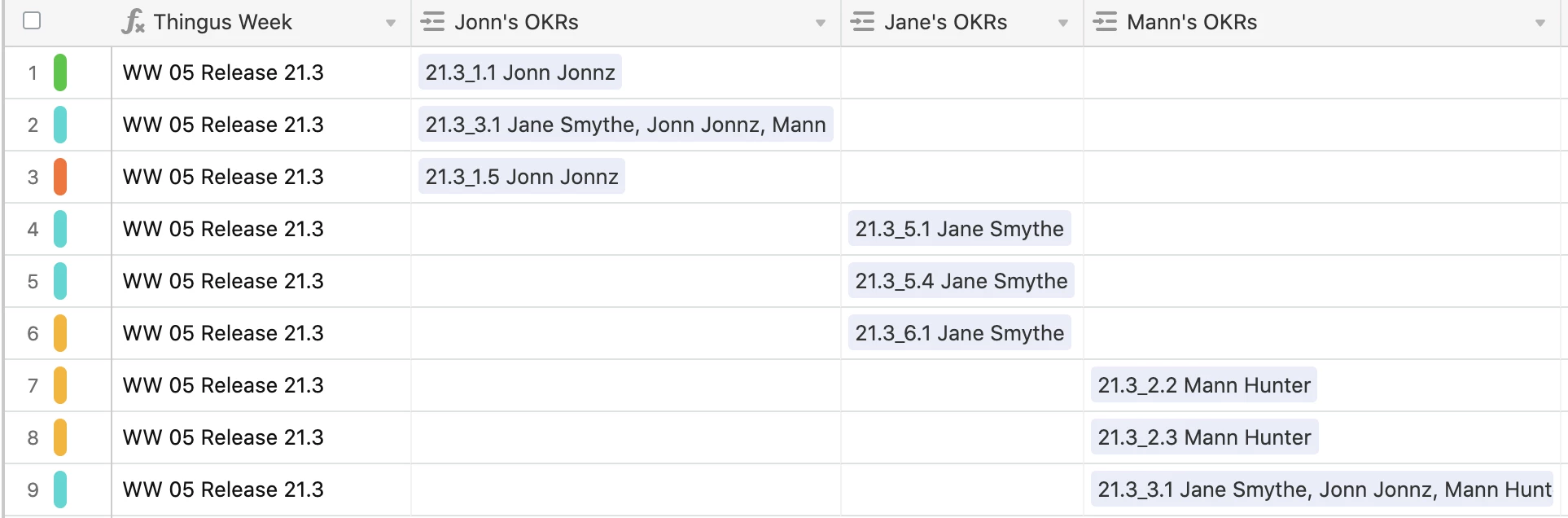
In my case, I’m trying to extract a key piece of text that is in any of these records (separated by an underscore) that flags the time frame for the entry (a “release date” in my case). But when I try to do that with a simple “FIND() MID()” I get the same result others have mentioned:

I solved it using a variant of what you mention above:

Here’s the variant I chose to use, but I suspect it’s a worse solution than simply making a local variable column…
"WW " & DATETIME_FORMAT(Date,‘WW’) & " Release " &

IF(
   FIND('_', 
            SUBSTITUTE({Jonn's OKRs},'"','',1) & SUBSTITUTE({Jane's OKRs},'"','',1) & SUBSTITUTE({Mann's OKRs},'"','',1)
        ),
    MID( SUBSTITUTE({Jonn's OKRs},'"','',1) & SUBSTITUTE({Jane's OKRs},'"','',1) & SUBSTITUTE({Mann's OKRs},'"','',1),
       1,
       FIND('_',
                SUBSTITUTE({Jonn's OKRs},'"','',1)& SUBSTITUTE({Jane's OKRs},'"','',1)&SUBSTITUTE({Mann's OKRs},'"','',1)
           )-1
        )
    ,""
   )

Which translates to: If there’s an underscore in the combination of linked fields, then extract everything from the start of the combined fields up to that underscore, eliminating any " marks along the way.
The problems with this solution include:

  1. It’s very difficult to read (and therefore maintain)

  2. It may take far more processing than if I’d simply made a local column that combined/substituted

But I don’t know enough about Airtable to know which would be less process-bound.
Thoughts on that last bit would be appreciated.


kuovonne
Forum|alt.badge.img+29
  • Brainy
  • February 8, 2021

First, congrats on getting a formula to to produce the results you want.
Second, congrats on recognizing that the formula you have will be hard to maintain.
Third, thank you for including screen captures. I would not have been able to understand your question without them.

It looks like you are trying to do two things: extract just the first digits of the linked record field and remove the quote mark. I think this is a good candidate for the new RegEx functions that Airtable recently released.

IF( {Jonn's OKRs}, 
  REGEX_EXTRACT({Jonn's OKRs}, "[0-9\\.]+"),
IF( {Jane's OKRs}, 
  REGEX_EXTRACT({Jane's OKRs}, "[0-9\\.]+"),
IF( {Mann's OKRs}, 
  REGEX_EXTRACT({Mann's OKRs}, "[0-9\\.]+")
)))

By the way, unless the amount of processing time is affecting your workflows, don’t worry about how much processing time your formula takes. The processing is done on Airtable’s servers and Airtable will deal with that. A formula that you understand and can maintain is more important than a formula that runs slightly faster.


  • New Participant
  • February 8, 2021

First, congrats on getting a formula to to produce the results you want.
Second, congrats on recognizing that the formula you have will be hard to maintain.
Third, thank you for including screen captures. I would not have been able to understand your question without them.

It looks like you are trying to do two things: extract just the first digits of the linked record field and remove the quote mark. I think this is a good candidate for the new RegEx functions that Airtable recently released.

IF( {Jonn's OKRs}, 
  REGEX_EXTRACT({Jonn's OKRs}, "[0-9\\.]+"),
IF( {Jane's OKRs}, 
  REGEX_EXTRACT({Jane's OKRs}, "[0-9\\.]+"),
IF( {Mann's OKRs}, 
  REGEX_EXTRACT({Mann's OKRs}, "[0-9\\.]+")
)))

By the way, unless the amount of processing time is affecting your workflows, don’t worry about how much processing time your formula takes. The processing is done on Airtable’s servers and Airtable will deal with that. A formula that you understand and can maintain is more important than a formula that runs slightly faster.


And thank you Kuovonne for responding so quickly and succinctly.

Of course Regex is the answer! It’s the answer to almost any string processing! :slightly_smiling_face:

But, even after 20 years of playing around with them, I still find them even more opaque than the code I wrote. (But that’s on me).

Thanks again


Forum|alt.badge.img+1
  • New Participant
  • July 22, 2025

Hi everyone,


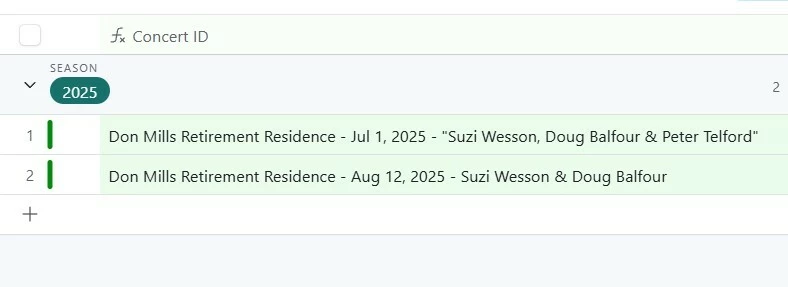
Bringing this random, quotations thread some love.  How can I get rid of these quotations in my Concatenate Concert ID field?


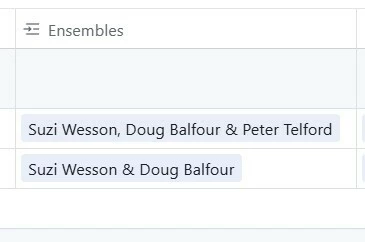
My Ensembles are:


My Concert ID:


And my current formula is:

CONCATENATE(Facility, " - ", DATETIME_FORMAT({Date & Time},'ll'), " - ", Ensembles)


Like many have said here, once I removed the comma, they disappeared.  But the comma is needed unfortunately.  I tried a few variations of the substitutes with quotation marks and apostrophes, but no dice.


Your advice would be great!


TheTimeSavingCo
Forum|alt.badge.img+31

Try this?  

CONCATENATE(Facility, " - ", DATETIME_FORMAT({Date & Time},'ll'), " - ", SUBSTITUTE(Ensembles,'"',''))


Forum|alt.badge.img+1
  • New Participant
  • July 22, 2025

Try this?  

CONCATENATE(Facility, " - ", DATETIME_FORMAT({Date & Time},'ll'), " - ", SUBSTITUTE(Ensembles,'"',''))


Wizard!  Thanks Adam!!