

Solved

Search Extensions and Fields Record organization

  • December 16, 2025
  • 3 replies
  • 45 views

Pascal_Vallet
Forum|alt.badge.img+14

When I use the search extension in Airtable, it works well for finding a record. However, when I click on a record, it shows me the fields, but I would like to be able to edit them. I have a view that is very well organized, and I was hoping to see the record displayed according to that field arrangement, but unfortunately, I haven't found a way to do this.

My goal is to quickly search for a record and, upon clicking it, display the specific information I need. So far, I haven't been able to organize the displayed information in the way I want.

Best answer by TheTimeSavingCo

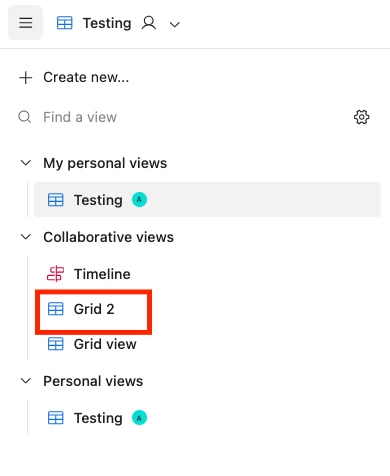
Hm, the field order is taken from the first collaborative Grid view of the table in question, and so in the following screenshot the field order from ‘Grid 2’ would be used when you opened a record via the Search extension


3 replies

Alexey_Gusev
Forum|alt.badge.img+25
  • Brainy
  • December 16, 2025

Hi,
On Grid view, select ‘Copy another view’s configuration’ , select all, or exact elements you interested (visibility, order, sort, filtering). Records will be displayed according to Grid View.
Also, if you are searching in a single table, choose your view and use Ctrl+F instead of Search Extension.


TheTimeSavingCo
Forum|alt.badge.img+31

Hm, the field order is taken from the first collaborative Grid view of the table in question, and so in the following screenshot the field order from ‘Grid 2’ would be used when you opened a record via the Search extension


Pascal_Vallet
Forum|alt.badge.img+14
  • Author
  • Inspiring
  • December 23, 2025

Hm, the field order is taken from the first collaborative Grid view of the table in question, and so in the following screenshot the field order from ‘Grid 2’ would be used when you opened a record via the Search extension


Perfect thanks
