

Simple point system

  • November 17, 2024
  • 3 replies
  • 35 views

Forum|alt.badge.img+4

Hello, hope you are all doing well. 

Need some help giving points to each participant per race result, would like to create a field on the same table with a formula that does that automatically. 

The point system is basically the reverse order of the number of participants, ea: 1st place gets the total number of participants in points, the 2nd place gets one less, and so on, with last place getting 1 point

Here is the condition, only the "Pos" with numbers will get assign the points. Positions that have a DNF or DNS will get just 1 point

Here is the table: 
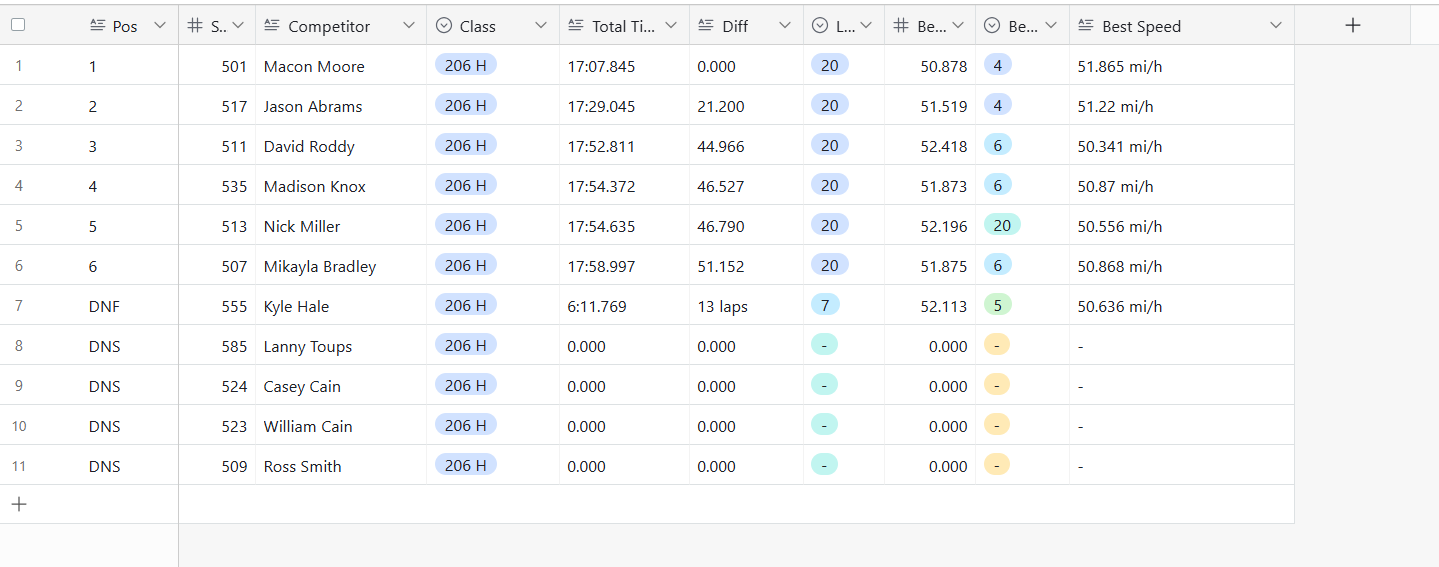
Any help will be grateful, my brain is toast for the night, trying all kinds of ways.

This might be super simple for someone out there 😆

Thank you!

3 replies

TheTimeSavingCo
Forum|alt.badge.img+31

Hm so there are multiple races, right?  If so, I think you're going to need:
1. Races: table where each record represents one race
2. People: table where each record represents one person

Let's call your main table "Data"

You'd then link everything up accordingly, which would allow you to create a Count field in the Races table that'll give you the total number of participants for that race.  You could then use a lookup to pull that Count field into the Data table, and you'd use a formula that would help you output the points for each person based on:
1. Their position in the race
2. The total number of participants in that race

Once you output those points, you can create a rollup field in People on that new points field, which would give you each persons total from all their races


Alexey_Gusev
Forum|alt.badge.img+25

Hi,
Is it correct that number of participants 11 here? And Pos1 gets 11 pts, Pos2=10 pts, Pos#6 gets 6 points, the rest (Pos 7-11) are 1 pts. 

Your formula will be 


1+IF(VALUE(Pos),11-VALUE(Pos))


if you have different total number each race, to count total, you need to link and do the stuff according to @TheTimeSavingCo  instructions


Forum|alt.badge.img+4
  • Author
  • New Participant
  • November 18, 2024

Thank you guys, will get working on this  😀. @Alexey_Gusev already applied that formula, thank you man. @TheTimeSavingCo  will work on those tables tonight. Thank you all again

