

Stacked graph based on multiple columns/fields

  • May 5, 2021
  • 5 replies
  • 106 views

Forum|alt.badge.img+1

Dear all,

I am new to Airtable and am trying to recreate a simple design I had in google sheets. In short, I have in one table:

  • Days of the week as rows
  • And for each day/row a column with time spend per part of my job (e.g., research, education, management); i.e., three columns.

Like this:
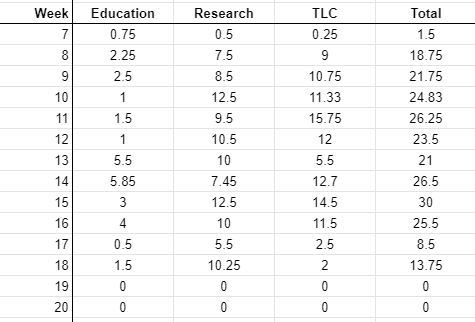
Now I would like to create a stacked barplot of these three columns. Like this:
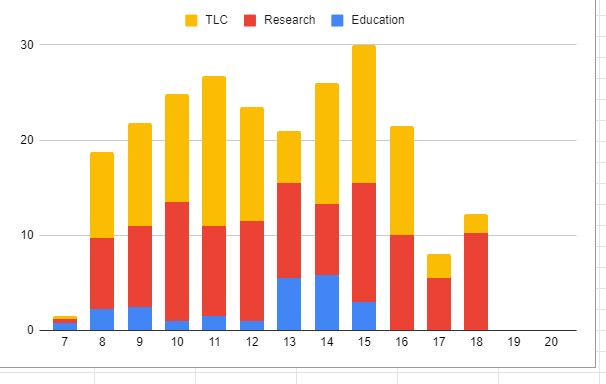
However, all documentation for both the chart-app and vega-lite app I read so far seem to assume that there is a separate grouping variable, rather than multiple columns being stacked. Is there any way to make this work?

Hope it’s clear, thanks in advance!

 all the best,

         Frank


This topic has been closed for replies.

5 replies

Forum|alt.badge.img+1
  • New Participant
  • May 6, 2021

Also looking for a solution for this

It’s such a simple application, I feel like I must be missing something obvious


Forum|alt.badge.img

I’m having the exact same problem - even in Vega-Lite it seems difficult to achieve.


Forum|alt.badge.img+1
  • New Participant
  • December 21, 2022

I'm having the same problem


Forum|alt.badge.img+2
  • New Participant
  • February 21, 2023

I'm having the same problem


same problem! please somebody answer!


Forum|alt.badge.img+17
  • Brainy
  • April 19, 2023

I also have the exact same problem