Vlookup for Airtable?

  • October 17, 2017
  • 33 replies
  • 816 views

Show first post
This topic has been closed for replies.

33 replies

Forum|alt.badge.img+6
  • Known Participant
  • August 11, 2021

Hi,

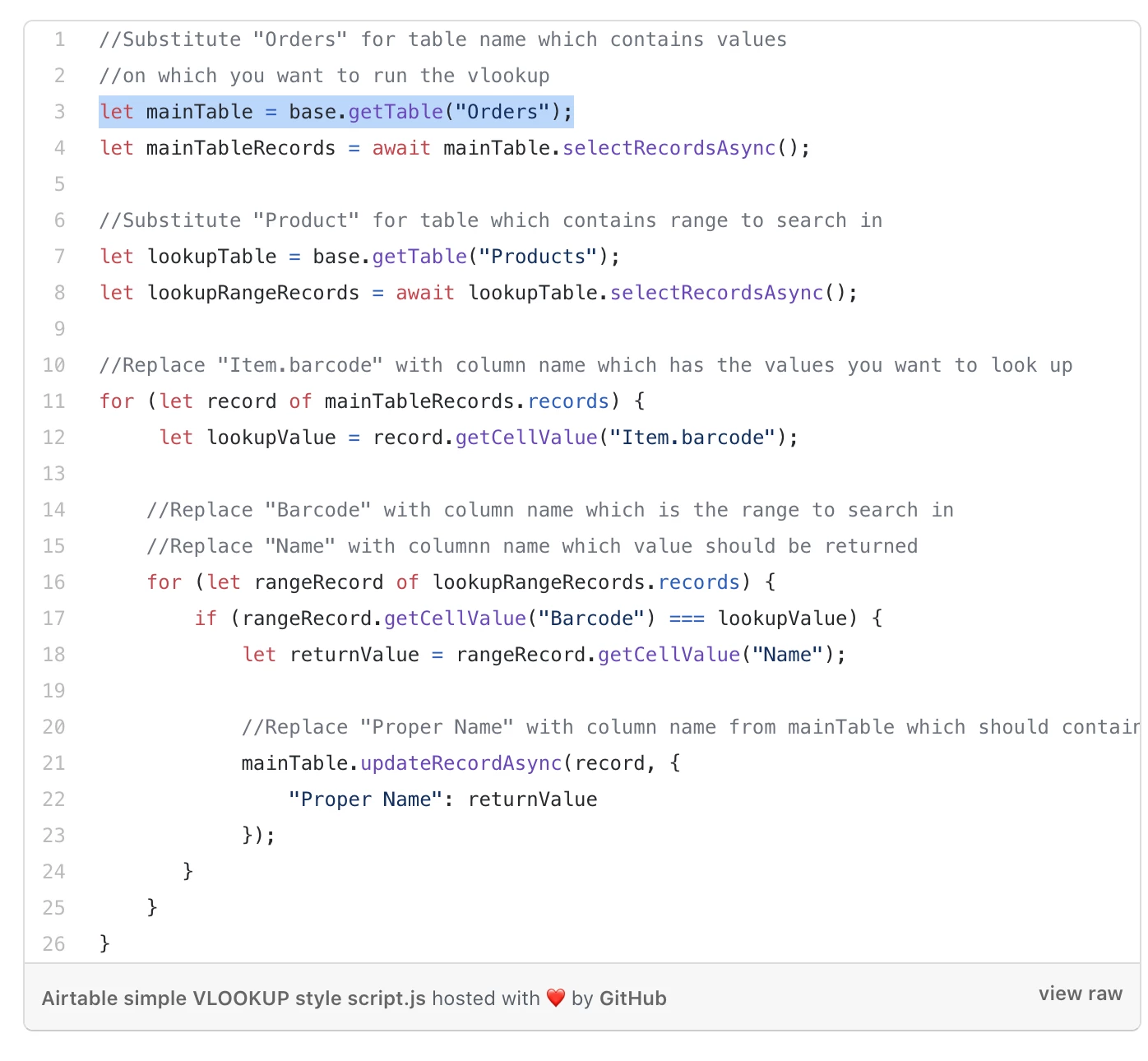
This was something that I was looking for as well as I needed to do quite a bit of matching between my tables - that were previously using VLOOKUP in Excel. This did not seem to be possible with regular Airtable functions (and I tried a lot of crazy stuff), so I started looking into the Scripting block.
This actually allowed me to make a perfect solution. OK, almost perfect, you still need to change the name of tables and columns manually in the code, but with comments below this should be fairly straight forward.

I have also made a quick video about it:

I hope that helps!


@Greg_F Thank you so much for sharing! One question: How can I make the script to return multiple values if the Barcode is used more than once. I set the Products field up to accept multiple linked records but the script just returns one. Thanks in advance. Christoph


Forum|alt.badge.img+19
  • Inspiring
  • August 12, 2021

For a No-Code approach to Vlookups in Airtable, we have a function for that in our On2Air: Actions product that can be set up in minutes:


Forum|alt.badge.img+6
  • Known Participant
  • August 12, 2021

@Greg_F Thank you so much for sharing! One question: How can I make the script to return multiple values if the Barcode is used more than once. I set the Products field up to accept multiple linked records but the script just returns one. Thanks in advance. Christoph


@Greg_F Solved it myself. I was starting from the wrong end, made the products my maintable and order the lookup…


Greg_F
Forum|alt.badge.img+18
  • Brainy
  • August 12, 2021

@Greg_F Solved it myself. I was starting from the wrong end, made the products my maintable and order the lookup…


It would be actually also possible to return array as result of search and link array as multiple links in linked field.

Either way - congrats on successfully hacking to a solution!


  • New Participant
  • October 6, 2021

hi, is there anywhere I could find an easier version of the script to amend, please?


  • New Participant
  • November 2, 2021

I think it is defined at lines 3. 7, 12, and 17.


Hey Bill -

Wondering if you could help me solve my problem, I am doing something very similar to this , however I have multiple return values for a given search value.

EX) Zip code 10001 exist in a few different cells in my search range, and when I run my function it only diplays one value apposed to all possible solutions.

Any ideas on how to fix?


Forum|alt.badge.img+19
  • Inspiring
  • November 2, 2021

Hey Bill -

Wondering if you could help me solve my problem, I am doing something very similar to this , however I have multiple return values for a given search value.

EX) Zip code 10001 exist in a few different cells in my search range, and when I run my function it only diplays one value apposed to all possible solutions.

Any ideas on how to fix?


Sorry Britt, I need a lot more information to be able to help. What is “this”. The thread has many things mentioned.


Forum|alt.badge.img+9
  • Inspiring
  • September 12, 2024

This is awesome and what I am looking for! I have a question... I want to use the second half of the video when you create a linked record referencing the ID. It works perfect if there is a singular match in the lookup table, but what if I have two records that i need to link?

Example: lookup table 'People' contains their company affiliation, email, and if they are the point of contact for that company. I have an Invoices table where I will use your script to match them to their company affiliation and return People ID to the linked column in Invoices. The issue is that I may have more than one person that is the point of contact. How can I adjust the loop and ADD to that linked column in Invoices and not just replace the first one?

Thanks in advance. This script is the bomb!