Airtable link to Excel via Power Query

  • October 17, 2018
  • 36 replies
  • 443 views

Show first post

36 replies

Forum|alt.badge.img+3
  • Author
  • Known Participant
  • October 9, 2019

Hello @Ben_McCabe,

Apologies (I have two versions of this code, and was looking at the wrong one). The code on this forum will (unfortunately for you) yield the screenshot you have posted.

Try replacing part of your code with this code instead (starting from the “LET” and ending with “Expanded stepB.1”):

let
      Pagination = List.Skip( List.Generate( () => [Page_Key = "init", Counter=0], // Start Value
    	                     each  [Page_Key] <> null, // Condition under which the next execution will happen
                          each  [Page_Key = try if [Counter]<1    
 			                                   then "" 
 			                                   else  [WebCall][Value][offset] 
 			                                   otherwise null, // determine the LastKey for the next execution
 		  	                     WebCall  = try if [Counter]<1    
 			                                   then  Json.Document(Web.Contents("https://api.airtable.com/v0/AIRTABLE_BASEID/TABLE_NAME?view=VIEW_NAME", [Headers=[Authorization="Bearer key????????????"]]))
 			                                   else  Json.Document(Web.Contents("https://api.airtable.com/v0/AIRTABLE_BASEID/TABLE_NAME?view=VIEW_NAME&offset="&[WebCall][Value][offset] , [Headers=[Authorization="Bearer key????????????"]])),// retrieve results per call
 			                     Counter = [Counter]+1// internal counter
                                 ],
    		                  each [WebCall]
                         ),
                       1
                    ),
      #"Json2Table" =  Table.RenameColumns(Table.FromList(Pagination, Splitter.SplitByNothing(), null, null, ExtraValues.Ignore),{{"Column1", "stepA.1"}}),
      #"Expanded to stepA.2" = Table.ExpandRecordColumn(#"Json2Table", "stepA.1", {"Value"}, {"stepA.2"}),
      #"Expanded to stepA.3" = Table.ExpandRecordColumn(#"Expanded to stepA.2", "stepA.2", {"records"}, {"stepA.3"}),
      #"Rows from stepA.3" = Table.RenameColumns(Table.ExpandListColumn(#"Expanded to stepA.3", "stepA.3"),{{"stepA.3", "stepB.1"}}),
     #"Expanded stepB.1" = Table.ExpandRecordColumn(#"Rows from stepA.3", "stepB.1", {"id", "fields", "createdTime"}, {"id", "Src", "createdTime"}),

… also, remember to replace the following variables with whatever text is specific for your view/table/user:

  • AIRTABLE_BASEID
  • TABLE_NAME
  • VIEW_NAME (dont forget to use HTML encoding for this name)
  • Bearer key???

@Adolfo_Ferreira and @Ivan_Larson

I tried using Adolfo’s code, and it looks legit. I see no reason why it is throwing errors except for the fact that I can’t see your API table names. When it tries paginating it throws the following error:

"Web.Contents failed to get contents from 'https://api.airtable.com/v0/[...redacted for privacy...]/[...redacted...]&offset=[...redacted...]' (404): Not Found"

And this error renders the next page of results as “Null”.

So, please look at @Jon_Thomas1’s post. I think this is the issue you are facing.

I would test it for you with the code you shared, but do not have easy access to your API table names. I probably will be away from this discussion board for about a day, but will reply ASAP.


Forum|alt.badge.img+3
  • Author
  • Known Participant
  • October 11, 2019

@Adolfo_Ferreira and @Ivan_Larson

I tried using Adolfo’s code, and it looks legit. I see no reason why it is throwing errors except for the fact that I can’t see your API table names. When it tries paginating it throws the following error:

"Web.Contents failed to get contents from 'https://api.airtable.com/v0/[...redacted for privacy...]/[...redacted...]&offset=[...redacted...]' (404): Not Found"

And this error renders the next page of results as “Null”.

So, please look at @Jon_Thomas1’s post. I think this is the issue you are facing.

I would test it for you with the code you shared, but do not have easy access to your API table names. I probably will be away from this discussion board for about a day, but will reply ASAP.


Hello @Adolfo_Ferreira and @Ivan_Larson ,

I am back from my “siesta”. After reviewing code that was shared with me, I found the error. If you are not using a particular view, then you had to modify the code, deleting the VIEW from the http request. When deleting the portion of the code that pertains to a parcticular airtable view, be careful NOT to delete the question mark (?) in the code that denotes HTTP request parameters…

This is easy to miss (as seen by the fact that I missed it when reviewing your code).

So, when NOT using a particular view for your import from airtable into excel, the following code should be modified FROM this

...
 WebCall  = try if [Counter]<1    
			    then  Json.Document(Web.Contents("https://api.airtable.com/v0/AIRTABLE_BASEID/TABLE_NAME?view=VIEW_NAME", [Headers=[Authorization="Bearer key????????????"]]))
			    else  Json.Document(Web.Contents("https://api.airtable.com/v0/AIRTABLE_BASEID/TABLE_NAME?view=VIEW_NAME&offset="&[WebCall][Value][offset] , [Headers=[Authorization="Bearer key????????????"]])),// retrieve results per call

Into this format

...
 WebCall  = try if [Counter]<1    
			    then  Json.Document(Web.Contents("https://api.airtable.com/v0/AIRTABLE_BASEID/TABLE_NAME", [Headers=[Authorization="Bearer key????????????"]]))
			    else  Json.Document(Web.Contents("https://api.airtable.com/v0/AIRTABLE_BASEID/TABLE_NAME?offset="&[WebCall][Value][offset] , [Headers=[Authorization="Bearer key????????????"]])),// retrieve results per call

So, in short we went from this code:

To this code:

Notice how we dropped the " ?view=VIEW_NAME " entirely from the first shown line, but on the
second shown line, we dropped only " view=VIEW_NAME " and kept the question mark (?)
but DROPPED THE AMPERSAND (&)


thanks @Matthew_Billiodeaux1 this worked like a charm; really appreciate saving me from re-inventing this :grinning_face_with_smiling_eyes:


Hi Guys,

Thanks for the original post and the replies. This helped me link AirTable data into MSExcel using PowerQuery. However the source table has 400 rows and only 100 are being downloaded into excel and it looks like a preview. Can one of you help me with any code updates.

Regards,

Bharat

let
Pagination = List.Skip( List.Generate( () => [Page_Key = “init”, Counter=0], // Start Value
each [Page_Key] <> null, // Condition under which the next execution will happen
each [Page_Key = try if [Counter]<1
then “”
else [WebCall][Value][offset]
otherwise null, // determine the LastKey for the next execution
WebCall = try if [Counter]<1
then Json.Document(Web.Contents(“https://api.airtable.com/v0/appfSBJGSgkE7a6tF/COVID-19%20Tracker?view=Treatments%20and%20Vaccines”, [Headers=[Authorization=“Bearer keyXXXXXXXXXXXXXX”]]))
else Json.Document(Web.Contents(“https://api.airtable.com/v0/appfSBJGSgkE7a6tF/COVID-19%20Tracker?view=Treatments%20and%20Vaccines?offset=”&[WebCall][Value][offset] , [Headers=[Authorization=“Bearer keyXXXXXXXXXXXXXX”]])),// retrieve results per call
Counter = [Counter]+1// internal counter
],
each [WebCall]
),
1
),
#“Json2Table” = Table.RenameColumns(Table.FromList(Pagination, Splitter.SplitByNothing(), null, null, ExtraValues.Ignore),{{“Column1”, “stepA.1”}}),
#“Expanded to stepA.2” = Table.ExpandRecordColumn(#“Json2Table”, “stepA.1”, {“Value”}, {“stepA.2”}),
#“Expanded to stepA.3” = Table.ExpandRecordColumn(#“Expanded to stepA.2”, “stepA.2”, {“records”}, {“stepA.3”}),
#“Rows from stepA.3” = Table.RenameColumns(Table.ExpandListColumn(#“Expanded to stepA.3”, “stepA.3”),{{“stepA.3”, “stepB.1”}}),
#“Source” = Table.ExpandRecordColumn(#“Rows from stepA.3”, “stepB.1”, {“fields”}, {“Src”}),
#“Expanded Src” = Table.ExpandRecordColumn(Source, “Src”, {“Developer / Researcher”, “Treatment vs. Vaccine”, “Product Category”, “Product Description”, “Stage of Development”, “Anticipated Next Steps”, “Clinical Trials for COVID-19”, “Funder”, “FDA-Approved Indications”, “Sources”, “Date Last Updated”, “CMS2”, “Record Update”, “Clinical Trials for Other Diseases (T only) / Related Use or Platform (V only)”, “Published Results”}, {“Src.Developer / Researcher”, “Src.Treatment vs. Vaccine”, “Src.Product Category”, “Src.Product Description”, “Src.Stage of Development”, “Src.Anticipated Next Steps”, “Src.Clinical Trials for COVID-19”, “Src.Funder”, “Src.FDA-Approved Indications”, “Src.Sources”, “Src.Date Last Updated”, “Src.CMS2”, “Src.Record Update”, “Src.Clinical Trials for Other Diseases (T only) / Related Use or Platform (V onl”, “Src.Published Results”}),
#“Filtered Rows” = Table.SelectRows(#“Expanded Src”, each true)
in
#“Filtered Rows”


  • New Participant
  • June 30, 2020

Hello, This information has been very helpful for linking airtable to Excel, I was able to get it to work properly, unfortunately some of the record names are strings generated by Airtable for the linked record fields instead of the name displayed in airtable or displayed when you export a csv of the table. Is there a way to translate these generated record strings into the names that are displayed in airtable?

Thanks


Forum|alt.badge.img+3
  • Author
  • Known Participant
  • July 2, 2020

Hello, This information has been very helpful for linking airtable to Excel, I was able to get it to work properly, unfortunately some of the record names are strings generated by Airtable for the linked record fields instead of the name displayed in airtable or displayed when you export a csv of the table. Is there a way to translate these generated record strings into the names that are displayed in airtable?

Thanks


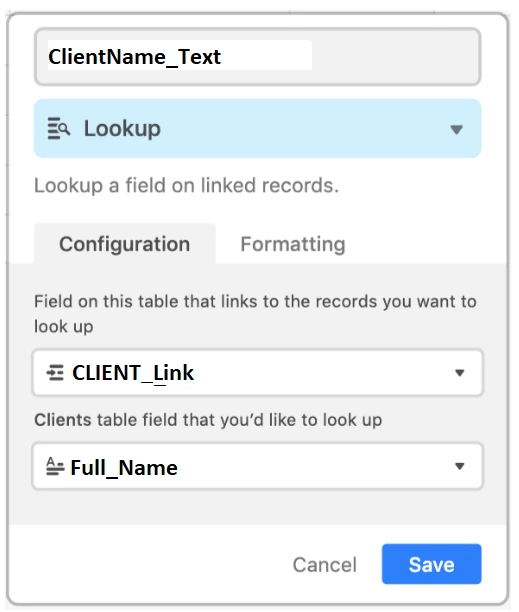
Hello Simon, please send a screen shot. If I understand you correctly, your solution is to create another field to extract the data from your linked record field in a more friendly fashion.

EX:
Lets assume you have an INVOICES_tbl (that shows the total amount owed to each client per invoice) and a CLIENTS_tbl (with contact info of each client, and a field for the clients name called Full_Name).

  1. Lets assume your linked field is called CLIENT_Link and it…
    • links to data in your CLIENTS_tbl.
    • and dislplays the name, but returns the record it in PoweQuery / Power BI
  2. So, to return the client’s NAME instead of the record ID, create a field called ClientName_Text like so…

  • New Participant
  • July 3, 2020

Hello Simon, please send a screen shot. If I understand you correctly, your solution is to create another field to extract the data from your linked record field in a more friendly fashion.

EX:
Lets assume you have an INVOICES_tbl (that shows the total amount owed to each client per invoice) and a CLIENTS_tbl (with contact info of each client, and a field for the clients name called Full_Name).

  1. Lets assume your linked field is called CLIENT_Link and it…
    • links to data in your CLIENTS_tbl.
    • and dislplays the name, but returns the record it in PoweQuery / Power BI
  2. So, to return the client’s NAME instead of the record ID, create a field called ClientName_Text like so…

Yep, this solved the problem, thank you very much for you hasty response.


Forum|alt.badge.img+3
  • Author
  • Known Participant
  • July 6, 2020

Hi Guys,

Thanks for the original post and the replies. This helped me link AirTable data into MSExcel using PowerQuery. However the source table has 400 rows and only 100 are being downloaded into excel and it looks like a preview. Can one of you help me with any code updates.

Regards,

Bharat

let
Pagination = List.Skip( List.Generate( () => [Page_Key = “init”, Counter=0], // Start Value
each [Page_Key] <> null, // Condition under which the next execution will happen
each [Page_Key = try if [Counter]<1
then “”
else [WebCall][Value][offset]
otherwise null, // determine the LastKey for the next execution
WebCall = try if [Counter]<1
then Json.Document(Web.Contents(“https://api.airtable.com/v0/appfSBJGSgkE7a6tF/COVID-19%20Tracker?view=Treatments%20and%20Vaccines”, [Headers=[Authorization=“Bearer keyXXXXXXXXXXXXXX”]]))
else Json.Document(Web.Contents(“https://api.airtable.com/v0/appfSBJGSgkE7a6tF/COVID-19%20Tracker?view=Treatments%20and%20Vaccines?offset=”&[WebCall][Value][offset] , [Headers=[Authorization=“Bearer keyXXXXXXXXXXXXXX”]])),// retrieve results per call
Counter = [Counter]+1// internal counter
],
each [WebCall]
),
1
),
#“Json2Table” = Table.RenameColumns(Table.FromList(Pagination, Splitter.SplitByNothing(), null, null, ExtraValues.Ignore),{{“Column1”, “stepA.1”}}),
#“Expanded to stepA.2” = Table.ExpandRecordColumn(#“Json2Table”, “stepA.1”, {“Value”}, {“stepA.2”}),
#“Expanded to stepA.3” = Table.ExpandRecordColumn(#“Expanded to stepA.2”, “stepA.2”, {“records”}, {“stepA.3”}),
#“Rows from stepA.3” = Table.RenameColumns(Table.ExpandListColumn(#“Expanded to stepA.3”, “stepA.3”),{{“stepA.3”, “stepB.1”}}),
#“Source” = Table.ExpandRecordColumn(#“Rows from stepA.3”, “stepB.1”, {“fields”}, {“Src”}),
#“Expanded Src” = Table.ExpandRecordColumn(Source, “Src”, {“Developer / Researcher”, “Treatment vs. Vaccine”, “Product Category”, “Product Description”, “Stage of Development”, “Anticipated Next Steps”, “Clinical Trials for COVID-19”, “Funder”, “FDA-Approved Indications”, “Sources”, “Date Last Updated”, “CMS2”, “Record Update”, “Clinical Trials for Other Diseases (T only) / Related Use or Platform (V only)”, “Published Results”}, {“Src.Developer / Researcher”, “Src.Treatment vs. Vaccine”, “Src.Product Category”, “Src.Product Description”, “Src.Stage of Development”, “Src.Anticipated Next Steps”, “Src.Clinical Trials for COVID-19”, “Src.Funder”, “Src.FDA-Approved Indications”, “Src.Sources”, “Src.Date Last Updated”, “Src.CMS2”, “Src.Record Update”, “Src.Clinical Trials for Other Diseases (T only) / Related Use or Platform (V onl”, “Src.Published Results”}),
#“Filtered Rows” = Table.SelectRows(#“Expanded Src”, each true)
in
#“Filtered Rows”


you may be having the same issue other’s have had.


Forum|alt.badge.img+3
  • Author
  • Known Participant
  • July 6, 2020

Hi Guys,

Thanks for the original post and the replies. This helped me link AirTable data into MSExcel using PowerQuery. However the source table has 400 rows and only 100 are being downloaded into excel and it looks like a preview. Can one of you help me with any code updates.

Regards,

Bharat

let
Pagination = List.Skip( List.Generate( () => [Page_Key = “init”, Counter=0], // Start Value
each [Page_Key] <> null, // Condition under which the next execution will happen
each [Page_Key = try if [Counter]<1
then “”
else [WebCall][Value][offset]
otherwise null, // determine the LastKey for the next execution
WebCall = try if [Counter]<1
then Json.Document(Web.Contents(“https://api.airtable.com/v0/appfSBJGSgkE7a6tF/COVID-19%20Tracker?view=Treatments%20and%20Vaccines”, [Headers=[Authorization=“Bearer keyXXXXXXXXXXXXXX”]]))
else Json.Document(Web.Contents(“https://api.airtable.com/v0/appfSBJGSgkE7a6tF/COVID-19%20Tracker?view=Treatments%20and%20Vaccines?offset=”&[WebCall][Value][offset] , [Headers=[Authorization=“Bearer keyXXXXXXXXXXXXXX”]])),// retrieve results per call
Counter = [Counter]+1// internal counter
],
each [WebCall]
),
1
),
#“Json2Table” = Table.RenameColumns(Table.FromList(Pagination, Splitter.SplitByNothing(), null, null, ExtraValues.Ignore),{{“Column1”, “stepA.1”}}),
#“Expanded to stepA.2” = Table.ExpandRecordColumn(#“Json2Table”, “stepA.1”, {“Value”}, {“stepA.2”}),
#“Expanded to stepA.3” = Table.ExpandRecordColumn(#“Expanded to stepA.2”, “stepA.2”, {“records”}, {“stepA.3”}),
#“Rows from stepA.3” = Table.RenameColumns(Table.ExpandListColumn(#“Expanded to stepA.3”, “stepA.3”),{{“stepA.3”, “stepB.1”}}),
#“Source” = Table.ExpandRecordColumn(#“Rows from stepA.3”, “stepB.1”, {“fields”}, {“Src”}),
#“Expanded Src” = Table.ExpandRecordColumn(Source, “Src”, {“Developer / Researcher”, “Treatment vs. Vaccine”, “Product Category”, “Product Description”, “Stage of Development”, “Anticipated Next Steps”, “Clinical Trials for COVID-19”, “Funder”, “FDA-Approved Indications”, “Sources”, “Date Last Updated”, “CMS2”, “Record Update”, “Clinical Trials for Other Diseases (T only) / Related Use or Platform (V only)”, “Published Results”}, {“Src.Developer / Researcher”, “Src.Treatment vs. Vaccine”, “Src.Product Category”, “Src.Product Description”, “Src.Stage of Development”, “Src.Anticipated Next Steps”, “Src.Clinical Trials for COVID-19”, “Src.Funder”, “Src.FDA-Approved Indications”, “Src.Sources”, “Src.Date Last Updated”, “Src.CMS2”, “Src.Record Update”, “Src.Clinical Trials for Other Diseases (T only) / Related Use or Platform (V onl”, “Src.Published Results”}),
#“Filtered Rows” = Table.SelectRows(#“Expanded Src”, each true)
in
#“Filtered Rows”


I suspect this is the error:

Contents(“https://api.airtable.com/v0/appfSBJGSgkE7a6tF/COVID-19%20Tracker?view=Treatments%20and%20Vaccines?offset=”&[WebCall][Value][offset]

Should be as follows:

Contents(“https://api.airtable.com/v0/appfSBJGSgkE7a6tF/COVID-19%20Tracker?view=Treatments%20and%20Vaccines&offset=”&[WebCall][Value][offset]


Forum|alt.badge.img+8
  • New Participant
  • October 29, 2020

Full disclosure, I’m a noob to power query and Airtable. This gives me the fields but not the ids. All linked fields use ids, which I need to then reference. How do I add a column with the id in it so I can look up all linked fields?


Forum|alt.badge.img+8
  • New Participant
  • October 29, 2020

Full disclosure, I’m a noob to power query and Airtable. This gives me the fields but not the ids. All linked fields use ids, which I need to then reference. How do I add a column with the id in it so I can look up all linked fields?


I can get a list of JUST the ids if i change {“fields”} out for {“id”} on the #“Source” line. I want to be able to do both, but I don’t know how to make it multiple columns.