

🎁 Welcome to Day 2 of the 12 Days of AI Plays!
Today we’re diving into an exciting corner of the Holiday Operations HQ: image generation and analysis.
Whether you're imagining the perfect gift straight from a kid’s wishlist or dreaming up the next great cookie design from Mrs. Claus’ Bakery, today’s challenge is all about using AI to describe, visualize, and interpret what you create.
Your Mission
-
Open the Holiday Operations HQ here and make a copy if you haven’t already.
-
In either the Presents table or the Bakery table, choose any record with:
-
A Gift Request, or
-
A Cookie Type
-
-
You’ll create two AI fields to transform that item into a visual concept and pull structured meaning from it.
Your Challenge
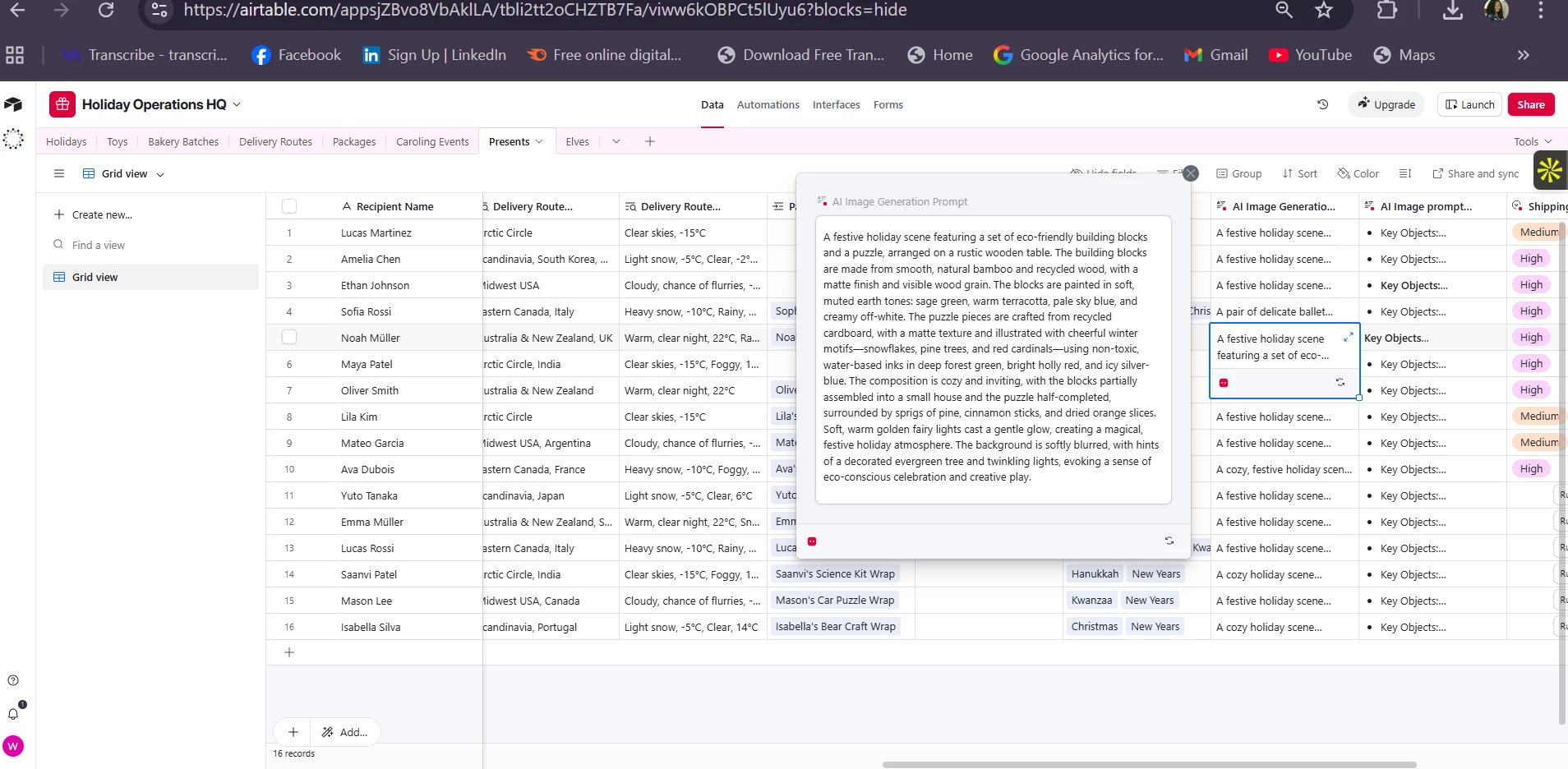
🎨 Step 1: Prompt Omni to generate an image
Add a new AI field with Omni that creates a detailed image prompt describing the selected gift or cookie in either the presents table or the bakery table.
Try prompts like:
-
“Generate a festive image describing this exact gift request in rich detail.”
-
“Turn this cookie type into a vivid visual concept for a bakery photoshoot.”
Encourage the field to get specific about:
-
Colors
-
Materials
-
Shape / form
-
Mood or aesthetic
-
Any magical or holiday elements
👁 Step 2: Analyze the Description
Next, create a second AI field that “analyzes” the generated image concept.
Have the AI identify:
-
Key objects or components
-
Materials
-
Potential delivery, storage, or production risks
(Think: fragile glass ornaments, melting hazards, glitter explosions…)
✨ Optional Extras
Feeling adventurous? Try adding:
-
A “Shipping Risk Score” classification based on the analysis for potential damage during shipping
-
A field for AI to analyze the artistic style of the AI generated image
Goal of Today’s Play
Today’s challenge showcases how Airtable AI can take text-based descriptions, turn them into image-ready prompts, and then interpret those concepts as structured operational data.
This is the same workflow used for:
-
Concept art briefs
-
Product descriptions
-
Packaging ideas
-
Visual QA workflows
-
And holiday magic, of course ✨
📍 Want to see our AI Plays for image generation and analysis? Grab the templates here!
Share What You Built!
Drop a screenshot or summary in the comments:
-
Which gift or cookie did you choose?
-
What did your AI-generated prompt sound like?
-
What risks or materials did the analysis field uncover?
-
Did anything unexpected (or hilarious) emerge in the description?
We can’t wait to see the imaginative visual prompts and clever analyses you come up with!
Happy creating — see you tomorrow for Day 3! 🎄✨