Problem using Typeform/Zapier

  • October 1, 2018
  • 5 replies
  • 89 views

Forum|alt.badge.img+2

This might be a bit difficult, because it involves both Typeform and Zapier as well as Airtable. I’m having two issues but both are overlapping.

  1. In my Typeform I have some questions that are multiple choice with the option for multiple or single select. One of the questions asks about which states the person is involved with and has them all listed out. One person might just choose one state and the next might choose five. When I plug this data into Zapier, it comes across as one lump instead of individual selections so it doesn’t match up with the multiple select field in Airtable unless the person just selects one. Does anyone know how to fix this?
  2. In my Typeform, I have a question similar to the one above that lets the person choose what field they are in. Some people select only one, but several select more than one. This works with a linked field in Airtable. The issue I’m having is similar to the one above, if a person selects 2 it creates a new field with those two as one item instead as the two separate items that already exist in the linked field.

I realize these are more problems with Typeform and Zapier, but I’m hoping one of you guys has worked with this and knows how to solve it.

Thanks!

5 replies

Forum|alt.badge.img+4

Hi Kristina

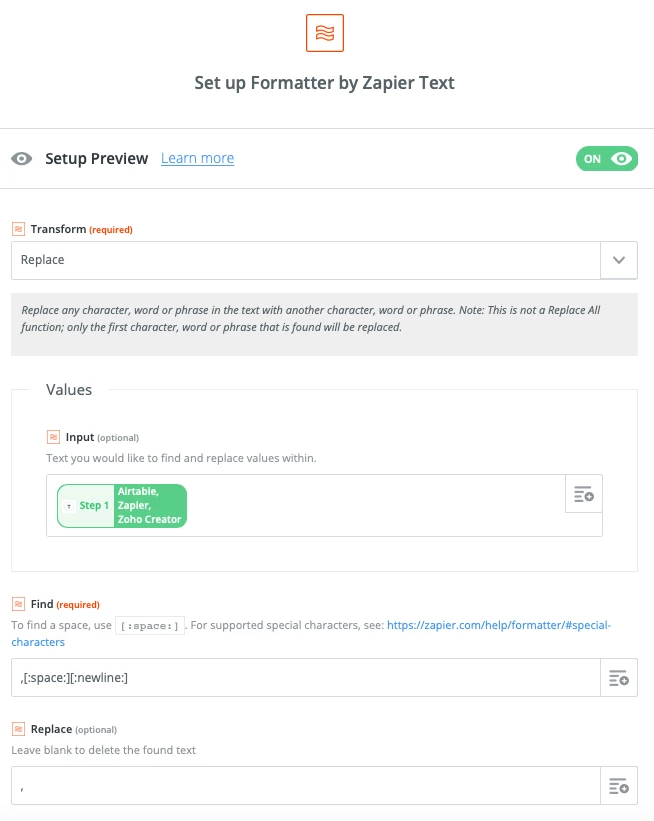
For part 1, the trick is to use a Formatter Zapier step configured as follows:

Which will replace the ,space newline between values from type form to just a comma. Involved a little trial and error but seems to work.

I haven’t experimented with your second question but there is probably a similar solution - let me know if not!

Julian


Forum|alt.badge.img+3

Hi Kristina

For part 1, the trick is to use a Formatter Zapier step configured as follows:

Which will replace the ,space newline between values from type form to just a comma. Involved a little trial and error but seems to work.

I haven’t experimented with your second question but there is probably a similar solution - let me know if not!

Julian


Worked like a charm!! It’s 2021 :raised_hands:


Yes, this works! So helpful. Thanks.


  • Inspiring
  • August 22, 2021

Will this work for multiple questions? In other words, if we have multiple questions where there are multiple options allowed.

Do we need to create a new filter step for each of these?


ScottWorld
Forum|alt.badge.img+35
  • Genius
  • November 9, 2025

Instead of using Zapier, this is much easier accomplished by using Make’s TypeForm integrations.

In general, I would strongly recommend against using Zapier, because Make is INFINITELY more powerful & customizable than Zapier, yet it is SIGNIFICANTLY CHEAPER than Zapier.

I wrote an entire post here comparing Make vs. Zapier, and if you’ve never used Make before, I’ve assembled a bunch of Make training resources in this thread.

However, your much better option than using TypeForm is to switch to Fillout’s advanced forms for Airtable because it communicates DIRECTLY with Airtable, so it feeds directly into Airtable’s single-select fields, multiple-select fields, linked record fields, attachment fields, etc.

Even better:, Fillout is 100% free, and it offers hundreds of features that Airtable’s native forms don’t offer, including the ability to update Airtable records using a formcreate custom PDF files from a form submissionaccept payments on formspre-fetch dynamic data from an Airtable recordcustomize the style and branding of your formcustomize a theme for your form, display Airtable lookup fields on forms, create new linked records on a formadd a login page to your form, perform math or other live calculations on your forms, collect signatures on a form, create multi-page forms with conditional paths, connect a single form to dozens of external apps simultaneously, add CAPTCHAs to your form, and much more.

I show how to use a few of the advanced features of Fillout on these 2 Airtable podcast episodes:

Hope this helps!

If you’d like to hire the best Airtable consultant to help you with anything Airtable-related, please feel free to contact me through my website: Airtable consultant — ScottWorld