If Statement checking for empty field

  • December 7, 2019
  • 3 replies
  • 30 views

I would like a formula field to be filled with either, the text of a certain field that always has text, but, but if there is text in another field, I want THAT other field text to be in the formula field instead. Using the IfThen formula with the “equal” sign doesn’t seem to work?


This topic has been closed for replies.

3 replies

Justin_Barrett
Forum|alt.badge.img+21

Welcome to the community, @Ralph_Mittman! :grinning_face_with_big_eyes: You didn’t include your existing formula, so the best I can do is work from scratch based on your description.

The formula field is pretty simple:

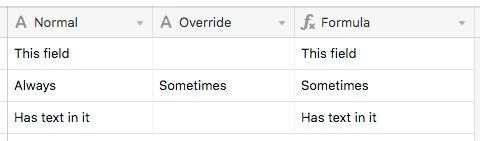
IF(Override, Override, Normal)

To translate: if the {Override} field contains anything, use it. Otherwise grab the contents of the {Normal} field.


  • Author
  • New Participant
  • December 8, 2019

That’s it! Thank you very much. I thought that I had to put an operator like “=” or something after each condition. So I was trying to do:
If(Field “A” > 0, Field “A”, Field B).
But your advice of:
IF({Job # & Client},{Job # & Client},{Job Notes})
Worked Great! Thank you so very much.


Justin_Barrett
Forum|alt.badge.img+21

That’s it! Thank you very much. I thought that I had to put an operator like “=” or something after each condition. So I was trying to do:
If(Field “A” > 0, Field “A”, Field B).
But your advice of:
IF({Job # & Client},{Job # & Client},{Job Notes})
Worked Great! Thank you so very much.


In cases like this, using an operator can actually be too precise of a comparison. When all you want to do is see if the field has anything in it, the field reference alone is a simpler shortcut because it just pulls the data. Any data will evaluate as TRUE; no data will evaluate as FALSE.