Question

Strange problem with AI extrtaction of Address data - preview is Ok but output is not

  • March 10, 2026
  • 8 replies
  • 59 views

Alexey_Gusev
Forum|alt.badge.img+25

Hi,

My problem is that I’m trying to extract some data (Name, Address(city, street,zip), order number, etc..) from filled form files. 
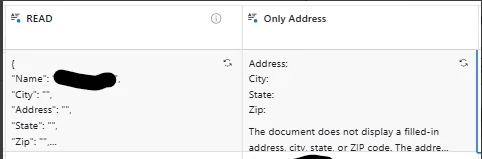
In ~50% it works OK, in rest it cannot retrieve Address-related data. Other data retrieved OK.
i tried to change prompt and model - result is the same or worse. When I changed prompt to very simple - it was able to get Addrees in ¼ of records where it failed to do it before.
The most strange thing - my first record in table is where it cannot pull address
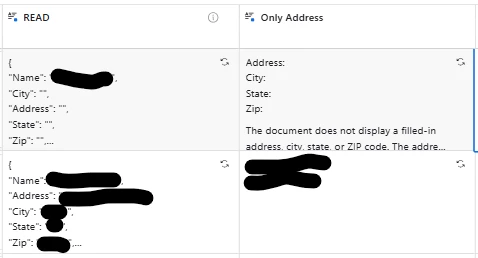
 

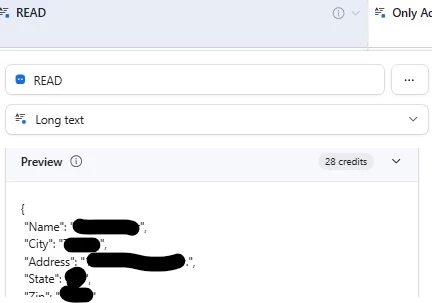
When I set up any of these fields, in preview, output of this file (from first record) is OK, with address, as it shoould be, on both fields. I changed order for ‘City’, ‘Address’ on purpose, to be sure bad result does not ‘cached’ anywhere, but still the same result. Preview is okay. Ouput is not. Other info is OK, like Name. Only Address-related data is empty.
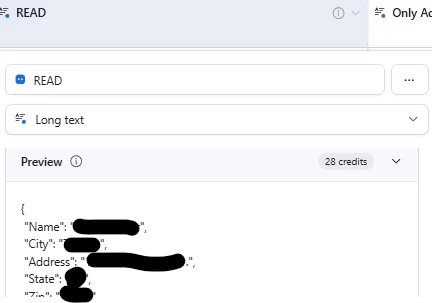
 

Preview is OK. 

8 replies

Tomás Amaro Monaco
Forum|alt.badge.img

Hi Alexey! Could you share a copy of the prompt? Redact any sensitive info from it if you need to. 


nroshak
Forum|alt.badge.img+10
  • Inspiring
  • March 10, 2026

Alexey, you could use a formula with REGEX_EXTRACT to extract the Address field only. I’ve been doing this with my JSON outputs with much success. Try something like this:

IF({Read}=BLANK(),BLANK(),REGEX_EXTRACT({Read}, '(?i)"Address":\\s*"([^"]*)"'))

Omni can help tweak regular expressions for this as well.

-Natalka


Forum|alt.badge.img+7
  • Participating Frequently
  • March 10, 2026

I agree with ​@nroshak. In this scenario, if the first field is properly parsing into a consistent JSON format, you should be using a REGEX_EXTRACT formula to format an “Address only” field rather than relying on an Agent. It will be faster, require less processing, and be more consistent.


Forum|alt.badge.img+9
  • Participating Frequently
  • March 10, 2026

Agree with ​@nroshak and ​@ryanmr as far as using something deterministic when the inputs are consistent and well-formatted.
That said, in general for tasks like this, I’ve found experimenting with the different models has helped me in the past. The mini models will help with cost, and sometimes I’ve found they’re better for these very simple tasks - my intuition is they’re less likely to “overthink” a task, so to speak.


Alexey_Gusev
Forum|alt.badge.img+25
  • Author
  • Brainy
  • March 10, 2026

It seems like my question was not clear.
AI field extracts data from PDF document. It does not output Address at all, shows empty spaces for ~50% or records,
even for the first record in table
 

While preview for the same record have Address
 

If I had some text with Address in any form, I would use regex formula, not AI.


nroshak
Forum|alt.badge.img+10
  • Inspiring
  • March 11, 2026

Oho, I see. My understanding is that the preview won’t necessarily be the same as the output because temperature > 0 and there’s no a way to change that for field agents. Tweaking the prompt could help. The thing I would try first is to include one or more specific examples in the prompt, something like this:

For example, if the PDF document contains a street address, such as “123 Anyplace Lane, Edmonton, Alberta”, you would put this information in the Address field of your JSON response, like so: “Address”:”123 Anyplace Lane”, “City”:”Edmonton”, “State”:”Alberta”. As another example, if the PDF document contained “999 Way Street, Toledo, Ohio,” you would put that in the Address field of your JSON response, like so: “Address”:”999 Way Street”, “City”:”Toledo”, “State”:”Ohio”. If there isn’t any street address in the document, your JSON response should put “Not found” in the address field, like so: “Address”:”Not found”, “City”:”Not found”, “State”:”Not found”.

If that still doesn’t do it, I would try splitting it into 2 agent steps: first agent to extract the text from the PDF, second agent to find the addresses in the text.

Feel free to share your prompt if you want input or feedback!

-Natalka


Alexey_Gusev
Forum|alt.badge.img+25
  • Author
  • Brainy
  • March 12, 2026

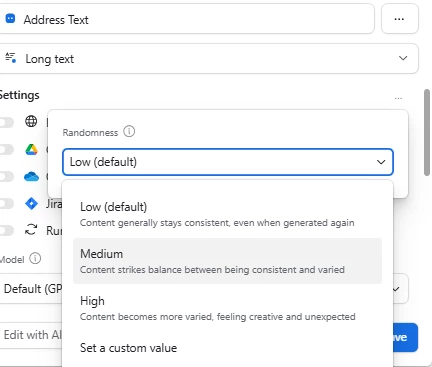
Actually, it’s possible to vary temperature in some way
 

I tried many ways, including “Extract Address in a just text mode”, then output it form that text via formula or via another AI. The problem is on the “Extract Adress” step
It is possible to do “just OCR”, then process but document contains a lot of text and a very little amount of user-entered.
I tried your way, a bit changed, “For example, if the PDF document contains a street address...” - not helpful. Your idea about randomness almost became a “game-changer” in my case. When I set it to ‘Meduim’, it started to fill Address. But the problem is that address data has nothing in common with real document data. It just invents random address.

What really strange - it works other day, like, for 20 records from 130 and don’t work for others. If I try to restart agents, the result is the same, and the same after 2-3 hours. But after 1-2 days it might change.
Week before this problem, the similar prompt worked with the pack of forms of the similar type, as it should be. So I scanned 200+ docs, it gave me 200+ results (with <10 errors or little mistakes). 


nroshak
Forum|alt.badge.img+10
  • Inspiring
  • March 12, 2026

The only way to make LLM output close to repeatable is to set randomness=0, which isn’t possible in the field agent. Even with randomess=0 it’s not totally deterministic. This article has some good explanations about why the output can vary between two runs of the same prompt & same model:  https://www.vincentschmalbach.com/does-temperature-0-guarantee-deterministic-llm-outputs/

in particular (since you are using GPT-4.1) note this bit: 

Consider GPT-4 as an example (which is rumored to use MoE internally). Users observed that even at temperature 0, the same prompt could yield different continuations on different tries. A likely explanation is that GPT-4's backend packs multiple queries together for efficiency, and tokens from different users might contend for the same expert. If in one run your prompt's token got the primary expert and in another run it got a backup expert (due to a busy primary), the resulting token output could diverge. In effect, MoE routing can create a race condition – your tokens might "race" against others for expert capacity. The model's output can thus vary across API calls, even though no traditional random sampling is happening.


You could try tweaking the prompt as I suggested, or try with different models other than the default GPT-4.1.