Solved

Automatically Updating Due Due

  • March 3, 2026
  • 4 replies
  • 22 views

Forum|alt.badge.img

I work for a small nonprofit and am trying to build a base to track our required legal filings. I have tried generating formulas and/or automations to help create an auto updating due date field but nothing that I have found to try is working.


The base has 2 tables, one with list of the required filings and one with the submissions, linked to the proper required filing. On the required filings table I have a field with the current due date, a rollup showing the most recent submission date, and a single select field for the frequency of the required filing (annual, etc). I want the current due date to update when the year in the most recent submission and the current due date match. The new due date would be based on the single select field where Annual = advance 1 year, Biennial = advance 2 years, Quinquennial = advance 5 years, and One-Time = remove the date. 


For example, if our Form 990 has a current due date of May 15, 2026 and is due annually, when we add the filing listing that it was submitted on March 2, 2026 it should update that current due date to May 15, 2027. 


As part of my attempts to make this work I do have a formula field that can serve as an automation trigger, it compares the years and returns “Match” if they match and “No Match” if not.

Best answer by ssundaram18

Hi! 

You could set up a formula field that reads your single select, match (Match/No Match) formula, and uses the DATEADD function (something like the example below). Sounds like the logic needed in the formula is: when due date and most recent submission date are equal (when your match field=”match”), review the single select field, if annual add 1 year to the due date, if biennial add two years to the due date, so on and so forth. 

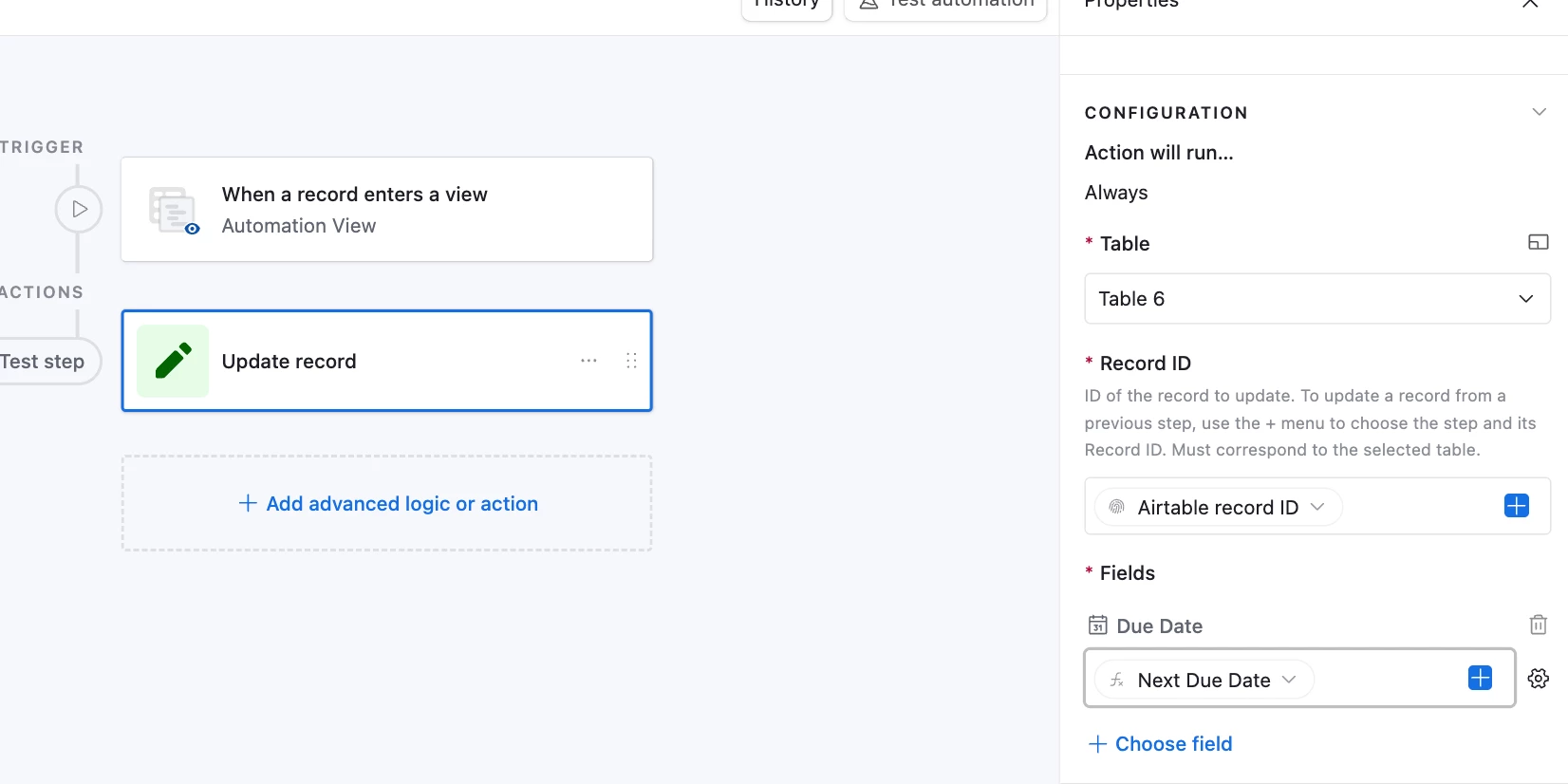
Once that formula field is set up, you will need an automated workflow where the action is updating a record. I would use ‘When a record enters a view’ as the trigger (view could be filtered to Match field is Match). When it enters that view, the action should ‘update a record’. 

Formula -- 

IF( {Match} = "Match",

  IF( {Updated Status} = "Annual", DATEADD({Due Date}, 1, 'years'),

    IF( {Updated Status} = "Biennial", DATEADD({Due Date}, 2, 'years'),

      IF({Updated Status} = "Quinquennial", DATEADD({Due Date}, 5, 'years'),

        IF({Updated Status} = "One-Time", BLANK(), BLANK())))), BLANK()) 


Automation set up --

I hope this helps! And would love to know if there are other ways to achieve this as well! 


4 replies

ssundaram18
Forum|alt.badge.img+1
  • New Participant
  • Answer
  • March 3, 2026

Hi! 

You could set up a formula field that reads your single select, match (Match/No Match) formula, and uses the DATEADD function (something like the example below). Sounds like the logic needed in the formula is: when due date and most recent submission date are equal (when your match field=”match”), review the single select field, if annual add 1 year to the due date, if biennial add two years to the due date, so on and so forth. 

Once that formula field is set up, you will need an automated workflow where the action is updating a record. I would use ‘When a record enters a view’ as the trigger (view could be filtered to Match field is Match). When it enters that view, the action should ‘update a record’. 

Formula -- 

IF( {Match} = "Match",

  IF( {Updated Status} = "Annual", DATEADD({Due Date}, 1, 'years'),

    IF( {Updated Status} = "Biennial", DATEADD({Due Date}, 2, 'years'),

      IF({Updated Status} = "Quinquennial", DATEADD({Due Date}, 5, 'years'),

        IF({Updated Status} = "One-Time", BLANK(), BLANK())))), BLANK()) 


Automation set up --

I hope this helps! And would love to know if there are other ways to achieve this as well! 


DisraeliGears01
Forum|alt.badge.img+21

You should be able to accomplish this in one formula field I think, no automations necessary. I ended up with...

IF(
DATETIME_FORMAT(Start, 'YYYY') = DATETIME_FORMAT({Submitted Date}, 'YYYY'),
SWITCH(Select,
"Annual", DATEADD(Start, 1, 'years'),
"Biennial", DATEADD(Start, 2, 'years'),
"Quinquennial", DATEADD(Start, 5, 'years'),
"One-Time", BLANK()),
{Submitted Date})

I’m using a bit of generic field names, but that essentially looks at Start Date field and Submitted Date field, checks whether the year matches, and if it does it performs a SWITCH to add the appropriate length to the Start date. If it doesn’t match I have it just keep the submitted date but you can do whatever there. I find SWITCH easier than nested IFs


Forum|alt.badge.img
  • Author
  • New Participant
  • March 3, 2026

Hi! 

You could set up a formula field that reads your single select, match (Match/No Match) formula, and uses the DATEADD function (something like the example below). Sounds like the logic needed in the formula is: when due date and most recent submission date are equal (when your match field=”match”), review the single select field, if annual add 1 year to the due date, if biennial add two years to the due date, so on and so forth. 

Once that formula field is set up, you will need an automated workflow where the action is updating a record. I would use ‘When a record enters a view’ as the trigger (view could be filtered to Match field is Match). When it enters that view, the action should ‘update a record’. 

Formula -- 

IF( {Match} = "Match",

  IF( {Updated Status} = "Annual", DATEADD({Due Date}, 1, 'years'),

    IF( {Updated Status} = "Biennial", DATEADD({Due Date}, 2, 'years'),

      IF({Updated Status} = "Quinquennial", DATEADD({Due Date}, 5, 'years'),

        IF({Updated Status} = "One-Time", BLANK(), BLANK())))), BLANK()) 


Automation set up --

I hope this helps! And would love to know if there are other ways to achieve this as well! 


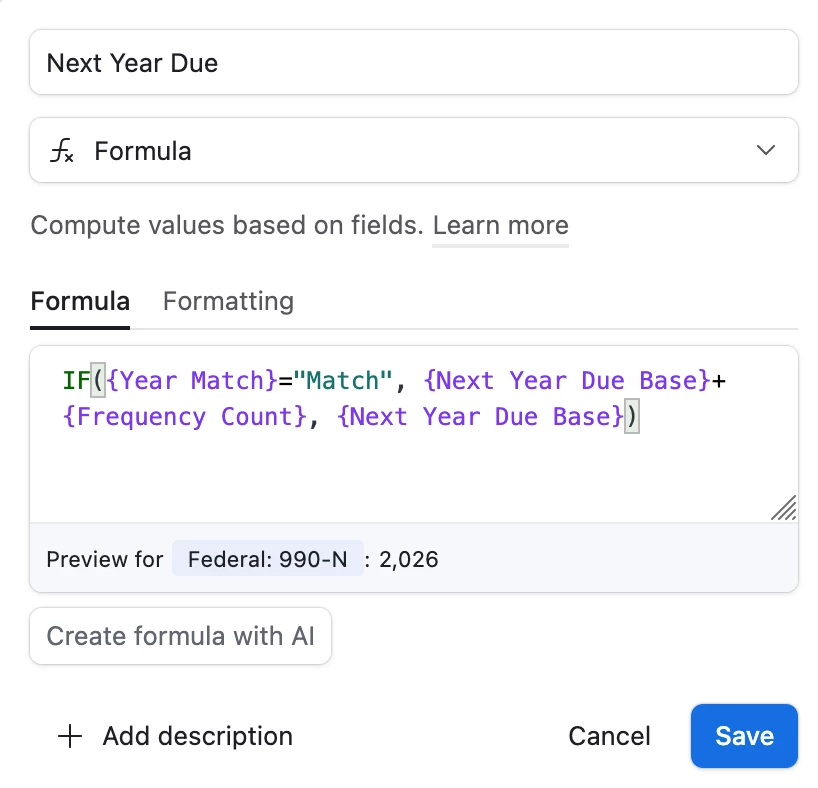
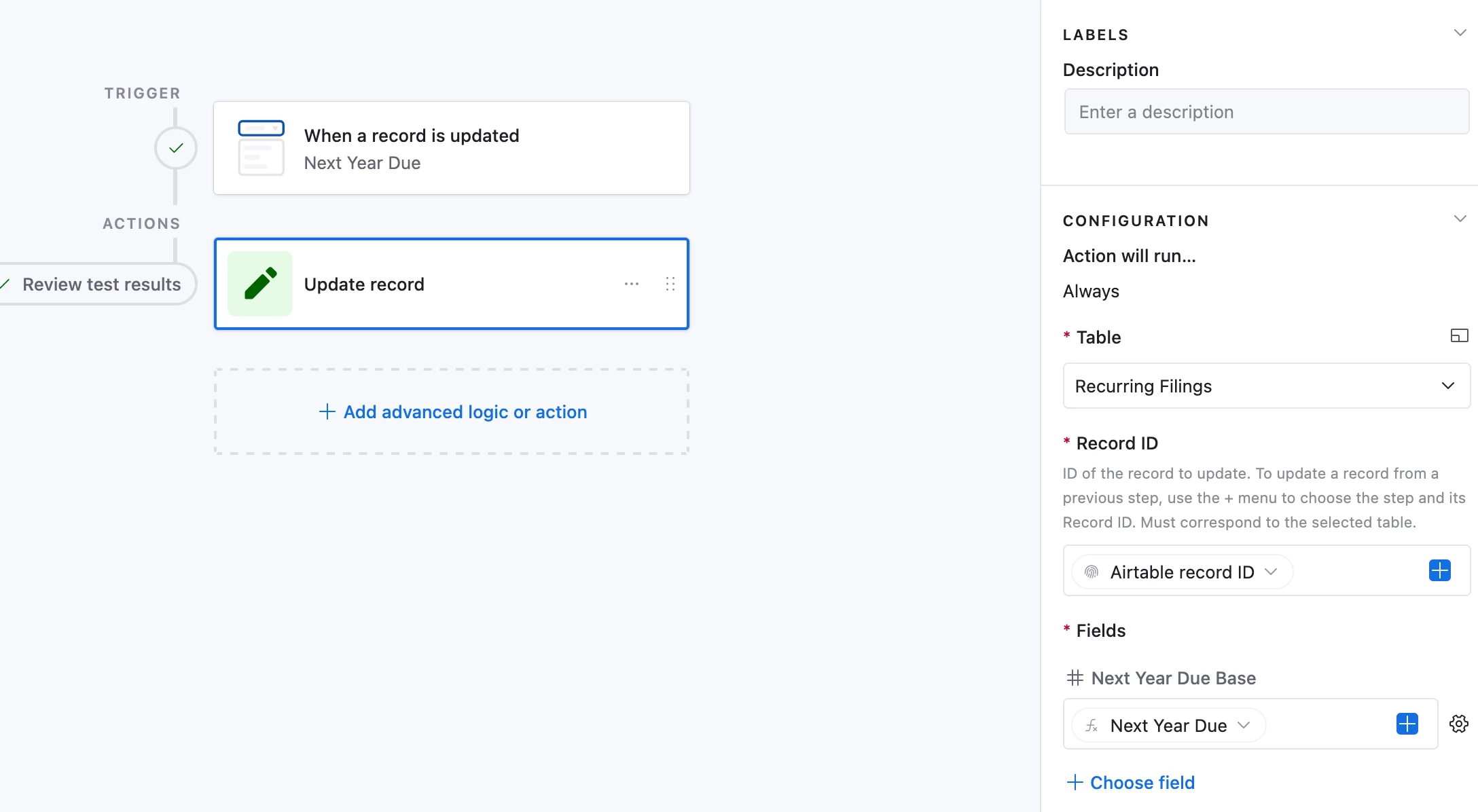
This worked, thank you!! I did find another complicated way to do it that required adding several unnecessary fields and didn’t actually use a date field at all. First, I added a formula field that looks at the single select frequency and generates a number based on the selection (annual = 1, etc). I created a number field that I titled as “next due year base” which served as a starting year for the due date. I changed my match to check against that (set it up to not show the thousands separator). To calculate the next year a form is due, I did a formula field that said if the years matched, add that frequency count field to the base year.


From there, I set up an automation that when the next year due field updated, to update the “next year due base” field with that value. 


I also created a single line text field with the month/day of the due date since that is static each time. To get a field with the full updated due date, I did a CONCAT formula to combine the month/day field with the next year due. 

In the end it worked, but I’m very happy to now get to delete a bunch of unnecessary fields!


ssundaram18
Forum|alt.badge.img+1
  • New Participant
  • March 3, 2026

You should be able to accomplish this in one formula field I think, no automations necessary. I ended up with… 

IF(
DATETIME_FORMAT(Start, 'YYYY') = DATETIME_FORMAT({Submitted Date}, 'YYYY'),
SWITCH(Select,
"Annual", DATEADD(Start, 1, 'years'),
"Biennial", DATEADD(Start, 2, 'years'),
"Quinquennial", DATEADD(Start, 5, 'years'),
"One-Time", BLANK()),
{Submitted Date})

I’m using a bit of generic field names, but that essentially looks at Start Date field and Submitted Date field, checks whether the year matches, and if it does it performs a SWITCH to add the appropriate length to the Start date. If it doesn’t match I have it just keep the submitted date but you can do whatever there. I find SWITCH easier than nested IFs

I will check out the SWITCH function, thank you!