Question

Carrying Values Forward in a Log Using Airtable Automations (Free Tier)

  • March 30, 2026
  • 4 replies
  • 34 views

Forum|alt.badge.img

I’m trying to configure a log-style table in Airtable where, when a new record is created, certain fields are automatically populated using values from the most recent existing record.


The problem I’m running into:

  • Using Automations → Find records, I can filter and sort records so that the correct prior record is identified
  • However, Automations treat the result of Find records as a list, even when sorted and limited to one record
  • Because of this, I can’t reliably reference a single previous record’s field value when updating the newly created record
  • I’m using the Airtable free tier, so scripting and paid features are not available

What I’m trying to understand:

  • Is there a supported way on the free plan to carry values forward from the most recent existing record into a new record using automations?
  • If this isn’t directly possible, what table design or workaround is required to achieve this behavior within Airtable’s constraints?

Any guidance on what can be done with free-tier Airtable automations to support this pattern would be appreciated.


4 replies

anmolgupta
Forum|alt.badge.img+3
  • Participating Frequently
  • March 30, 2026

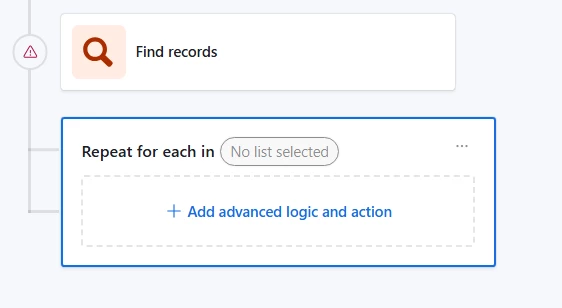
Why don’t you use “Repeating Logic” block in automation after “Find Record” with limit set to 1 record? This will help you loop over every record found in the list and do whatever you want to do. But since you are setting conditions and limit such that you are expecting exactly 1 record from Find Records, your loop win run only once.


nroshak
Forum|alt.badge.img+10
  • Inspiring
  • March 31, 2026

I agree with Anmol. In addition to that, I suggest using a self-link instead of populating values. So, your automation would just find the previous record and link to it. Then use lookup fields instead of inserting values from the previous record. That way, if you ever make a mistake in one record, you don’t have to edit other records to fix it.

A different way you could do this is to use “Deep Link” and an AI prompt to auto-populate the link with the previous record. For example, if you have an autoincrement number field, you could add a formula field to get the previous number (n-1) and tell Deep Link to find the record with that number. But, this would use AI credits.

-Natalka


ScottWorld
Forum|alt.badge.img+35
  • Genius
  • March 31, 2026

@CRMichalk 

If you’re trying to create your new record based on the existing record that you’re looking at, you don’t even need to use a “Find Records” step. You can just pull the values directly from the record that triggered the automation.

- ScottWorld, Expert Airtable Consultant 


Forum|alt.badge.img+4
  • Participating Frequently
  • March 31, 2026

This is quite a challenge to do on the free tier, but there are some options that can help you with this challenge.

One potential solution would be to create a dedicated single row in a separate table, something like “Config” or “Defaults that holds the “current defaults” that you will carry forward.  You can then create an automation that triggers when a new log record is created.  This will read from the fixed row, and then copy the values into a new log record, finally it will update the config row for the next run.

There is no need for sorting or “Find Records” that is needed and I would be happy to walk through the automation steps with you if you prefer.