Question

Extracting data from a csv or json attachment

  • February 28, 2026
  • 3 replies
  • 51 views

CKARC
Forum|alt.badge.img+10

I am importing records that have attachments, and that attachment can be csv or text or json  . . whatever. Airtable ai wont read it, can a script in an automation read data from an attached non image file?

3 replies

TheTimeSavingCo
Forum|alt.badge.img+31

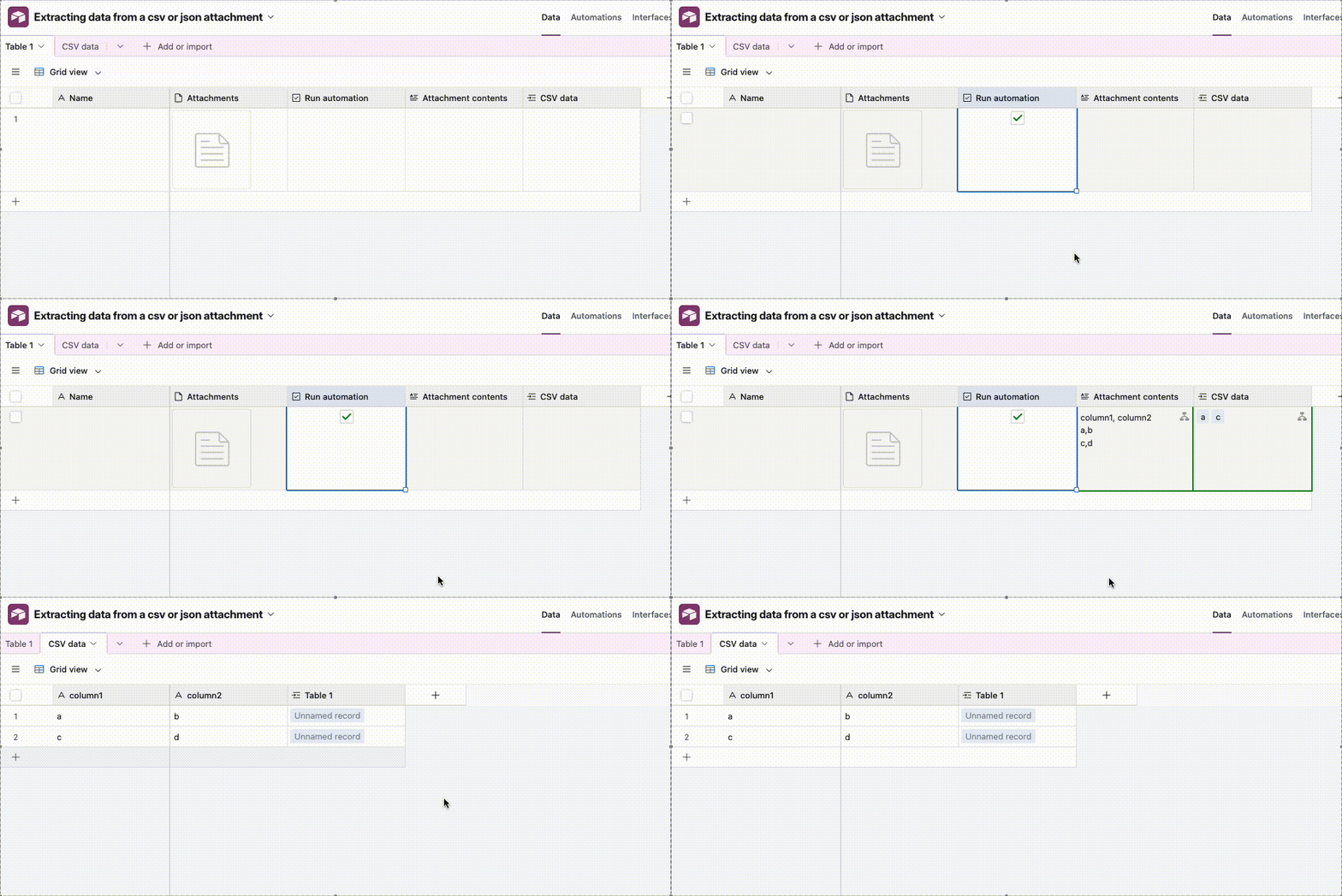
Yeap, I’ve set up an example here for you to check out where we use a script to parse a CSV and then use a repeating group to create one record per line in the CSV


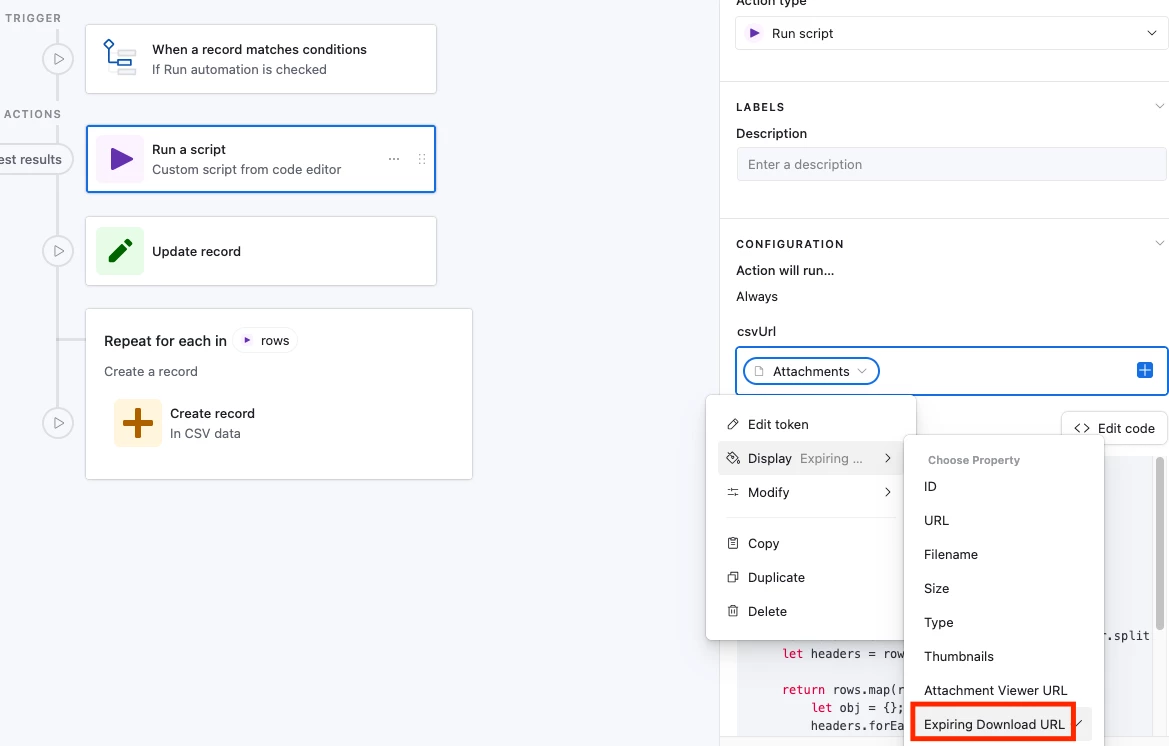
We need to use the expiring download URL for the script input variable:


Here’s the CSV text:

column1, column2
a,b
c,d

And here’s the code:

let { csvUrl } = input.config();

let res = await fetch(csvUrl);
let csvText = await res.text();

// output full raw csv
output.set("csvText", csvText);

function parseCsv(text, delimiter = ",") {
let rows = text.trim().split("\n").map(r => r.split(delimiter));
let headers = rows.shift();

return rows.map(row => {
let obj = {};
headers.forEach((h, i) => {
obj[h.trim()] = (row[i] || "").trim();
});
return obj;
});
}

let records = parseCsv(csvText);

output.set("rows", records);


Forum|alt.badge.img
  • New Participant
  • March 3, 2026

Hello,

when it comes to looking inside files, but a script in an automation can totally act as its eyes. It basically just grabs the file URL, "reads" the text, and then spits it into a long text field where the AI can finally see it.

It works perfectly for JSON, CSV, and TXT because those are just plain text. If you try it with a PDF or a Word doc, the script will just see gibberish, so stick to those "flat" file types.

Script grabs the attachment URL.

It "fetches" the content of that URL.

It writes that content into a regular text field in your record.

Then you point your Airtable AI at that text field.


ScottWorld
Forum|alt.badge.img+35
  • Genius
  • March 4, 2026

I have a client who does this every day, multiple times per day.

The process is completely automated using Make’s CSV modules along with Make’s Airtable modules. (You can also use Make’s JSON modules if you want to parse JSON files.)

I demonstrate how to automatically import the data from CSV files into Airtable on this Airtable podcast episode.

NOTE: In the video, I pull the CSV files from Google Drive. But you can easily pull the CSV files from Airtable attachment fields as well.

If you’ve never used Make before, I’ve assembled a bunch of Make training resources in this thread. For example, here is one of the ways that you could instantly trigger a Make automation from Airtable.

Hope this helps!

If you have a budget and you’d like to hire the best Airtable consultant to help you with this or anything else that is Airtable-related, please feel free to contact me through my website: Airtable consultant — ScottWorld