Solved

Find Duplicate Email

  • July 14, 2023
  • 6 replies
  • 164 views

Forum|alt.badge.img+4
  • Participating Frequently

Hello guys,

I'm trying to create an automation that:

When a new record is created -> Compare "E-mail" field with existing records -> If true, do something.

The issue I'm facing is that: The automation is comparing the email to the contact being created instead contacts already created and always return "True" obviously.

I'm I doing something wrong? Or is there any way other way to achieve this?


Thanks in advanced

Best answer by TheTimeSavingCo

Thanks a lot for the reply.

Actually I found another way to compare because I have another table where I have a column with some of those email. So all good 🙂

Although I'm curious about the length property.

Does this means the number of character a value have?

What does the length propriety specifies?


Glad you got it sorted!

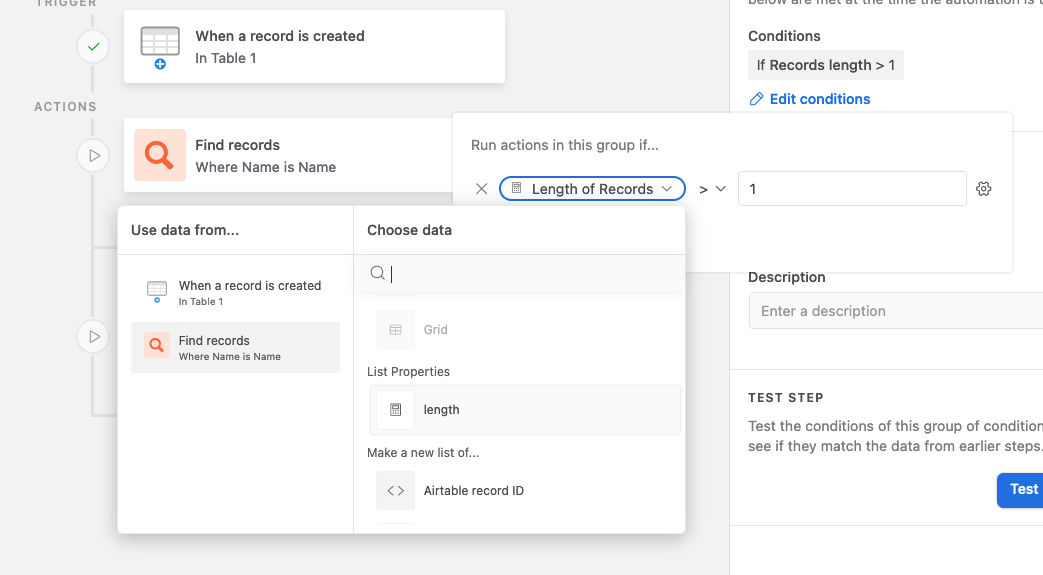
The length property refers to the number of results that it found

If there were 3 results, it would look like:
Records = [record1, record2, record3]

And thus the length property of "Records" is 3

If there was 1 result, it'd be:
Records = [record1]

And so the length property is 1.  Does that make sense?

6 replies

TheTimeSavingCo
Forum|alt.badge.img+31

Hmm, I'm assuming the new record is being created in "Table 1" with that email value, and you want to make sure that's the only record with that email?

If so, try adding a conditional logic step checking the length of the result from your "Find Record" action, and if it's more than 1 (i.e. it's found more than one record), then you'll know that there's another record with the same email

What's the next step of your automation going to be?


Forum|alt.badge.img+4
  • Author
  • Participating Frequently
  • July 14, 2023

Hmm, I'm assuming the new record is being created in "Table 1" with that email value, and you want to make sure that's the only record with that email?

If so, try adding a conditional logic step checking the length of the result from your "Find Record" action, and if it's more than 1 (i.e. it's found more than one record), then you'll know that there's another record with the same email

What's the next step of your automation going to be?


Thanks or your reply 🙂

"Hmm, I'm assuming the new record is being created in "Table 1" with that email value, and you want to make sure that's the only record with that email?"

Exactly. I want that someone cannot send this request more than once on my website so don't allow the same e-mail twice.

I add the conditional logic step at the end of the automation but I'm not sure how the "length" parameter works.

I still have the same options to choose from on the condition. I choose:

If "Email" is "Email"

but it's still comparing the email of the record being created with that record and not old records that I already have on my database.

Next step it's just to add a string like "Duplicated email" on another column on that record.


Thanks


TheTimeSavingCo
Forum|alt.badge.img+31

Thanks or your reply 🙂

"Hmm, I'm assuming the new record is being created in "Table 1" with that email value, and you want to make sure that's the only record with that email?"

Exactly. I want that someone cannot send this request more than once on my website so don't allow the same e-mail twice.

I add the conditional logic step at the end of the automation but I'm not sure how the "length" parameter works.

I still have the same options to choose from on the condition. I choose:

If "Email" is "Email"

but it's still comparing the email of the record being created with that record and not old records that I already have on my database.

Next step it's just to add a string like "Duplicated email" on another column on that record.


Thanks


Roger that, thanks for the details

Yeah, you need to set up your automation to check whether the length's more than 1:

If it is, mark the checkbox

I've set it up for you here to experiment with


Forum|alt.badge.img+4
  • Author
  • Participating Frequently
  • July 15, 2023

Roger that, thanks for the details

Yeah, you need to set up your automation to check whether the length's more than 1:

If it is, mark the checkbox

I've set it up for you here to experiment with


Thanks a lot for the reply.

Actually I found another way to compare because I have another table where I have a column with some of those email. So all good 🙂

Although I'm curious about the length property.

Does this means the number of character a value have?

What does the length propriety specifies?


TheTimeSavingCo
Forum|alt.badge.img+31

Thanks a lot for the reply.

Actually I found another way to compare because I have another table where I have a column with some of those email. So all good 🙂

Although I'm curious about the length property.

Does this means the number of character a value have?

What does the length propriety specifies?


Glad you got it sorted!

The length property refers to the number of results that it found

If there were 3 results, it would look like:
Records = [record1, record2, record3]

And thus the length property of "Records" is 3

If there was 1 result, it'd be:
Records = [record1]

And so the length property is 1.  Does that make sense?


Forum|alt.badge.img+4
  • Author
  • Participating Frequently
  • July 16, 2023

Glad you got it sorted!

The length property refers to the number of results that it found

If there were 3 results, it would look like:
Records = [record1, record2, record3]

And thus the length property of "Records" is 3

If there was 1 result, it'd be:
Records = [record1]

And so the length property is 1.  Does that make sense?


Oh that makes a lot of sense.

Thanks a lot for the explanation 😊🙏

I didn't get it before because I thought was something like the "length" in characters of a string or number.

Anyway, much thanks again 😊😊