
Question

How to set up email notification automations across multiple tables

  • April 25, 2026
  • 2 replies
  • 18 views

jpcubish
Forum|alt.badge.img+3

I have created a “Release Planner” base in Airtable for coordinating all the steps we have to complete for a software release. I created one table called ‘Template”, and I copy that template to a new table for each release.

Now, I want to set up automations to notify me and the assigned to person daily while any task is open, across all tables. 

I seem only to have been able to set it up on one, but then it doesn’t copy over when I copy the template to a new table. And I can’t seem to set it up the right way every time, plus it’s time consuming. 

Does anyone have a hack for creating a base-wide notification? Or a way to copy automations across tables?

Happy to do scripting, but I would need detailed instructions, as I haven’t done that in Airtable before.

Thank you!

2 replies

ScottWorld
Forum|alt.badge.img+35
  • Genius
  • April 26, 2026

That would actually not be the proper way to setup your base, because you will run into an endless amount of problems down the line… and you’re already running into one of the key problems.

That setup might be okay for a spreadsheet like Excel or Google Sheets, but a database works differently (and better) than a spreadsheet.

You can still have a master table called “Template” or “Steps Template”, which lists all of your software release steps that you want to apply to each software release.

However,  when it’s time to actually apply the steps to a new software release, you always want to put ALL of your template steps for ALL of your software releases into the exact same unified table. You can call this unified table something as simple as “Steps” or “New Release Steps”.

But each row in your “Steps” table would have a linked record field, which you would link to one of your new releases in your “New Release” table.

Then, once all of your steps for all of your new releases are combined into the same table, you can filter that table by the new release that you want to see at-a-glance, and even better, you can unlock the power of interfaces to show you all the release steps as a list/grid/kanban/etc. that are linked to each new release.

You might get some benefit from taking my free Airtable training course at this link, which is 100% free if you sign up for a free 30-day trial with LinkedIn Learning.

Note that my course is EXTREMELY outdated because it was created way back in 2020 using one of the earliest versions of Airtable. It was created before automations even existed, and it was created years before interfaces existed! It was practically version 1.0 of Airtable back then! Lol.

However, the core concepts of building a base remain the same to this day — such as working with linked record fields, how to properly structure your base, and working with lookup fields.

ALTERNATE APPROACH:

There is also another way of doing this as well, which uses Airtable’s Record Templates feature. This can be automated as well. You would STILL need to combine all of your “new release steps” into one unified table, but you wouldn’t need the “Templates” table.

Hope this helps!

If you have a budget and you’d like to hire the best Airtable consultant to help you with this or anything else that is Airtable-related, please feel free to contact me through my website: Airtable consultant — ScottWorld


TheTimeSavingCo
Forum|alt.badge.img+32

Happy to do scripting, but I would need detailed instructions, as I haven’t done that in Airtable before.

Hm, yeah you could technically do this with an automation that runs on a schedule, and it’ll have a Run Script action that’ll look through all your task tables, check the tasks, and then send out notifications as needed?  Before you do that, I’d highly suggest restructuring your base so that you end up with 3 tables instead

  1. Releases
  2. Tasks - Linked to Releases
  3. Task Templates - This’ll be your current ‘Template’ table

And you’d have an automation that you could trigger for each Release record that would, for this Release,

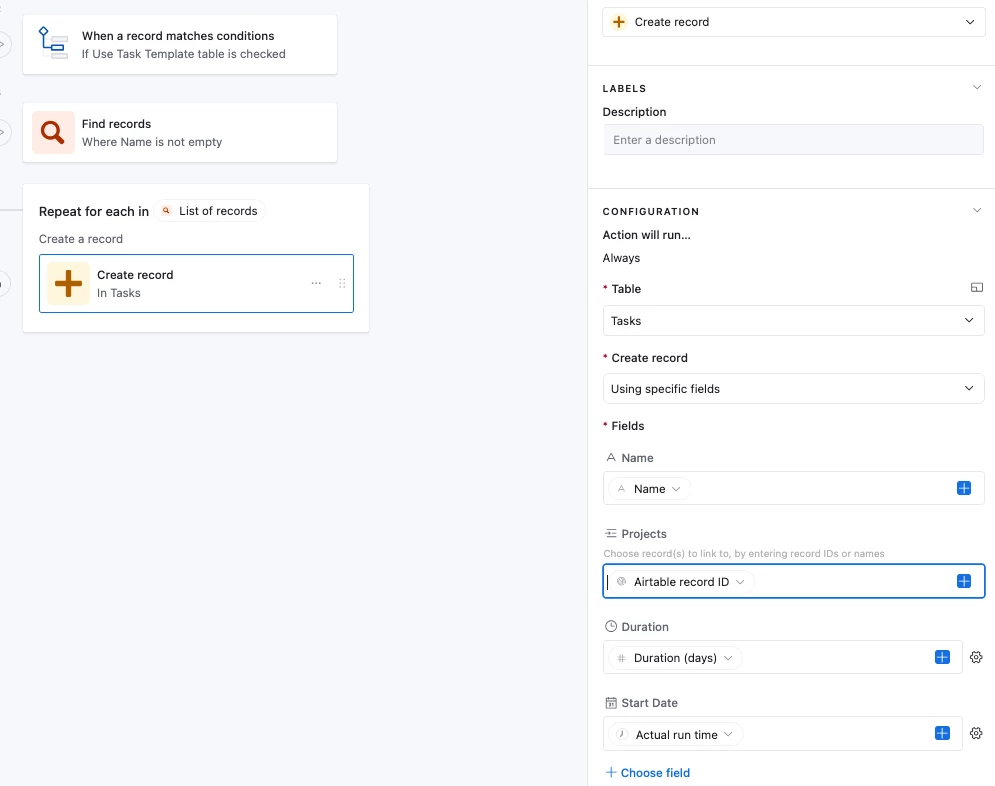
  1. Grab all the records the Task Templates table
  2. Using a Repeating Group, create one record per Task Template record found

This way you’d only need one automation that sends out notifications set up in the ‘Tasks’ table, and it’d work for all Task records for all Releases, does that make sense?  And you’d create views filtered by the ‘Releases’ linked field so that you’re only looking at active Releases

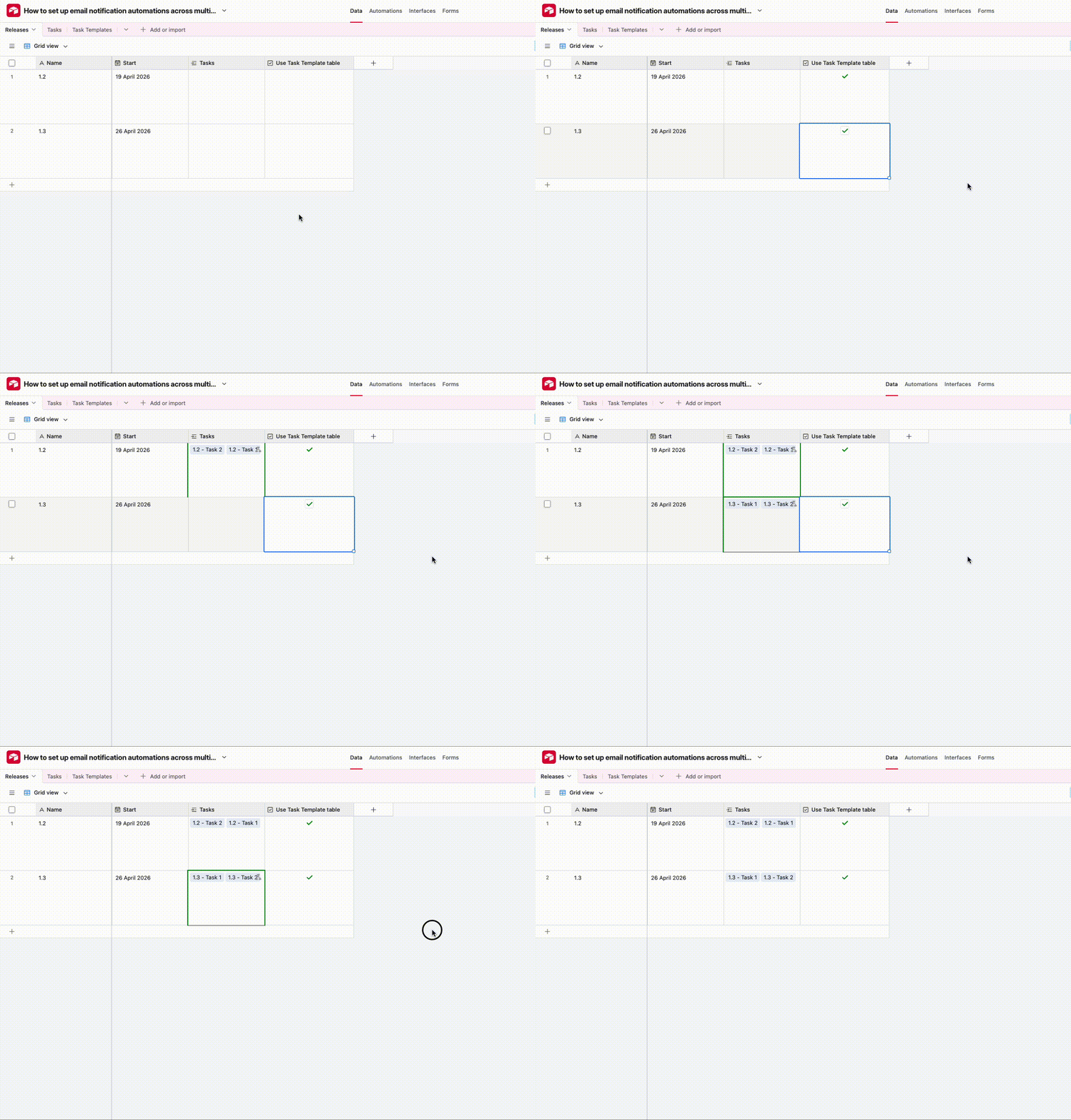
I’ve set it up here for you to check out!  

And here’s how the automation looks:


If your task template is more complicated and has date dependencies (e.g. Task A should be completed 5 days before release date) and predecessors (Task B is linked to Task C, and if Task B’s due date updates then Task C’s due date should get updated as well) then I’d recommend you use Record Templates instead though, and the base linked above also has Record Templates set up as an example!