Question

Is Paste Pixel still alive, or are there similar alternatives for e-mail tracking within Airtable?

  • March 1, 2026
  • 9 replies
  • 83 views

Forum|alt.badge.img+17

Hi,

We’re looking at adding e-mail tracking (open, follow links etc) to our mails that currently are sent from Airtable with its Gmail function. This is for individual mails to leads, not bulk mailing, so no need to add any dedicated mailing services to the stack.

I learnt about Paste Pixel from the community here, but now they have a notice saying they don’t take new customers when trying to sign up, and I’m getting no response on my mails.

Would anybody know if Paste Pixel is still alive, or if there are other similar services? I’m familiar with BaseMailer, but their pricing seems very steep, and it may be unnecessarily complex for our current needs.

We use Zapier, if that would help finding other alternatives.

Rgds,

Björn

9 replies

leok
Forum|alt.badge.img+2
  • Participating Frequently
  • March 1, 2026

Hey ​@0800-grizzly Björn,


I haven't tried this myself with Zapier but I think it can work. Let me share two ways you could do this.


Option 1 - Zapier Webhook

In Zapier, create a new Zap and choose "Webhooks by Zapier" then "Catch Hook" as the trigger. Zapier will give you a link that looks like this:

https://hooks.zapier.com/hooks/catch/123456/abcdef/

In your Airtable automation, when you build the email, paste this at the bottom of the email body and add the record ID at the end so you know which lead opened it:

<img src="https://hooks.zapier.com/hooks/catch/123456/abcdef/?lead={{Record ID}}" width="1" height="1" style="display:none">

When the person opens the email, their email app loads that tiny hidden image and Zapier catches it. You can then add a second step in the Zap to update the Airtable record, for example check a box called "Opened" and add the time.

One thing to know: Zapier does not send back a real image, so technically the pixel is empty. Since it is hidden and tiny, the reader never sees it. Some email apps might block it but most will not.

If you also want to track link clicks, this gets a bit more complicated and a separate tool might be easier for that part.


Option 2 - A small custom service

If you have access to a developer, a small tracking service is not that much work to build. It would do a few things. First it gives you a unique tracking ID for each email before you send it. Then it serves a real tiny image when the email is opened. Then it updates your Airtable record directly. For link tracking, it would catch the click, record it, and then send the reader to the right page.

Platforms like Railway or Render can host something like this for free or very low cost. This option is more reliable than the Zapier one and you keep all the data yourself.

For your situation I would try the Zapier route first since you already have it. If it is not enough then the custom service is the way to go.

I also searched around for other simple tools that have an API for this kind of tracking but could not find anything that would fit well.

Hope this helps. If you need a hand setting any of this up, feel free to ask.

Leo


Forum|alt.badge.img+17
  • Author
  • Known Participant
  • March 2, 2026

Thanks ​@leok for this idea! In principle it sounds like it could work with your Zapier approach. I’ll test that to see how it plays out in practice. I’ll be missing link clicks with that solution so not ideal, but at least a first step.

The second suggestion I think is more work than connecting to a dedicated mailing service like MailerLite.

Cheers,

Björn


leok
Forum|alt.badge.img+2
  • Participating Frequently
  • March 2, 2026

Hi ​@0800-grizzly Björn, glad it was helpful! Hope this gives you enough to start with.

One small thing to keep in mind with any tracking approach. I noticed this with Airtable's own emails actually. When I click a link in one of their mails, my browser blocks it and shows a warning because the link goes through a tracking redirect. Some of your leads might see the same depending on what browser or ad blocker they use. Just something to be aware of before going live with it.

Good luck, let us know how it goes!

Leo


Forum|alt.badge.img+17
  • Author
  • Known Participant
  • March 2, 2026

Thanks ​@leok Leo, I managed to do a simple proof-of-concept based on your instructions. Very helpful!

I guess there’s no difference between this approach and what the mailing services do, except for perhaps offering customised domains. That could help with some blocking issues, but in my tests neither the Outlook or the Gmail client had any problems with the invisible pixel.

From your message I understand that you have implemented link click monitoring also, is that right? I see your warning about browser warnings, but would like to test.

Would you be able to describe how to do that also?

Rgds,

Björn


leok
Forum|alt.badge.img+2
  • Participating Frequently
  • March 2, 2026

Hi ​@0800-grizzly Björn, for link click tracking I use Brevo and Resend in my projects and both work really well with Airtable. You do need to write a small script to connect them but it is not that hard, and if you ask ChatGPT something like "write me an Airtable compatible script to send email via Brevo API and track opens and clicks" it will give you clear instructions and ready to use code.

Here is how each one works:

Brevo

Create a free account at brevo.com and grab your API key from settings. In your Airtable automation, add a "Run script" step and use this:

const record = input.config();

const response = await fetch("https://api.brevo.com/v3/smtp/email", {
method: "POST",
headers: {
"Content-Type": "application/json",
"api-key": "YOUR_BREVO_API_KEY"
},
body: JSON.stringify({
sender: { name: "Leo", email: "you@yourdomain.com" },
to: [{ email: record.leadEmail, name: record.leadName }],
subject: "Your subject here",
htmlContent: "<p>Your email body here</p>",
tags: [record.recordId]
})
});

const data = await response.json();
console.log(data);

Brevo automatically wraps your links for click tracking and inserts the open pixel. The tags field passes your Airtable record ID so you can match events back to the right record later. Free plan gives you 300 emails a day.

Resend

Create a free account at resend.com and use this:

const record = input.config();

const response = await fetch("https://api.resend.com/emails", {
method: "POST",
headers: {
"Content-Type": "application/json",
"Authorization": "Bearer YOUR_RESEND_API_KEY"
},
body: JSON.stringify({
from: "Leo <you@yourdomain.com>",
to: record.leadEmail,
subject: "Your subject here",
html: "<p>Your email body here</p>",
tags: [{ name: "record_id", value: record.recordId }]
})
});

const data = await response.json();
console.log(data);

Free plan is 3000 emails a month.

Getting the data back into Airtable

Both tools have a dashboard where you can see opens and clicks directly, which is honestly enough for most cases. You can also set up webhooks to write events back into your Airtable records automatically, but keep in mind that every open and click fires a new automation run. It can eat through your monthly quota pretty fast. If you do go that route, I would only enable it for clicks and skip open events.

I also came across another tracker recently that could work for this but it also needs some scripting to connect with Airtable so the effort is similar.

If you need a hand setting this up feel free to reach out.

Leo


Forum|alt.badge.img+17
  • Author
  • Known Participant
  • March 2, 2026

@leok Leo, thank you for the walk-through. 

I’m a bit confused however, why do you use all three mail sending options - Airtable built-in, Brevo and Resend?

We currently send (almost) only one-on-one mails based on leads’ initiatives from Meta ads. Registering for discovery calls, reminding about coming meetings, thank you and summary mails after meetings, order confirmation etc. I guess this is what Brevo and Resend call transactional mails (new term to me).

We use Google Workspace with our own domain. How would a Brevo/Resend fit into this architecture? Would mails sent via them still be routed out through Google, and hence be visible in the ‘Sent mails’ there?

In our mails, we use text templates from Airtable tables, and combine them in the Airtable “composing” field with sections that use Airtable variables for e.g. name, dates, and amount of products. Could we still use that field for putting the mail together, and then just have it sent out via Brevo/Resend? Or does the whole mail need to be composed in the external service?

For bulk mailing and actual campaigns I can see the point of Brevo/Resend, but for our current use cases the only thing I clearly identify as a plus is monitoring of link clicks, and general deliverability monitoring, perhaps also monitoring of spam marking.

Sorry for the surely stupid question, this is just all new stuff to me.

Rgds,

Björn


Forum|alt.badge.img+17
  • Author
  • Known Participant
  • March 2, 2026

@leok, Leo, I stumbled on a problem when testing the Zapier webhook for mail opens. Or, when I first made a proof-of-concept it worked nicely as expected. Now when I tried to start moving it to production, it behaves differently.

Now the webhook gets triggered several times before the mail has been opened (6-8 times). The webhook evens gets triggered before I send the mail (manually from browser Gmail client). Initial tests it didn’t trigger before I opened the mail.

Any clues what’s happening, what I could do to debug?

And further, seeing this may not work after all, do you see a possibility to build trackable link clicks with just Zapier webhooks? I looked at PastePixel’s implementation, and it seemed to be an URL forwarding, from a PastePixel URL to the end URL. Zapier doesn’t seem to support this in itself, but could one build some automatic forwarder for the webhook URL…? Don’t know it this makes sense at all :).

Cheers,

Björn


Forum|alt.badge.img+17
  • Author
  • Known Participant
  • March 2, 2026

@leok, Leo, and anybody else who finds this, I discovered that Make can execute a URL re-direct after triggering their webhook. Quick proof-of-concept done, need to look deeper into it.

Rgds,

Björn


leok
Forum|alt.badge.img+2
  • Participating Frequently
  • March 3, 2026

Hi Björn, I think I overcomplicated things in my earlier messages, let me go through your questions one by one.

I use Resend for my own projects and Brevo for my clients. Brevo has a really clean interface and covers everything my clients need. I actually connect it directly to their Airtable interfaces so they send all their emails from there without touching Brevo at all.

Yes, what you are describing are transactional emails, which are one to one emails sent automatically based on something the recipient did. Brevo and Resend handle these really well.

You can use your own Google Workspace domain and email address with both tools, but the emails will not appear in your Gmail sent folder since they go through their own servers. A simple workaround is to add yourself as BCC on every email, that way you always get a copy in your inbox.

Your Airtable templates work exactly the same way. You compose everything in Airtable as you do now and just pass the finished email to Brevo or Resend. Nothing changes on the composing side. We use Brevo for both bulk and one to one emails and it handles both really well.

Not a stupid question at all, happy to answer. If anything I should apologize for using too much technical language.

On the Zapier webhook issue, what you are seeing is email clients like Google, Microsoft and Apple automatically opening emails on their own servers to protect their users from tracking. Apple does this especially aggressively. Tools like PastePixel most likely filter out these server requests and only register the real human open, but doing that with Zapier is quite complicated.

The redirect feature you found in Make sounds interesting! One thing I am curious about though, are you creating a new redirect URL manually each time or did you manage to automate that part as well?

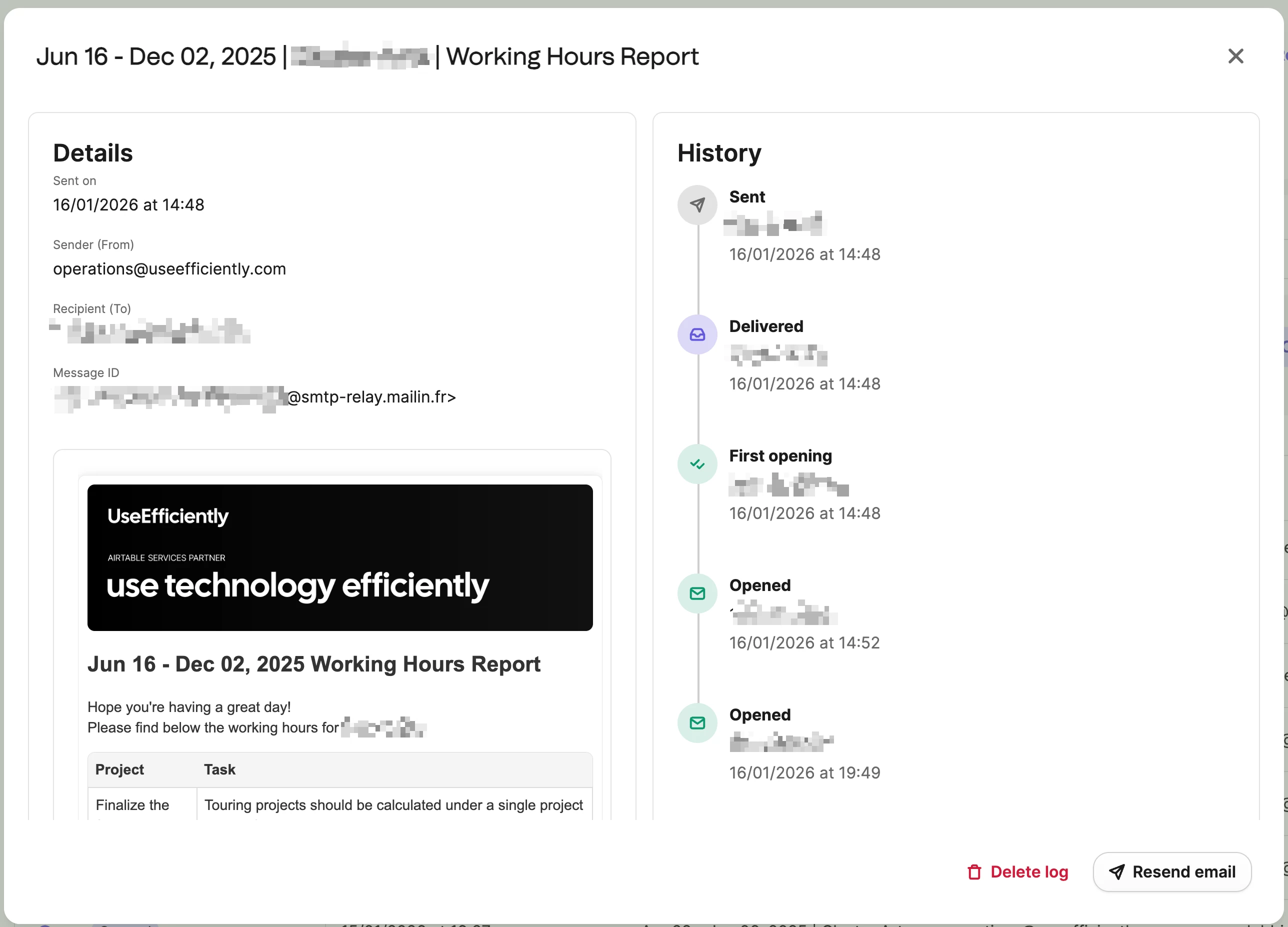
Personally if I were in your position I would go with Brevo, but I completely understand not wanting to change everything at once. I am attaching a quick screenshot from my own Brevo dashboard so you can see what the tracking looks like in practice.

Hope this helps!

Leo from UseEfficiently