Question

Manual trigger of automation

  • March 9, 2026
  • 2 replies
  • 24 views

Good afternoon.

I would like to clarify whether it is possible to manually trigger an automation without linking it to any tables. I noticed that the “Run automation” button is available on the record details page, but in my case the first step needs to be an API call that retrieves data before anything is added to the tables. I don’t need scheduling and cannot use webhooks. Is this approach supported?

2 replies

ScottWorld
Forum|alt.badge.img+35
  • Genius
  • March 9, 2026

@hanna_rudzenka 

You can only DIRECTLY trigger an automation from a button if that button is attached to a record detail page.

One quick way to  workaround this — although it’s not the ideal user experience — would be to just have the button appear on every record, and ask your users to ignore that button when they don’t need to use it.

Like I mentioned above, that’s not really the ideal user experience — and it’s exactly what you’re trying to avoid. 

So if you want to place your button on an overview page — or if you want to place your button at the very top of the page/record list/group — you can only INDIRECTLY trigger an automation.

Here are 2 great ways that I’ve used with my clients to INDIRECTLY trigger an automation from a button:

  1. Have your button open a form page. When the user submits the form, your automation can be triggered.
     
  2. Have your button automatically trigger a Make webhook, which will automatically trigger a Make automation that communicates with Airtable.

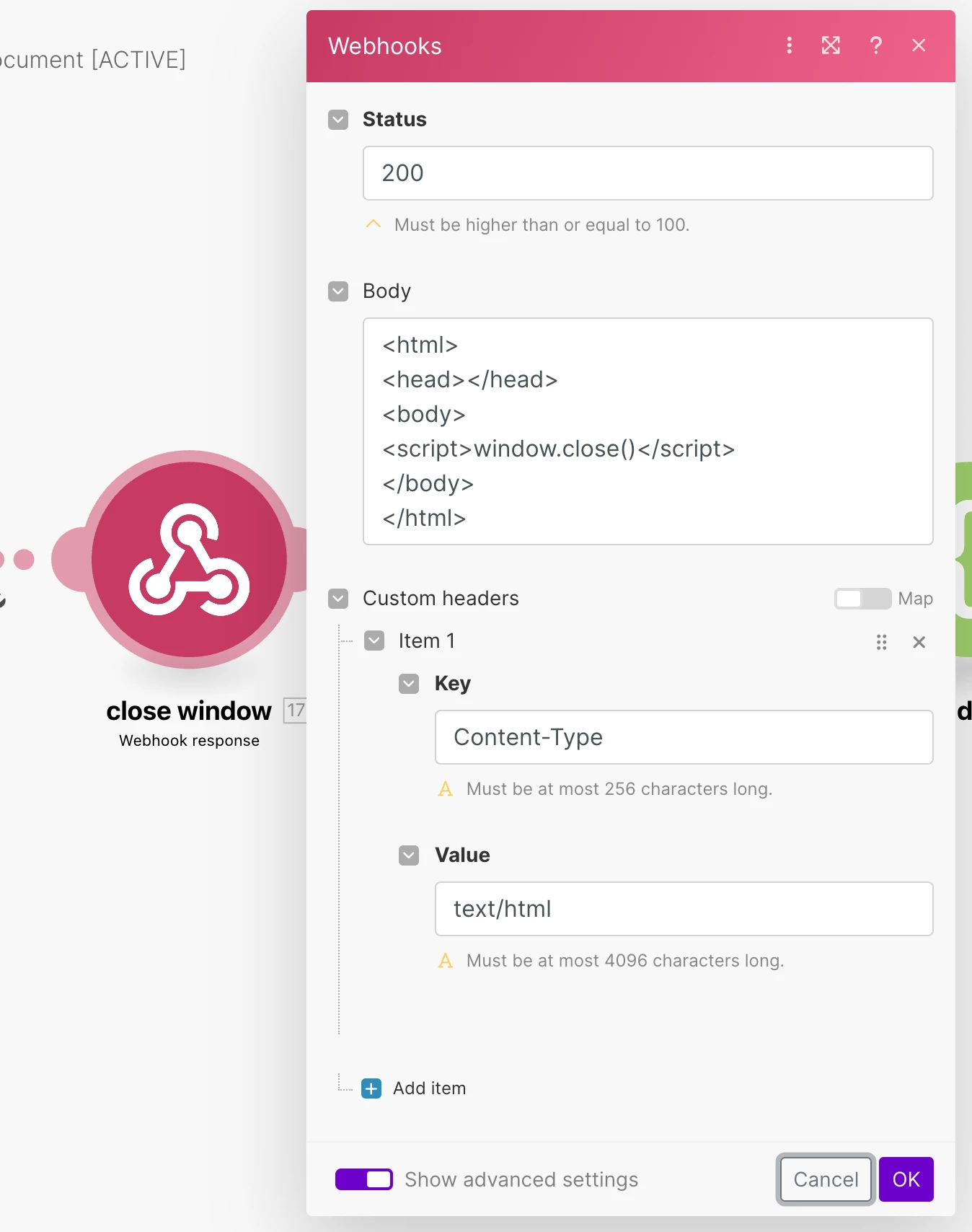
    One thing to note is that your Make webhook will automatically take your users to a new browser tab with a webhook response. You can customize the text of this webhook response with your own custom text or your own custom HTML by using the webhook response module. Alternatively, you can automatically close the new browser tab by setting your webhook response to the Javascript in the screenshot below.
     

    If you’ve never used Make before, I’ve assembled a bunch of Make training resources in this thread. For example, here is one of the ways that you can instantly trigger a Make automation from Airtable

    I also give live demonstrations of how to use Make in many of my Airtable podcast appearances. For example, in this video, I show how to work with Airtable arrays in Make.

Hope this helps!

If you’d like to hire the best Airtable consultant to help you with anything Airtable-related, please feel free to contact me through my website: Airtable consultant — ScottWorld


Forum|alt.badge.img+4
  • Participating Frequently
  • March 9, 2026

When working with Airtable automations, they always require a “table-scoped trigger context” so a table independent manual run isn’t supported currently.

The best technical workaround is to create a small “control” table that acts as a trigger surface:

  • Add Button field that will update the dedicated trigger field (checkbox / single select / last modified time)
  • Use the field change as the automation trigger
  • As your action Run a script or an API call to fetch external data before writing anything to operational tables.

This will decouple your logic layer from your data layer satisfying Airtable’s event-driven architecture.


If you want a completely UI-driven trigger with no field mutation, the only alternatives are external entry points (webhooks, scripting app buttons, or scheduled runs).