Question

Script Help

  • April 1, 2026
  • 8 replies
  • 47 views

Hello, I would like to write a script that will move this project from “Active Projects” table to “Completed Projects” table when the status is changed to “Completed”. Can anyone help? Thanks!



8 replies

DisraeliGears01
Forum|alt.badge.img+21

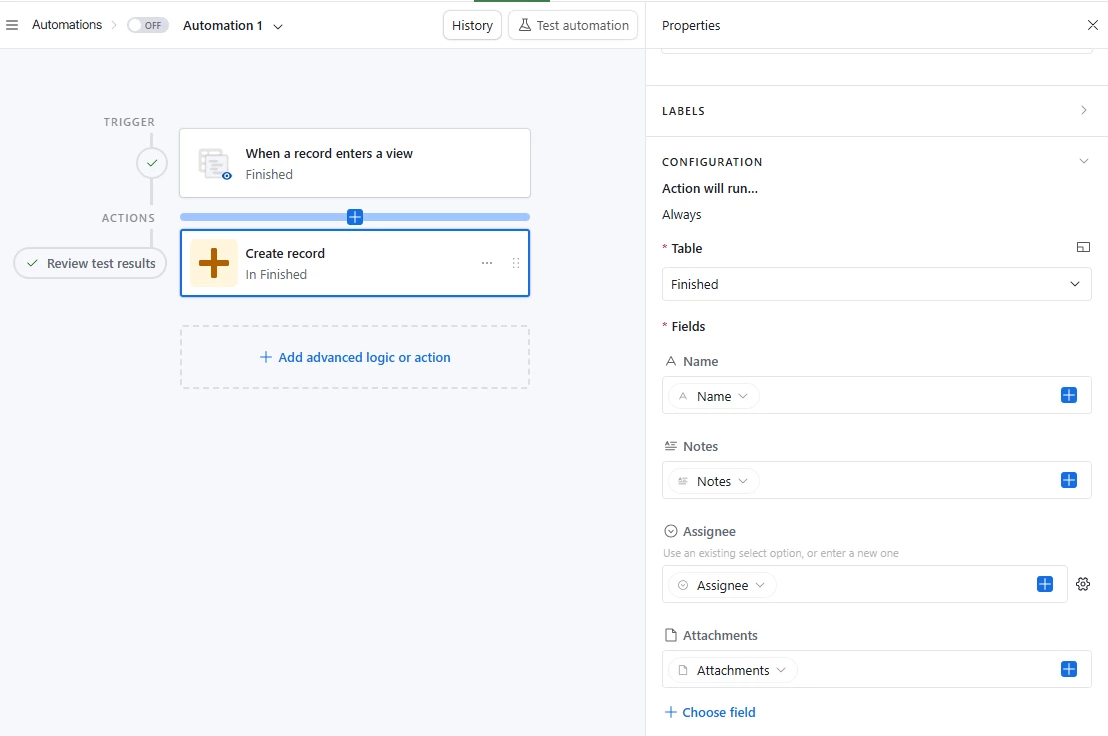
Actually transferring the record is easy enough to do via automation (trigger when Status=Completed, Action Create Record in “Completed Projects” table and fill in the fields with information from the trigger record).

The only part you’d need a script for is deleting the record from the Active Projects table, which should be a pretty dead simple script. This YouTube video goes into the details on a simple delete script, which you’d place after the Create Record action


Chris_Moore
Forum|alt.badge.img+9
  • Known Participant
  • April 1, 2026

You can do this with an automation BUT I do recommend just using the Views section to filter this. For the automation, you’ll need to do this anyway.

Here’s how I’d do it:

  1. Create a new view in the Active Projects section. Filter this view so it only shows completed projects. Make this a locked view so that accidental errors don’t occur.
  2. Set up an automation that is triggered by a record entering a view. Make it be the filtered view.
  3. Choose Create record to occur next. Create this record in the Finished Projects tab and select the information that you want to carry over.
  4. Turn it on and it should run when a new record enters the view!


And I recommend just using the view inside of the Active Projects tab because there is not yet a “Delete Record” option inside of Airtable automations. The record will continue to live in that base but can be filtered out so that it’s not visible in your Active section.

Hope this helps!
Chris


VikasVimal
Forum|alt.badge.img+12
  • Inspiring
  • April 2, 2026

While it is quite easy to do via automations or scripts, I’d discourage doing that.

The power of database is to not have to duplicate stuff. And good database design involves one type of data kept in one table. This preserves relationships between data an allows long term reporting etc.

Active and completed should be Views in the Projects table, not separate tables. That’ll achieve the same goal, and will be far more scalable as you add more features to this tool in future.


anmolgupta
Forum|alt.badge.img+3
  • Participating Frequently
  • April 2, 2026

I agree with ​@VikasVimal and ​@Chris_Moore - you can do this with an automation without even a script step → Trigger when status changes to completed in Active Projects table → create a new record in Completed Projects table

However, the structure of both the tables is exactly the same as both contain projects data. Following database principles, you should just have one project called “Projects”. You can then create different  filtered views for Active Projects and Completed Projects in your base as well as Interfaces. You won’t need any automation. The status field will do its job.

I’d highly discourage against creating identical tables.


bill12
Forum|alt.badge.img+3
  • Participating Frequently
  • April 2, 2026

Agree with the above. It is a simple automation but duplicate data tends to come back to haunt you later and would need to be updated every time something changes in the structure - for example you add a column in Active projects, you will always have to add that to Completed projects. Using a status column in a single table seems the best route with few exceptions and provides a more scalable solution. 


ScottWorld
Forum|alt.badge.img+35
  • Genius
  • April 2, 2026

@MickeyMouse123 

Just chiming in here to say — as others have already pointed out above — that your database is not currently setup in the proper way, so ideally you would not want to continue going down this path.

Proper database structure depends on each record only appearing ONCE in your entire system, so you never want to duplicate a record across different tables.

The solution is to simply have a dropdown menu where you can change a record from Active to Completed, and then you can use Airtable’s filtering tools to only show you the Completed records.

Instead of creating different tables, you can accomplish this by creating different filtered tabs in interfaces, different interface pages in interfaces, different views in the data layer, and much more.

As long as you’re not creating multiple tables, you’re okay and you have many different options to choose from.

Also, since you’re new to Airtable, you might gain some valuable insights by taking my free Airtable training course, which you can take for free by signing up for a free 30-day trial with LinkedIn Learning.

Note that my course is extremely outdated because it was created way back in 2020 using one of the earliest versions of Airtable. It was created before automations even existed, and it was created years before interfaces existed!

However, the core concepts of building a base remain the same to this day — such as how to properly structure your base.

Hope this helps!

If you have a budget and you’d like to hire the best Airtable consultant to help you with this or anything else that is Airtable-related, please feel free to contact me through my website: Airtable consultant — ScottWorld


DisraeliGears01
Forum|alt.badge.img+21

While I do agree that you don't want to be duplicating data unnecessarily, I occasionally find value in a similar table that is basically “Archived” records. When the project is transformed from Active to Completed, you might also have additional fields in the completed table for customer feedback or whatever. 

As other have mentioned though, if your database is growing modeling that transformation when you have multiple interlinked tables can get messy.


ScottWorld
Forum|alt.badge.img+35
  • Genius
  • April 2, 2026

True, but of course those additional fields can be added to the main table and just hidden/shown when needed.