Question

Help with Juction table and automation process

  • March 4, 2026
  • 5 replies
  • 30 views

Forum|alt.badge.img+1

Hi all,

I’m currently building a new hire onboarding process, and I’m struggling to understand the best way to set up the flow. Here’s what i’m trying to accomplish:

  • New hires added manually to the “New Hire” tab
  • The onboarding steps are outlined in the “Onboarding Steps Tab”
  • We’d like to: manage the flow of each employee through the onboarding steps (which include things like: Send new hire welcome email, add employee to workday, manager to create onboarding plan etc, all the way through the 30/60/90 day post start date plan
  • We’d like to automate as much of this as possible (team reminders, emails, slack messages etc)

To do this i’ve set up three tables so far:

  • New Hire Tab (the employee info)
  • Onboarding Steps (the process the employee goes through, but managed by a number of internal teams)
  • A junction table combining both of these


Where i’m struggling: 

  • Is a junction table the best way to set this up?
  • How do I auto assign departments and team members to each new employee’s onboarding process? Depending on a number of factors, the assigned team member will be different (Different employee location and internal department will affect who manages what process etc)
    • eg. an email reminder to the HR partner: “Hey John Smith you have two new hires with outstanding Welcome Emails” 
  • In the “Onboarding Tasks” each will have a due date depending on different factors
    • 30/60/90 plans are due 30/60/90 after start date
    • But the steps before the start date will be due within a window after the previous step is completed. 
    • How do I accomplish this?

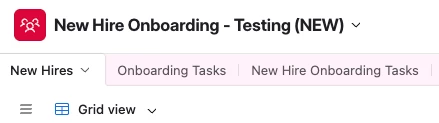
Example set up:
 

5 replies

DisraeliGears01
Forum|alt.badge.img+21

Your junction table setup is probably the right way to set things up. Couple thoughts related to your questions…

  • For assigning team members to complete tasks related to the NEO, you’ll need to bring their information into the system in some manner. If you’re already tightly integrated with Airtable, perhaps you have an employee directory you can sync to this base. Otherwise your new hires table could just be an Employees table, with new hires having an “In training” status flag. 
    • You could create an automation to fire whenever an employee record is flagged as “In training” to generate the NEO Tasks records.
  • As for assigning team members automatically, you’ll probably need to create automations alongside considering the assignment logic. Something like “When record in NEO Tasks is created” → “Find records in Employees where Department=NEO Tasks Department AND Location= NEO Tasks location AND Trainer=✔️”→ “Update NEO Tasks record so Supervisor= Find Record list”.
  • When you set up date fields, you can enact date dependencies. Otherwise you could always do some formula work to define a date range and then check against the NEO Task for True/False (or complete, outstanding, overdue). 

Forum|alt.badge.img+1
  • Author
  • New Participant
  • March 4, 2026

Awesome, thank you, this helps.


RE: who’s in charge of what step.

  1. Each new hire record will have their department, manager, and manager email assigned, so sending the manager reminders should be easy
  2. There will be a few 3-4 admins of this process (HR admins, Workplace Admins, IT admins) who will be directly set up as users
  3. Then there will be a number of individuals who will not be added as users, who will need reminders and actions/tasks.

Outside of the first two type of users, I’m thinking group 3 could just be added as a column(s) assigned to that new hire (HR Partner, HR director etc), based on their location and team/department. Or would it be better to create another table with departments and those the manage it, and then link/assign to New Hire records based on the pre-determined factors?


DisraeliGears01
Forum|alt.badge.img+21


I’m thinking group 3 could just be added as a column(s) assigned to that new hire (HR Partner, HR director etc), based on their location and team/department. Or would it be better to create another table with departments and those the manage it, and then link/assign to New Hire records based on the pre-determined factors?

With both group 1 and group 3, it depends a bit on how much data you’re storing, how the data is coming in, and how automated you want the process. 

Are you getting the department/manager/manager email from a different data source (form, spreadsheet or something)? Because if you’re manually adding individual new employees, you don’t want to have to type out IT Team Lead, Beth Smith, beth_smith@randocompany.com into columns every time a new IT staff member comes on board, it can be easier to keep a table of active employees and then link Beth Smith, bringing that info over via lookup. That said, if you’re getting a standardized form/spreadsheet row and it can be imported or copy/pasted, it’s not that onerous to skip the Employees table and store stuff in fields instead. 

If you feel the need to go with linkages, I’d say don’t bother with a Departments table… In the end the information you’re storing isn’t about the departments, it’s the people in the department. That’s why I come back to a general Employees table, where department and position level can be indicated. You can also make child/parent records in the same table, so supervisor relationships can be modeled in a single table. 


TheTimeSavingCo
Forum|alt.badge.img+31

For the predecessor tasks + durations thing you may want to check out record templates: https://support.airtable.com/docs/using-record-templates-in-airtable

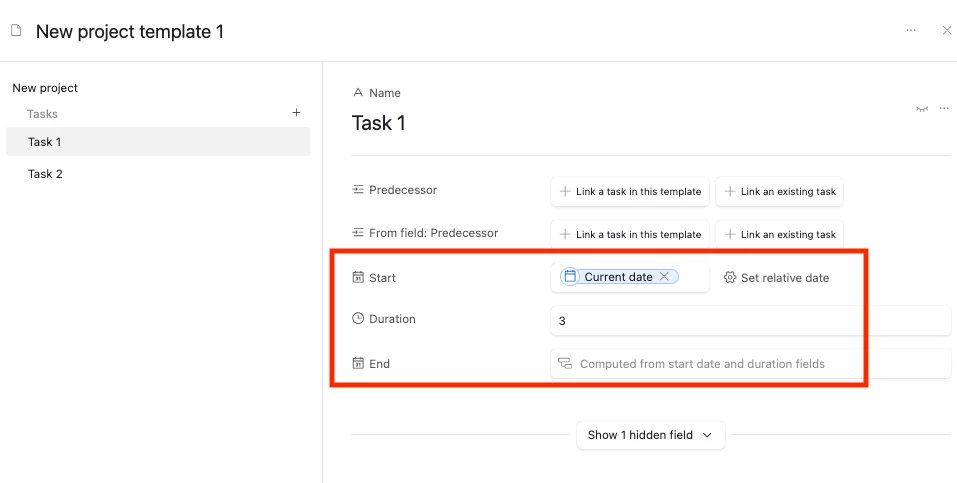
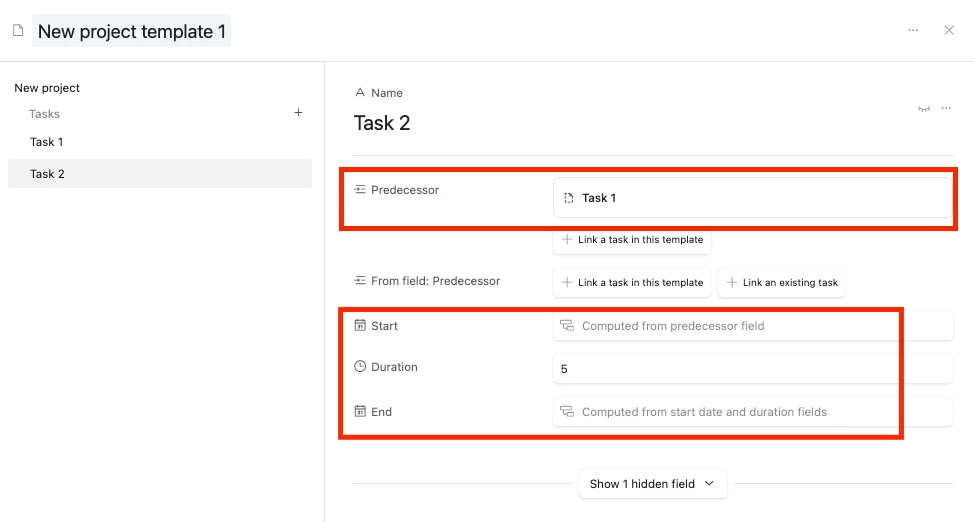
In the following example, Task 1 is set to start on the day the task is created with a duration of 3 days, and Task 2 automatically has Task 1 as its predecessor:


And so after we apply the template, the predecessor + dates get set automatically:

I think we can get the predecessor links working with just an automation as well but record templates are simpler for this


Forum|alt.badge.img+1
  • Author
  • New Participant
  • March 5, 2026


I’m thinking group 3 could just be added as a column(s) assigned to that new hire (HR Partner, HR director etc), based on their location and team/department. Or would it be better to create another table with departments and those the manage it, and then link/assign to New Hire records based on the pre-determined factors?

With both group 1 and group 3, it depends a bit on how much data you’re storing, how the data is coming in, and how automated you want the process. 

Are you getting the department/manager/manager email from a different data source (form, spreadsheet or something)? Because if you’re manually adding individual new employees, you don’t want to have to type out IT Team Lead, Beth Smith, beth_smith@randocompany.com into columns every time a new IT staff member comes on board, it can be easier to keep a table of active employees and then link Beth Smith, bringing that info over via lookup. That said, if you’re getting a standardized form/spreadsheet row and it can be imported or copy/pasted, it’s not that onerous to skip the Employees table and store stuff in fields instead. 

If you feel the need to go with linkages, I’d say don’t bother with a Departments table… In the end the information you’re storing isn’t about the departments, it’s the people in the department. That’s why I come back to a general Employees table, where department and position level can be indicated. You can also make child/parent records in the same table, so supervisor relationships can be modeled in a single table. 


TY!

Our hope is to eventually have a workday sync where we will have new hires added via the sync, and that will pull in all the relevant info (Name, Department, Manager, start date etc). But for now we are likely going to proceed with manually adding people, as it’s only 1-4 new hires a week. Which is manageable for now.