
Solved

Single or Multiple Bases?

  • March 13, 2026
  • 9 replies
  • 147 views

AdamPilat
Forum|alt.badge.img+2

Hi! I’m a first-time poster here. I hope the below makes sense. Here goes.

I’m a Marketing Coordinator and we have a team of 6. I am redesigning our Airtable base, so that it aligns with best practices and utilises the functions within Airtable more efficiently. Currently everyone works directly from tables, with no interfaces or automations. I have a fairly good understanding of Airtable and it’s capabilities. Our team has deliverables associated with multiple departments and with many external partners. I am starting from scratch, building workflows and the likes, having inherited the Airtable space.

Departments include:

  • Product
  • Sales
  • Partnerships (including events)
  • Customer Service
  • Retail

Requests include tasks for:

  • Social Content
  • eCommerce
  • Web and SEO
  • Photography and videography
  • Print and digital design (for catalogues, sales conferences, specialty customer product promos, website, etc.)
  • Photo and video processing, editing and creation

My question is; would it be suitable to have all tables relating to each department in one base? Or build bases for individual departments and link them? Teams in those departments will ideally use interfaces and forms to request tasks, that will be turned into projects, or campaigns, and at times cross paths. Mostly each of the marketing team members will work on individual aspects of those requests to reach a common goal.

Sorry. Long-winded, I know. But I’m in two minds.

Thanks in advance.

Adam
Best answer by TheTimeSavingCo

Yeah the two biggest ones are:

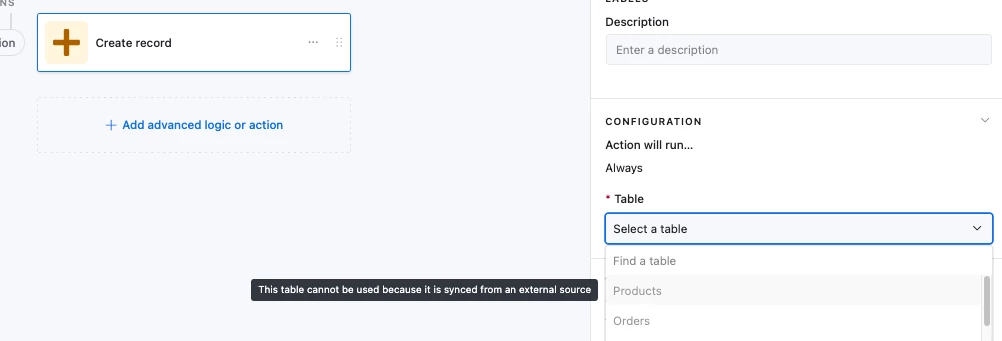
  1. Automations can’t create records in synced tables


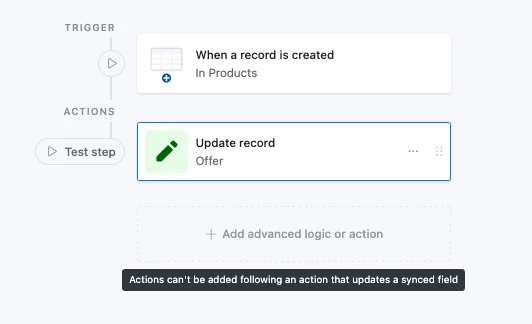
  2. Automations that update synced tables get hit with an ‘Actions can’t be added following an action that updates a synced field’ notice:


9 replies

TheTimeSavingCo
Forum|alt.badge.img+32

Hm, you mention that it crosses paths at times and so I’d recommend keeping them all in one base.  Multiple bases is doable, but ime syncing stuff between bases is more trouble than its worth due to the limitations around automations and synced tables

The main thing that might change the calculus is if a specific department’s data might cause us to break record limits, and in that case yeah I’d say build it in multiple bases with an eye on how to maintain continuity


AdamPilat
Forum|alt.badge.img+2
  • Author
  • New Participant
  • March 13, 2026

Hmm, great point, and advice, Adam. I’ll do more research into the limits. Thank you.


TheTimeSavingCo
Forum|alt.badge.img+32

Yeah the two biggest ones are:

  1. Automations can’t create records in synced tables


  2. Automations that update synced tables get hit with an ‘Actions can’t be added following an action that updates a synced field’ notice:


AdamPilat
Forum|alt.badge.img+2
  • Author
  • New Participant
  • March 16, 2026

Thanks for the additional feedback, Adam. Having automations create records is a key component to my workflows. You’ve made the decision for me. Thanks again.


anmolgupta
Forum|alt.badge.img+5
  • Inspiring
  • March 16, 2026

Based on my experience, I recommend keeping all the tables in one base unless the data between departments is not shared at all (but that’s usually not the case). A customer’s data typically flows across departments. Hence, in order to have a single source of truth - keeping all the tables in one base is the way to go.

In RDBMS terms, a base is very much like a database instance itself in which you can define relationships between different entities. But you can’t define relationships between entities belonging to two different databases altogether.

Keep them in one base and you will have a clean and normalized database. And you are anyway planning to access the data through interfaces + forms which is another good thing. Base should not be ideally touched by end users directly.


AdamPilat
Forum|alt.badge.img+2
  • Author
  • New Participant
  • March 16, 2026

Anmol, I appreciate your feedback. That has confirmed the decision. Many thanks.


  • New Participant
  • May 3, 2026
 

That’s an interesting perspective on choosing between single or multiple bases both definitely have their own advantages depending on the situation. I’ve noticed that having access to reliable data can really help in making the right call, especially when reviewing things like Rutherford Case Information for better clarity. It often comes down to flexibility versus simplicity in the long run. Curious to see what others here prefer and why!


Michael_Turner45
 

I think the choice between a single or multiple bases really depends on how much flexibility and scalability you need over time. A single base can keep things simple, but multiple bases often help with organization and performance when data grows. I’ve seen some useful examples and references through  Sandusky Court Database  that highlight how structured systems can improve efficiency. Ultimately, it comes down to your specific use case and how you plan to manage data long term.


It really depends on the situation—sometimes a single base keeps things simple, while multiple bases can offer more flexibility and better coverage. I’ve noticed that when dealing with property-related data, having access to structured resources like Taylor Property Records can make comparisons much easier. It helps in understanding variations and making more informed decisions. Overall, balancing simplicity with functionality is key when choosing the right approach.