Question

Multi-Step IF function with different outputs

  • March 13, 2026
  • 2 replies
  • 15 views

I’ve got a database with events that I am using a list format to display -- the main reason for a list instead of a calendar is that I want people to be able to filter the type of event by tags and have a visual queue of event items. I’ve got the conditions of the list set to only display events that come after yesterday’s date, so once an event passes, it falls off the view. Additionally, this is a calendar that is populated by the community at large via a form.

Most of the events are single date events, so the standard M-D-Y h:mm a format for the date is fine, but when the event spans multiple days (conferences and festivals for example), I’m having trouble figuring out the right formula to display these events with the series of dates (4/10/26-4/12/26, for example) so that they will stay on the view for the duration of their schedule. 

I know how I want this formula to function, but everything I’ve tried doesn’t seem to work. 

I’ve got a column for each event that is a checkbox -- “Is this a multi-day event?” -- based on how they answer this question, I’ve created a column for the formula: 

If the checkbox is checked, then I would like the dates for the event to say “Friday, March 13 - Sunday, March 15, 2026” with no times attached. On these events, folks would populate the description with all the details of the multi-day event. 

If the checkbox is not checked, I would like for the dates for the event to say “Friday, March 13, 2026 4:00 - 6:00pm” 

I’ve tried splitting my event date details into multiple columns -- ie: Starting Date and Ending Date -- but this feels unnecessary when it’s a one day event, which most will be.

I’ve tried including the time with the date, but then I seem to struggle with how to not include it in the instance where the checkbox for multi-day event is checked. 

Either I get an error or nothing displays. 

Would love some insight!

2 replies

Forum|alt.badge.img+2
  • Participating Frequently
  • March 13, 2026

If you want to use a list instead of a calendar there are a ton of ways you can do it.

One way we make this possible is we have a field that is just like “Final Delivery Date” and if you’re filtering everything past today, it won’t disappear until that Final Delivery Date has passed. You could even do this automatically with an AI agent field that is trained to pull the end date. 

The other option you mentioned - with the time, instead of having that field be populated by hand, populate it by date and have an automation fill it in, so you can set the condition - If “Is this a multi-day event?” is checked don't include time. 

And here is what my personal assistant repo said about it:


This is a common challenge with event calendars in Airtable. The core issue is you actually do need two date fields — but it's not as redundant as it feels. Here's why and how to make it work
  cleanly:
                                                                                                                                                                                                          Field Setup
                                                                                                                                                                                                        
  ┌─────────────────┬──────────────────────────┬──────────────────────────────────────────────────────┐
  │      Field      │           Type           │                        Notes                         │
  ├─────────────────┼──────────────────────────┼──────────────────────────────────────────────────────┤
  │ Start Date      │ Date (with time enabled) │ Always populated — it's the event date + start time  │
  ├─────────────────┼──────────────────────────┼──────────────────────────────────────────────────────┤
  │ End Date        │ Date (with time enabled) │ Multi-day: last day. Single-day: same day + end time │
  ├─────────────────┼──────────────────────────┼──────────────────────────────────────────────────────┤
  │ Multi-Day Event │ Checkbox                 │ Controls display format                              │
  ├─────────────────┼──────────────────────────┼──────────────────────────────────────────────────────┤
  │ Display Date    │ Formula                  │ The formatted output                                 │
  ├─────────────────┼──────────────────────────┼──────────────────────────────────────────────────────┤
  │ Filter Date     │ Formula                  │ Used for your view filter                            │
  └─────────────────┴──────────────────────────┴──────────────────────────────────────────────────────┘

  Why End Date isn't redundant for single-day events: You need it anyway to capture the end time (the "6:00pm" in your example). For single-day events, it's just the same date with the end time. On   
  your form, you can label it "End Date/Time" and add help text like "For single-day events, enter the same date with your end time."

  The Display Formula

  IF(
    {Multi-Day Event},
    DATETIME_FORMAT({Start Date}, 'dddd, MMMM D') & ' - ' &
      DATETIME_FORMAT({End Date}, 'dddd, MMMM D, YYYY'),
    DATETIME_FORMAT({Start Date}, 'dddd, MMMM D, YYYY h:mm') & ' - ' &
      DATETIME_FORMAT({End Date}, 'h:mma')
  )

  This gives you:
  - Multi-day: Friday, March 13 - Sunday, March 15, 2026
  - Single-day: Friday, March 13, 2026 4:00 - 6:00pm

  The Filter Date Formula

  This is the piece that keeps multi-day events visible for their full duration:

  IF({Multi-Day Event}, {End Date}, {Start Date})

  Then set your view filter to: Filter Date is on or after today

  This way a conference running March 13-15 stays visible until March 15 passes, while single-day events drop off after their date.

  Why Your Previous Attempts Likely Failed

  The most common gotcha: if {Start Date} has time data and you try to format it without time tokens in the multi-day branch, it still works — DATETIME_FORMAT just ignores the time portion. But if    
  {End Date} is blank (because you were trying to avoid it for single-day events), the formula returns nothing for that entire branch. Airtable formulas short-circuit to blank/error when any
  referenced field in a DATETIME_FORMAT call is empty.

  That's why both fields need to be populated for both event types.

  Form Tip

  Use conditional field visibility on the form — you can't hide End Date entirely since single-day events need it for end time, but you can add descriptive help text that changes based on context, or 
  add a description field that says "For single-day events, keep the same date and just set your end time."


TheTimeSavingCo
Forum|alt.badge.img+31

Hm, how this is set up depends a lot on how you want your users to be keying in data, really.  My take on this involves using specific fields for a multi day or single day event. 

  1. Single day
    1. Start date
    2. Duration
  2. Multi day
    1. Start date
    2. End date

(We can use another ‘End Date’ field for the single day instead of a Duration field too)

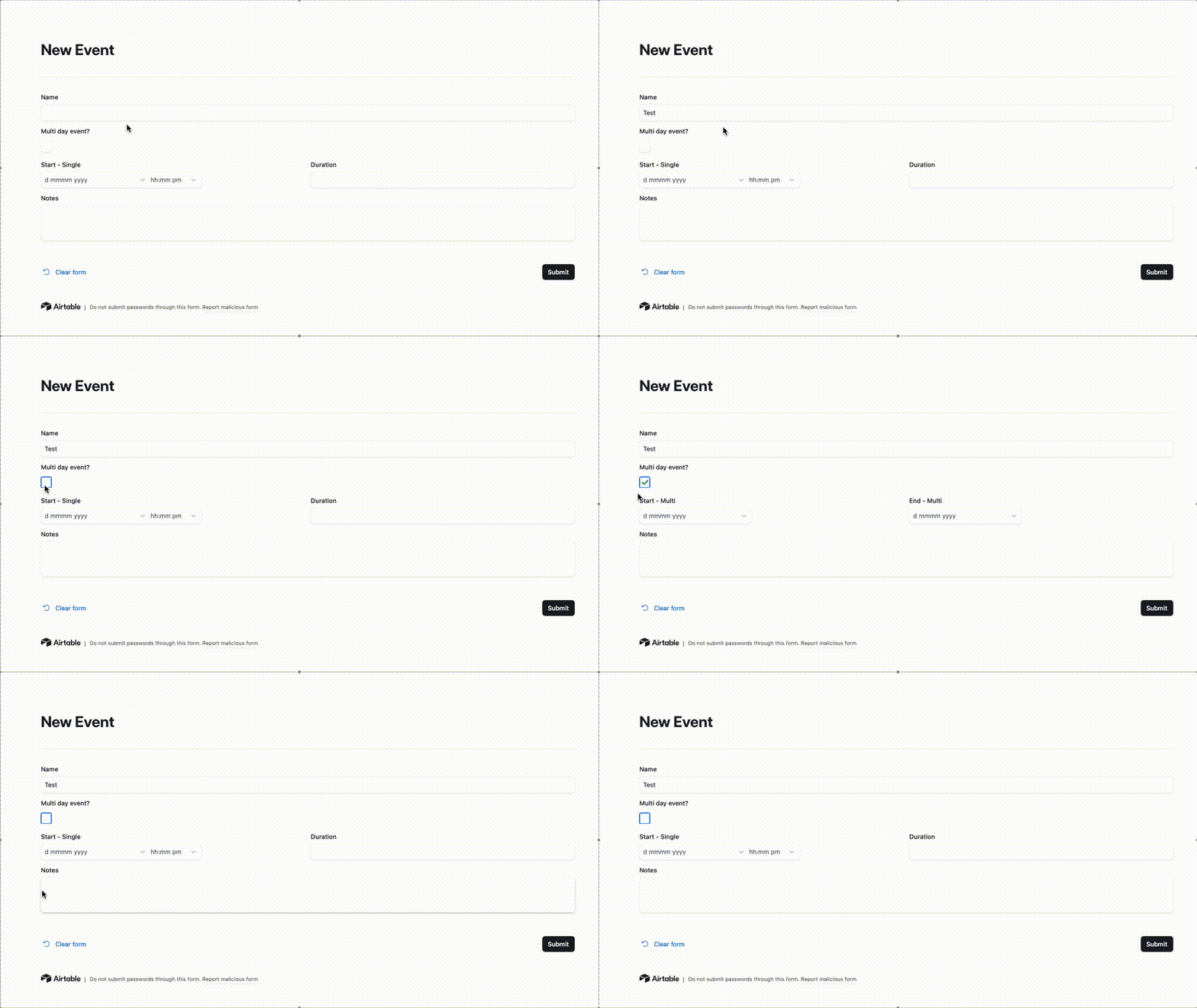
And we’d use the ‘Multi day event’ checkbox to make the relevant fields visible in the form.  I’ve set it up here for you to check out.   This way the single day events allow for selection of a start time, and the multi day events only have dates


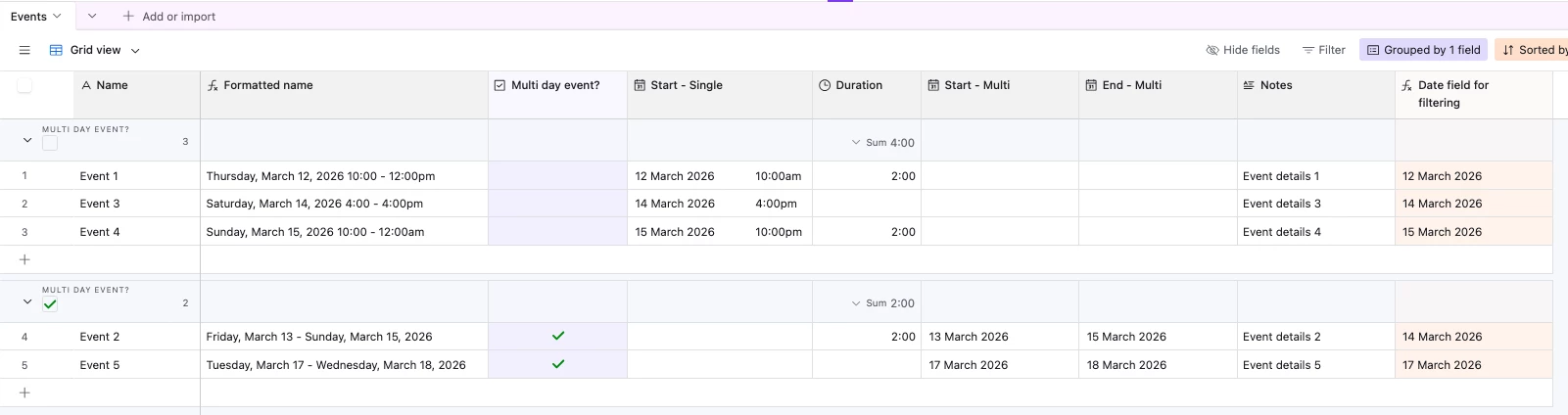
And here’s how the data looks after submission: