Question

Automation with manual step in between for pre-viewing information (PDF)

  • March 30, 2026
  • 11 replies
  • 66 views

Forum|alt.badge.img+17

Hi,

In an automation that is triggered by an user from an interface button, would it be possible to divide the action in two parts, with user interaction inbetween?

I’d like to show the user a preview of an invoice that would be sent out after the user has checked it’s all good. The PDF would be produced in the first stage, then sent out in the second if OK.

I cannot see any way to this in Airtable, but I have been amazed before by elegant solutions :). Would there be a solution also to this?

Rgds,

Björn

11 replies

coderkid
Forum|alt.badge.img+3
  • Participating Frequently
  • March 30, 2026

You could add a single select field called "Status"...

When the user clicks the button initially, set it to "Generating Invoice" After the invoice is created, update it to "Invoice Ready"

From there, you can use the status to control what the user sees in the interface; showing or hiding fields, buttons, and actions depending on where they are in the workflow.


ScottWorld
Forum|alt.badge.img+35
  • Genius
  • March 30, 2026

@0800-grizzly 

You can do all of this from one unified automation, but the automation will need to be manually triggered twice because there is no way to pause an Airtable automation to wait for the user’s feedback before continuing. (Unless you’re manually running a script from the script extension in the data layer, which is not really an automation.)

So what you would want to do is give your users a drop-down menu with different choices such as “Generate PDF” and “Send PDF”.

When they choose “Generate PDF”, the automation would create the PDF file and put it into an attachment field for them to see.

That attachment field can appear right next to the dropdown menu so it’s conveniently located.

Then, when they’re ready to send the PDF file, they would choose “Send PDF” to send the PDF file.

I also like to give options like “Running” and “Done” which are automatically selected by Airtable during the automation to let the user know what’s going on.

Hope this helps!

If you have a budget and you’d like to hire the best Airtable consultant to help you with this or anything else that is Airtable-related, please feel free to contact me through my website: Airtable consultant — ScottWorld


Forum|alt.badge.img+17
  • Author
  • Known Participant
  • March 30, 2026

​Thanks @coderkid! Interesting concept. But wouldn’t what you describe with the status controlling the interface only be available on the Business plan and upwards? I’m on the Team plan, and to my knowledge I can only create conditional interfaces for new forms, not existing records.

Cheers,

Björn


Forum|alt.badge.img+17
  • Author
  • Known Participant
  • March 30, 2026

Thanks ​@ScottWorld! That sounds like a very elegant solution. But, how can I trigger a script twice from the same dropdown? If I choose when matches a condition = Generate PDF it won’t trigger for the second case. Or do you mean a trigger when a record is updated + conditional logic cases, one group for Create PDF and another for Send PDF?

Cheers,

Björn


ScottWorld
Forum|alt.badge.img+35
  • Genius
  • March 30, 2026

That is correct — by using conditional logic in your automation!

- ScottWorld, Expert Airtable Consultant


coderkid
Forum|alt.badge.img+3
  • Participating Frequently
  • March 30, 2026

@0800-grizzly It is available for team plan too. You will see a section called “Rules” on side menu, and under “Rules”, “Visibility”...


anmolgupta
Forum|alt.badge.img+3
  • Participating Frequently
  • March 30, 2026

Why not just divide the process into two different automations?

First automation will get triggered through the button in your interface and generate the PDF and sets the status to “Pending Approval”

Then you will show the PDF draft of the invoices pending user approval through an interface page.

Once the user approves an invoice (eg. by changing its status to OK), you will trigger second automation to send the invoice.

This will cost you 2 automation runs but even somehow triggering one single complicated automation twice will cost you 2 runs. I’d rather keep it simple by dividing it into 2 parts as it makes debugging and maintenance also easier.


Forum|alt.badge.img+17
  • Author
  • Known Participant
  • March 31, 2026

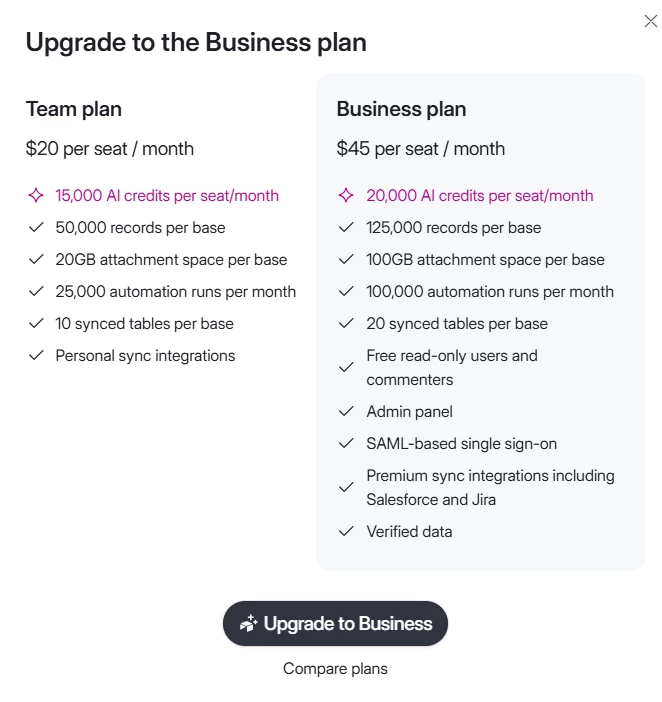
@coderkid, it is not available on the Team plan. Here’s what I get when clicking the visibility switch.


Forum|alt.badge.img+17
  • Author
  • Known Participant
  • March 31, 2026

@anmolgupta thank you for replying. You’re absolutely right that dividing into two automations would be simpler. Unfortunately I’m nearing the 50 automations limit and cannot afford any “extra” automations.


ScottWorld
Forum|alt.badge.img+35
  • Genius
  • March 31, 2026

@0800-grizzly 

By the way, when you run out of automations in Airtable, I would recommend building the rest of your automations in Make.

You can trigger an unlimited number of automations in Make from Airtable without using any additional automations in Airtable.

You would just need to start your Make automations with a custom webhook, and then trigger the webhook with a button or URL in Airtable.

Hope this helps!

If you have a budget and you’d like to hire the best Airtable consultant to help you with this or anything else that is Airtable-related, please feel free to contact me through my website: Airtable consultant — ScottWorld


VikasVimal
Forum|alt.badge.img+12
  • Inspiring
  • April 2, 2026

Within Airtable, have a single workflow with one trigger and multiple branches based on conditions. Trigger once > Branch 1 > Updates a field > verify and Trigger again > Updates another field


If you want to use Make, connect the button to a webhook url. In make you can use Webhook response to send back data/HTML to the user in browser. Then you can have as many actions in that HTML as you wish, each of the actions would need to be mapped to one or multiple Make workflows. It would be harder to build, but more intuitive to use.