Solved

interfaces & ussers

  • April 20, 2026
  • 15 replies
  • 104 views

Forum|alt.badge.img+1
  • Participating Frequently

This question has probably already been answered… but I haven’t managed to find it.
So here it goes.

I’m trying to implement a work control system for a nursing home. Many of the staff only need to view their tasks and record certain information in a couple of processes.

I’ve designed a form for this purpose.

On the other hand, the Interface contains multiple administrative views and queries.

Currently, we only have one editor user and one viewer user.
Unfortunately, I can’t get the staff to have access only to creating, editing, and viewing their own tasks.

I’ve tried embeds, iframes, HTML… in many different ways, and nothing works. Airtable always limits me.

Am I doing something wrong?
Do I necessarily have to pay for additional users?
Would that give me another interface?

Would Fillout (as suggested by Scott Rose @ScottWorld) be the solution?

I don’t want to use tools like Make or n8n.

Thanks in advance.
Natxo Rodríguez

Best answer by DisraeliGears01


However, at least two groups of them should also be able to modify records… and for that I need to find a solution—the most cost-effective one, at least until the whole system is fully working.

My question here is how large are these groups, how much turnover, and can you train them a little? The implementation I mentioned above has completely outside users creating records through forms, and then a higher tier (the interpreters) viewing Airtable data through interface pages but using forms to create/edit as necessary. For that the interpreters do have Airtable accounts, but with only view permissions (so not paid seats). 

For 1,000 actions per month Fillout should work just fine, you might need the lowest paid plan at that point though (I forget their submissions limits for free plans off the top of my head).

15 replies

Forum|alt.badge.img+5
  • Known Participant
  • April 20, 2026

The solution noted here might help you 


DisraeliGears01
Forum|alt.badge.img+22

I have something similar set up for an interpretation ticketing and time tracking system, and it does leverage Fillout (Zite) to get the job done economically.

I have two paid seats on the system (myself as the builder and the interp admin) and everyone else is on view only seats. For those view only seats I created an interface for each interpreter with multiple pages, and share only each interpreter’s interface with them (which are of course filtered to the specific user). That handles all the viewing. Then for creating/editing, I have several Fillout forms for creating tickets, creating log events, and editing tickets as necessary. Each interface contains links to those forms so the view only users just need to keep a bookmark of their interface pages and they can access the relevant forms. 

One thing to deeply consider in your environment is proper compartmentalization and compliance for HIPAA (being a nursing home). Airtable only claims HIPAA compliance at the Enterprise level, and last I checked (it was awhile ago) Fillout had HIPAA on a roadmap but was more focused on European data security requirements. 


Forum|alt.badge.img+1
  • Author
  • Participating Frequently
  • April 20, 2026

Thank you very much for the responses…

In parallel, while I was waiting for replies, I confirmed that Fillout can indeed work. I started by creating an app, and within minutes I had it up and running. Now I’ll check the cost, but I was surprised by how easy it was. It connects to the database without any issues.

That said, I still have mixed feelings… If the solution is already defined within the Interface, why doesn’t Airtable enable that capability directly?

Anyway, nothing more to add.
Thanks again, team!


ScottWorld
Forum|alt.badge.img+35
  • Genius
  • April 20, 2026

@nre 

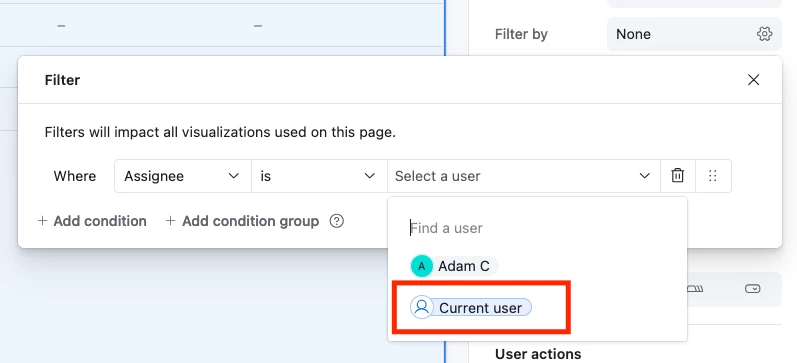
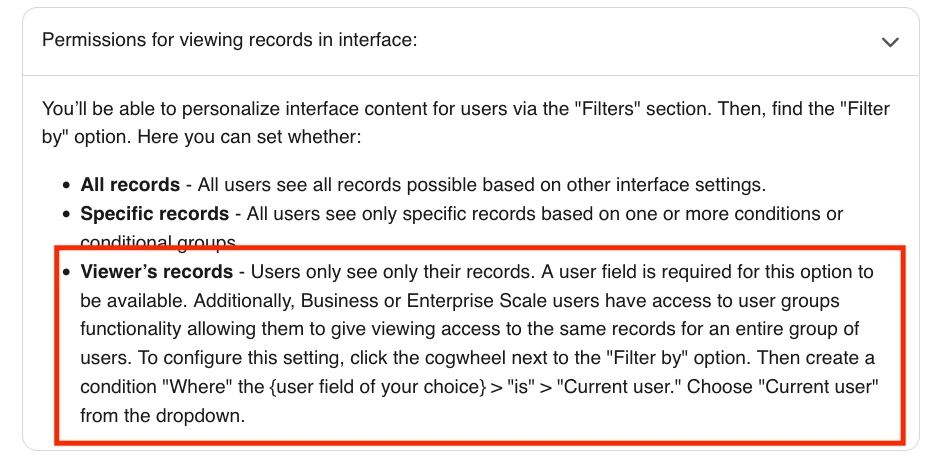
If all of your users have Airtable accounts, then you can do this natively within Airtable’s interfaces. You can filter any interface by the “current user” or the “current user’s email address”.

However, it sounds like you’ve already got it setup with Fillout's advanced forms for Airtable, which is one of my favorite tools for Airtable.

You can also do this with Zite's AI portal builder as well. Zite was created by the same team that created Fillout.

Hope this helps!

If you have a budget and you’d like to hire the best Airtable consultant to help you with this or anything else that is Airtable-related, please feel free to contact me through my website: Airtable consultant — ScottWorld


TheTimeSavingCo
Forum|alt.badge.img+32

Unfortunately, I can’t get the staff to have access only to creating, editing, and viewing their own tasks.

Hm, may I know what issues you had with filtering by the current user?  This assumes you’ve set an assignee for each task, and then they’d update / create task data via forms, right?


And here are the docs:

https://support.airtable.com/docs/interface-designer-permissions?highlight=interface#filtering-data-by-current-user


anmolgupta
Forum|alt.badge.img+4
  • Participating Frequently
  • April 21, 2026

I have implemented user level access in multiple projects and it can be done very easily. You have two options:

  1. Use Airtable’s native “User” field and link every task to a user. Then create a separate interface for every user and filter the records by “User” for every team member in their respective interface.
  2. If you don’t want to use Airtable’s native “User” field, create your own User table and link each task to a record in your User table. And do the same as above in interfaces.

Either ways, every team member gets to see the tasks only belonging to them. And if you want them to create tasks also only for themselves, native “User” field will be helpful there as well as Airtable form will capture the “User” who created the task and then you build an automation to assign the task also to the same User who created the task.


Forum|alt.badge.img+1
  • Author
  • Participating Frequently
  • April 21, 2026

No. Users do not have accounts in Airtable.
Maybe I didn’t explain that clearly.

The users are external people who use creation forms for this purpose; there is no issue there.
However, at least two groups of them should also be able to modify records… and for that I need to find a solution—the most cost-effective one, at least until the whole system is fully working.

I built an app as I mentioned. It works.
But I am also completing my own HTML web, running it locally, designing it to my needs, and I believe I’ll be able to launch the query and modification URLs created with Fillout.

Do you think this is a good approach?
What I don’t know is the potential cost.

We would be talking about around 1,000 modification/creation actions per month.


DisraeliGears01
Forum|alt.badge.img+22


However, at least two groups of them should also be able to modify records… and for that I need to find a solution—the most cost-effective one, at least until the whole system is fully working.

My question here is how large are these groups, how much turnover, and can you train them a little? The implementation I mentioned above has completely outside users creating records through forms, and then a higher tier (the interpreters) viewing Airtable data through interface pages but using forms to create/edit as necessary. For that the interpreters do have Airtable accounts, but with only view permissions (so not paid seats). 

For 1,000 actions per month Fillout should work just fine, you might need the lowest paid plan at that point though (I forget their submissions limits for free plans off the top of my head).


Forum|alt.badge.img+1
  • Author
  • Participating Frequently
  • April 21, 2026

In total there will be around 30 members creating entries through forms.

They are stable, with low turnover, but they perform personalized care work as gerocaregivers. They record information so that others, in healthcare supervision, can make decisions.

These records are tasks that are continuously updated in a Kanban format. Since the entries are often made very quickly by voice, there is a possibility that they may need to be modified afterward.

That is where I would like to give them editing capabilities.

The healthcare control staff, using those previous records as a reference, act accordingly—moving the workflow forward, documenting, commenting, closing tasks, and so on.

Broadly speaking, this is the situation I am trying to solve. I understand that by creating new Airtable users, even shared ones, I could build interfaces that would handle this scenario, but I believe Fillout can achieve the same outcome at a lower cost.

Does that make sense?

Thank you for your responses.


ScottWorld
Forum|alt.badge.img+35
  • Genius
  • April 21, 2026

@nre 

That is correct. You could handle this with Airtable interfaces or by using Fillout, but Fillout would be less expensive (i.e. probably free for your needs).

One advantage of Airtable is that it lets your users see multiple records at a time, whereas Fillout only lets them view/edit one record at a time.

- ScottWorld, .Expert Airtable Consultant


DisraeliGears01
Forum|alt.badge.img+22

Yeah, creating as Airtable users with view permissions could be useful, but 30+ users to manage (presumably not on an Enterprise workspace) feels like a lot to me. 

From your description, my mind goes to a workflow scheme of Fillout Forms for record creation, gets logged in Airtable and an autogenerated email is sent to the submitter summarizing the record along with a link to an edit form created in Fillout. Then they can make edits through the form if necessary (or just leave it be), while the healthcare control staff are working directly in Airtable 


Forum|alt.badge.img+1
  • Author
  • Participating Frequently
  • April 21, 2026

Well, I’m going to work with Fillout, web HTML, and interfaces… I’m sure everything will turn out fine!!!
Thanks for everything.


TheTimeSavingCo
Forum|alt.badge.img+32

Hm, it sounds like you’ve got everything sorted, but it’s worth noting that read-only users on an Interface would be free, and so you can do an Interface filtered to only show tasks assigned to the current user (as defined by who submitted the form probably), and then have a button that would open a form they can submit to edit the data, and it’d all be free

Using Fillout for the forms would be the simplest for editing data and their free tier goes up to 1k submissions per month.  If you need more you could either pay or use Airtable forms for it, and Airtable has a guide for that here:

https://support.airtable.com/docs/use-case-update-records-via-a-form


Forum|alt.badge.img+1
  • Author
  • Participating Frequently
  • April 22, 2026

Wow!!!!

That hadn’t occurred to me… very good.

I’m definitely going to explore it as well.


I’m wondering how to “pass” the ‘id’ to the external form, but I’m sure there’s a solution.


Fantastic suggestion. Thank you.


ScottWorld
Forum|alt.badge.img+35
  • Genius
  • April 22, 2026

@nre 

I show how to do this on this Airtable podcast episode:

On that episode, I demonstrate how to:

Also, you can click on the links above for Fillout’s written instructions on these topics.

Hope this helps!

If you have a budget and you’d like to hire the best Airtable consultant to help you with this or anything else that is Airtable-related, please feel free to contact me through my website: Airtable consultant — ScottWorld