Question

Selector multi-conditional

  • April 20, 2026
  • 3 replies
  • 37 views

Forum|alt.badge.img+5

Hello,


I tried to find out a solution the whole afternoon but I am not sure if it is possible, so I drop the question here, maybe there is something I am missing out.


Table
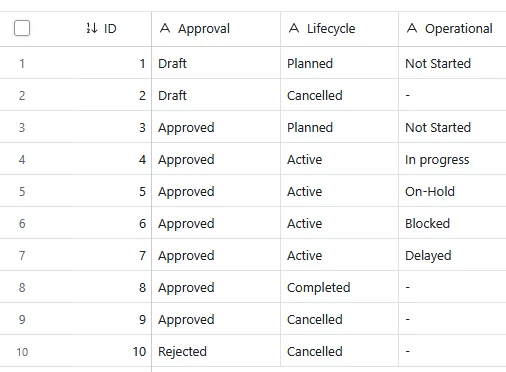


The idea is to get this form with conditional selector here (this is part of “add a new record form”)
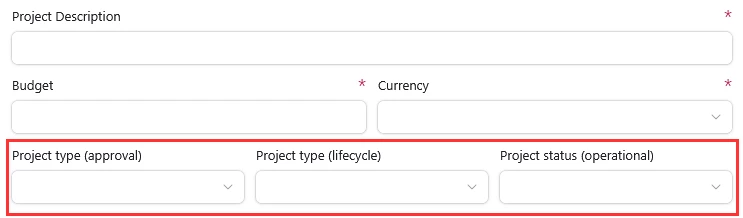
 

So basically, from the perspective of the user, ideally, he should get “Draft” selected on the approval selector, that would force only “planned” or “cancelled” on lifecycle, and depending on that, it also allows “not started” or “-” on the operational selector. Which should be a match with the table logic.


Conclusions (they can be wrong)

  • Visibility rules apply to the entire field rather than its content, so this is not a viable solution.
  • Rollups? I’ve tried experimenting with them, but I couldn’t find a way to make them work in this context. I don’t fully master the rollup feature yet, among many other things.
  • Creating a side table called “Project Status and Phases” and linking it to the “Project” table… mmm, kind of, but it becomes confusing, as it allows selecting between two “Draft” values (for example).
  • A script? If possible, I can’t see how it could help


I dont think it is possible within the functionality of AT and AT interface but…

Subscription is team, maybe upgrading it there is something? I need to review the doc.


Just thinking loud here, the only way I can figure out I can do it is splitting the approval, lifecycle and operatioanl on 3 tables and link fields between them. I need to test it




3 replies

DisraeliGears01
Forum|alt.badge.img+22

I think I figured out a hacky methodology for this inside Airtable, but just for the record this would probably be infinitely easier using Zite/Fillout Forms… Anyhow, on to the wonkiness…

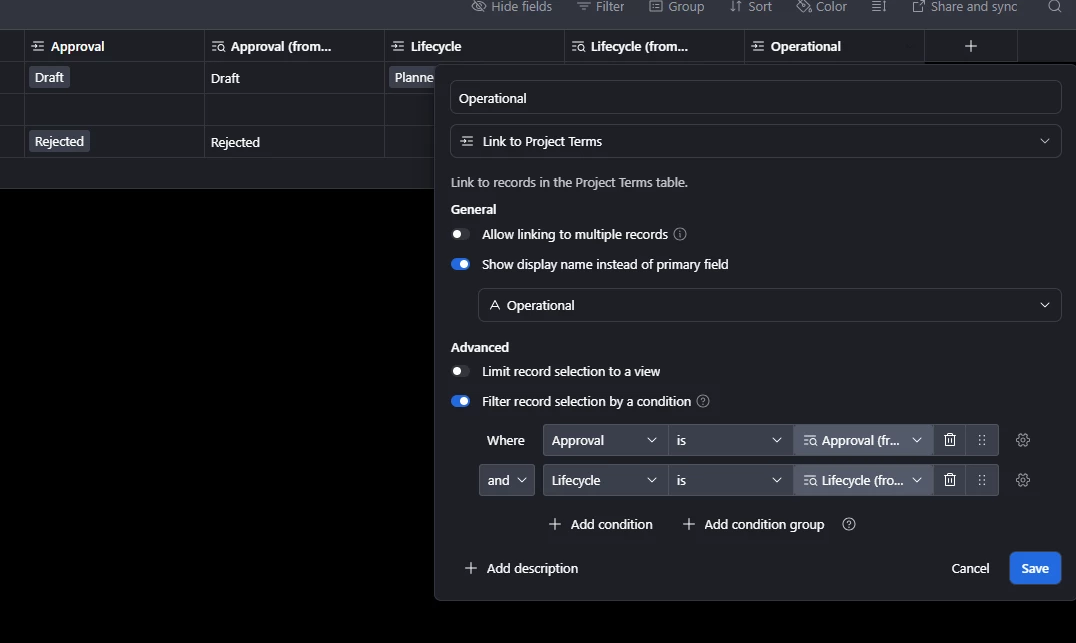
What I came up with to solve for this is using one additional table (I called it Project Terms) where I copied in your screenshot above. Then I create three linked record fields to that table, one for each term level (Approval, Lifecycle, and Operational). Using the fairly new option to show Display Names instead of Primary Field, I set each of those linked record fields to focus on it’s specific term. Then I added a lookup field for the Approval lrf and the Lifecycle lrf (these are necessary to grab the terms). Finally I added dynamic conditions to the Lifecycle and Operational lrfs, so it limits the selectable options. Specifically for the Lifecycle lrf I filtered record selection by condition where “Approval” in the Project Terms table= “Approval Lookup” field. For Operational you need to do double conditions. 


I just put this together so some tweaks are probably necessary, and maybe I’m missing something, but would this get at what you’re trying to do?


EDIT: And I just realized the problem, you’re using a form wherein all the data flows in together. This would work for an interface where users are editing the record, but not as a one shot data entry for a form submission. Airtable won’t apply the dynamic filtering logic until after it’s submitted. Tbh Fillout is the way. I’m leaving this up though because someone might find it an interesting application 🤷‍♂️


ScottWorld
Forum|alt.badge.img+35
  • Genius
  • April 20, 2026

@luismi 

As ​@DisraeliGears01 mentioned above, the only way to do this is to use linked record fields.

As he mentioned above, if you stick with Airtable’s forms, you can use Airtable’s dynamic filtering feature to set this up

However, as ​@DisraeliGears01 also mentioned, it is significantly easier to use Fillout’s advanced Airtable forms for this.

With Fillout, you can use their feature to select and filter Airtable linked records in a dropdown, which is significantly easier to setup than Airtable’s filtering feature.

Fillout is 100% free and it also offers hundreds of advanced features that you can’t get with Airtable’s forms, such as the ability to update Airtable records with a form, along with hundreds of other advanced features.

Hope this helps!

If you have a budget and you’d like to hire the best Airtable consultant to help you with this or anything else that is Airtable-related, please feel free to contact me through my website: Airtable consultant — ScottWorld


Forum|alt.badge.img+5
  • Author
  • Known Participant
  • April 20, 2026

Thanks @DisraeliGears01 and @ScottWorld for the info and help. I’ll give dynamic filtering a try—I can see (at least in my head) how I might be able to make it work or adapt it to the process here.