Solved

Import Data with Dates add one day to all dates

  • April 30, 2026
  • 3 replies
  • 26 views

Forum|alt.badge.img+4

I’ve imported several tables into AT. They each had a day field (no time element). I just noticed all the dates are +1 day from what they should be. How is this even possible?

More importantly, how do I fix it?

Best answer by TheTimeSavingCo

Try adding a formula field that’ll output the previous day, then you can copy and paste the values into the original Date field:

DATEADD(
Date,
-1,
'days'
)
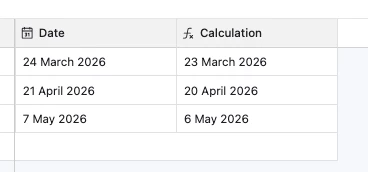
As to why this happened, it might be a timezone thing?  Try importing the data into another table and this time make the date field a Single Line Text field instead.  After you verify the date values, try converting it into a Date field to see what happens?

3 replies

TheTimeSavingCo
Forum|alt.badge.img+32

Try adding a formula field that’ll output the previous day, then you can copy and paste the values into the original Date field:

DATEADD(
Date,
-1,
'days'
)

As to why this happened, it might be a timezone thing?  Try importing the data into another table and this time make the date field a Single Line Text field instead.  After you verify the date values, try converting it into a Date field to see what happens?


AngeeB
Forum|alt.badge.img+1
  • New Participant
  • May 1, 2026

I had this happen and I noticed it was because  Airtable interpreted them as UTC‑based timestamps during import. To fix it, re‑import using a strict date‑only format (YYYY‑MM‑DD) or adjust the field settings to ignore time zones, then correct the shifted values (the formula in the comment above is a quick fix for this).

For context (as I understand it): Airtable keeps all dates in UTC under the hood. Even if you import a “date‑only” field, Airtable often assumes the value is midnight UTC. If you’re in a timezone behind UTC, midnight UTC lands on the previous evening for you, so Airtable displays the next day.

🙃


Forum|alt.badge.img+4
  • Author
  • Inspiring
  • May 1, 2026

@TheTimeSavingCo thanks for your answer. I created the formula, copied the values into a text field and then converted to a  date. That worked.

@Angee B thanks for the explainer. I think you’re right. It uses midnight UTC. Thus all my dates were off by 1.