Summary
This setup allows Airtable to automatically number collections of items that may not be in sequential order. Item length can be either fixed or variable, with only minor changes needed to the core system to accommodate the latter.
Example
To borrow from the thread that inspired this endeavor, say you’re building product codes that have a variant sub-code, and want that sub-code to automatically increment each time an item of a given product code is added in a new record. However, it needs to auto-increment each product’s sub-code separately, even when product codes are added out of order.
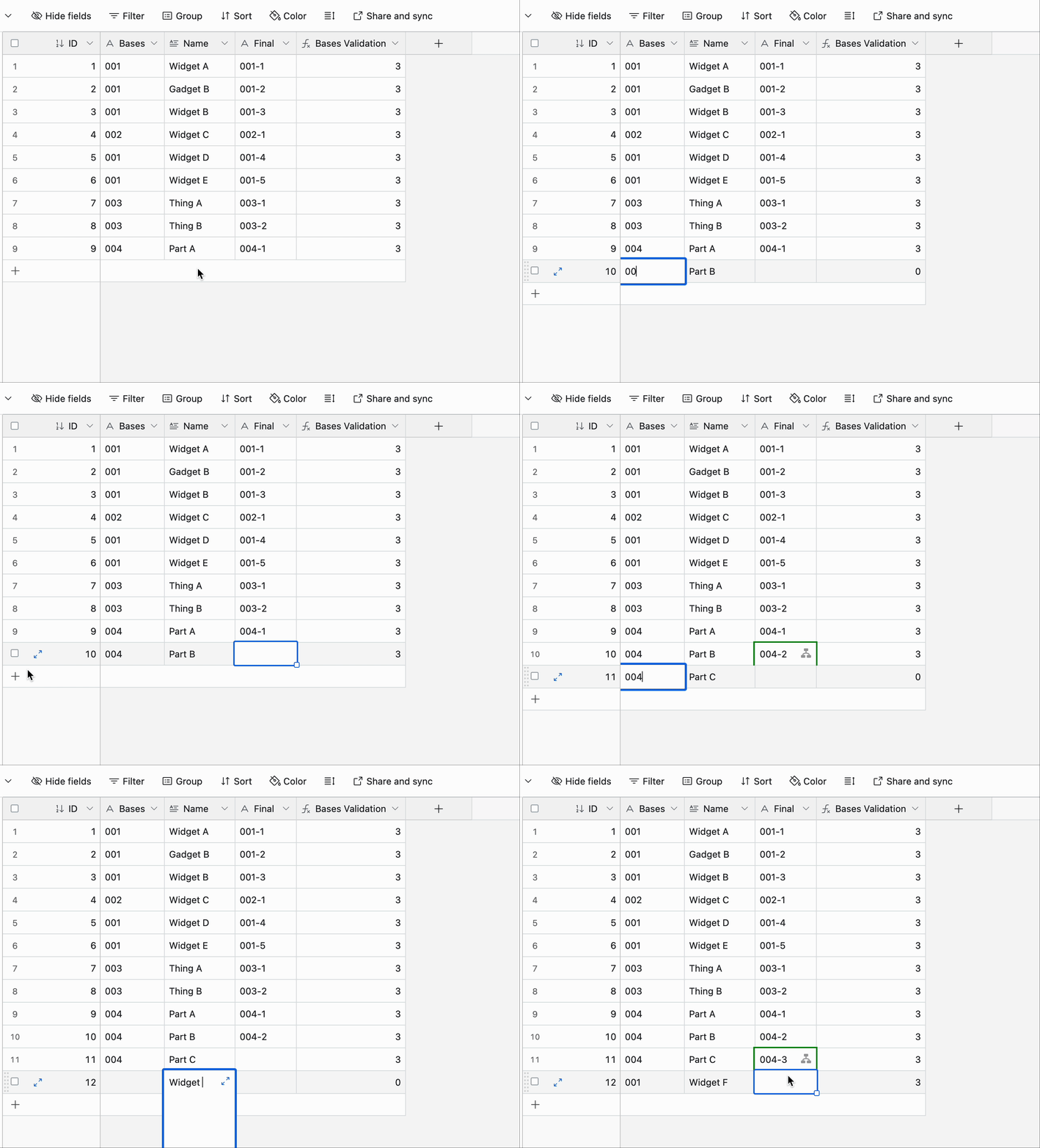
For example, the first product code is 001, and its initial sub-code is 1, so the full combined code is 001-1. When you add a new variation of product 001, the sub-code bumps up by 1, creating 001-2.
Now a new product is introduced with code 002. Because it’s the first of its kind, its full combined code is 002-1. If we then introduce a third variant of product 001, it would end up with a combined code of 001-3.
So far our full product codes, in the order they were created, look like this:
001-1
001-2
002-1
001-3
For a small list, creating these manually might not be a problem, but most people don’t use Airtable with small lists. :winking_face: It would be much easier to manage if the variant codes would auto-increment each time we add a new product code.
This independent sequential numbering requires some knowledge of how many of each item came before the current one, no matter how far back in the list those previous items might live. Because each Airtable record is independent, not having any “knowledge” of any other records in the same table, there’s no direct way to reference other records to make this count. However, with a little table and field trickery (inspired by the work of @W_Vann_Hall), this can be done. The core method requires items of a fixed length, but with a minor adjustment it will also work to track items of varying lengths.
Here’s a sample base that you can copy if you wish to dig into the guts of the system, which are described below.
Core Solution
Only two tables are required:
- The main table recording the items to be tracked.
- A
[Control]table with a single record.
The data requirements for this setup are:
- The primary field in the main table must be an Autonumber field.
- Every record in the main table must be linked to the lone record in the
[Control]table. - The character length of the data in the field containing the base items to be tracked must be the same for every record. The exact length isn’t important, but it must be consistent. For example, if you’re going to use a five-character base code, the content of that code can be pretty much anything as long as it’s unique (obviously), and always five characters long in every record. The good news is that the field type can be any number of things, including (but not limited to) Single line text, Single select, Date, Duration, Phone Number, or even a link from another table
Here’s a cropped look at the [Fixed Length] table in the sample base:
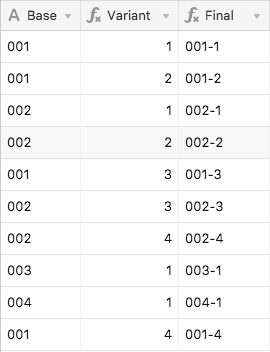
Here’s a rundown of how the system works. All field names are from [Fixed Length]:
- First, a unique character is added to the base item (see the
{Unique Base}field), in order to prevent accidental crossover between base items when aSUBSTITUTEis run later in the process. My sample base uses a vertical bar, but anything else can be used instead as long as it’s not part of any of the base codes. - These unique items are looked up in the
[Control]table, and that collection is then looked up back in the main table (see the{Lookup}field). - That lookup is then condensed into a string, and only the leftmost portion kept, with the length based on multiplying the record’s autonumber value by the
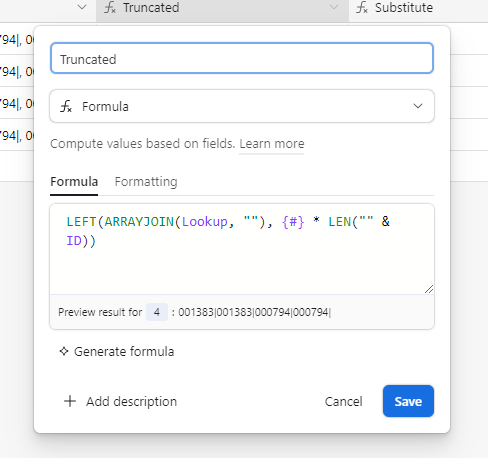
{Unique Base}length (see the{Truncated}field). For example, if{Unique Base}is four characters long, this field will only keep the first four characters of the mashed-together lookup for the first record. For the second record, it will keep the first eight characters, and so on. This creates a record-by-record tally of everything that has been added. - The
{Substitute}field then takes that tally and removes all instances of{Unique Base}, leaving everything else except that item. - The length of
{Substitute}is subtracted from the length of{Truncated}, then divided by the length of{Unique Base}, and we have the unique number to assign to the listed item (see the{Variant}field) - The variant number is combined with the base and any desired separators in the
{Final}field.
The four helper fields in the main table can be hidden once everything is set up. Because the numbers assigned in the Autonumber field are maintained even when reordering records, the variant numbers remain properly assigned even after records are moved around.
Variable Length Items
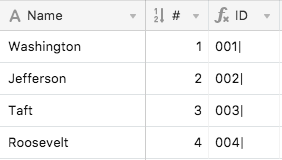
The same basic system also works with items of varying lengths. However, because of that variation, we can’t use the items themselves to track their count. Instead, we need to track another fixed-length item that’s tied to that primary item. For this, I created a new table, with the item names in the primary field, an autonumber field adjacent to that, and a formula field that padded the autonumber with leading zeroes to create a unique fixed-length ID for each item. Because these IDs are only going to be used in various formulas, I also added the vertical bar character here instead of doing so in the main table.
Back in the main table, the base items became links to records in that other table, with a lookup field pulling in each item’s unique ID, and then the rest of the system flows as outlined above, operating on that ID instead of the item itself. Once the item’s unique number is calculated, it’s combined with the original item.
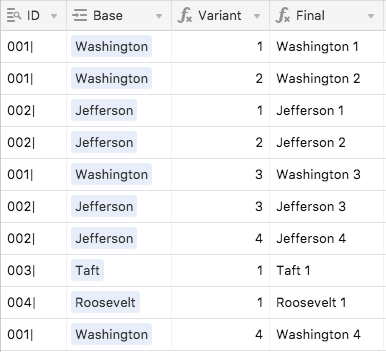
Here’s a sample lookup table for this variable-length system (the [Presidents] table in the sample base):
And here’s the main portion of the [Variable Length] table: